







Question: This has to be coded in Python only. The game will display a square grid, with the columns labeled with letters, and the rows with
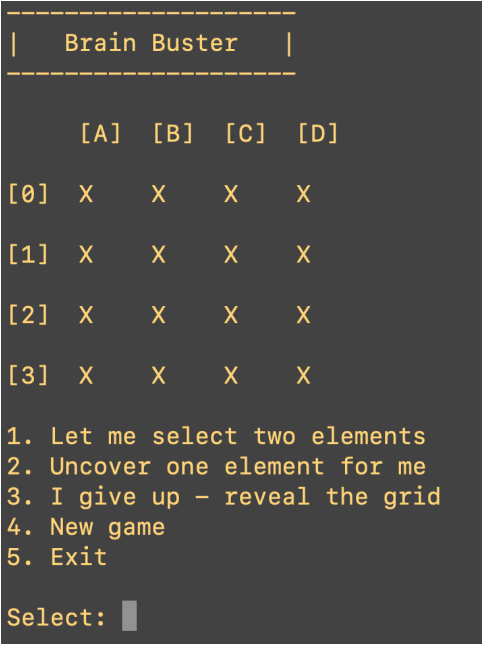
This has to be coded in Python only. The game will display a square grid, with the columns labeled with letters, and the rows with numbers. Elements within the grid will be associated with pairs of integers a pair of s and pair or s a pair of s etc. Initially, we will not be able to see any of the numbers, as they will be hidden by X symbols. The title Brain Buster is displayed first. Next, we have the grid. Column names use letters A to D in this case while rows are labeled with numbers to in this case Any individual cell in the grid is identified by a letternumber combination eg A B
Again, when we start a new game, all we see is a grid of X symbols. Our job is to find the pairs. We will do this primarily by selecting Menu Option which will allow us to specify a pair of cells to test. When we do this, we will be prompted to enter the first cell using the letternumber format and then the second cell ie there will be two separate input prompts, one for each cell Note that column letters may be given either as upper case or lower case.In this case, the two numbers will remain visible for seconds, at which point they will be replaced by Xs again., if the two cells match, then the numbers will remain visible and the player continues to search for other pairs. It is also possible for a player to manually turn cells over if they want to solve the game a little more quickly. To do so they will select Menu Option Using Menu Options and but mostly Option the player will work through the grid until shehe has uncovered all of the pairs in the grid. At that point the game will indicate that the player has won and will provide a score. Basically, the score reflects the number of guesses actually taken versus the minimum number actually required. The score itself is a very simple calculation, and is computed as follows: Score minimumpossibleguesses actualguesses Note: Using Option counts as two guesses, so using it a lot will produce a very low score. Menu Option is entitled I give up reveal the grid In short, this ends the game and displays all hidden numbers. t the program must have basic error checking. Otherwise, the program will fail constantly, as the player accidentally inputs a bad selection. The error checking includes: Check the command line argument to make sure that a or has been specified. The program can be stopped immediately if the grid size is invalid. Check the menu option selections. It must be a number between and If a bad selection has been made, the player must be informed and asked to enter the option again the program should NOT just stop The cell coordinates must be verified to ensure that the column a letter and the row the number are valid for this grid. If not, the player should be informed and asked to enter the cells again. The image below illustrates user feedback when invalid entries are made. Note as well that the player should not be able to enter the same cell twice when making a guess eg a and a This will make things easier for you. Menu Option is to start a new game, and option is to exit.
Brain Buster
ABCD
x x x x
X x x x
X X x x
x x x x
Let me select two elements
Uncover one element for me
I give up reveal the grid
New game
Exit
Select:
Step by Step Solution
There are 3 Steps involved in it
1 Expert Approved Answer
Step: 1 Unlock

Question Has Been Solved by an Expert!
Get step-by-step solutions from verified subject matter experts
Step: 2 Unlock
Step: 3 Unlock
 Study Help