







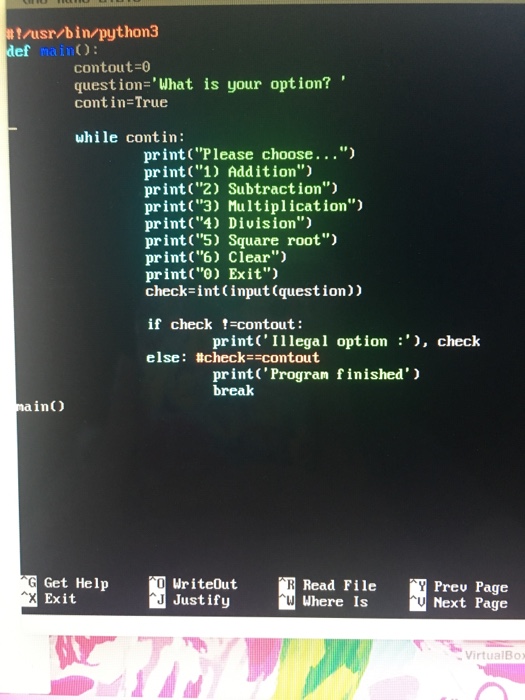
Question: This has to be written in Python and run in Python 3. The second picture is what I have so far. This means that there
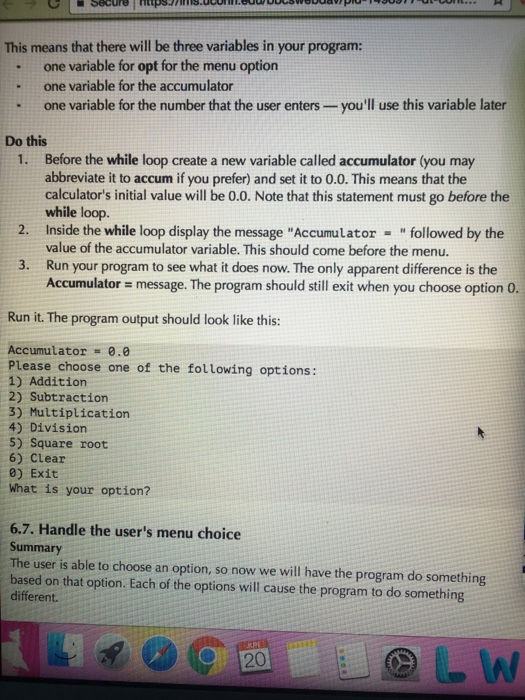
This means that there will be three variables in your program: one variable for opt for the menu option one variable for the accumulator one variable for the number that the user enters you'll use this variable later Do this 1. Before the while loop create a new variable called accumulator (you may abbreviate it to accum if you prefer) and set it to 0.0. This means that the calculator's initial value will be 0.0. Note that this statement must go before the while loop. 2. Inside the while loop display the message "Accumulator followed by the value of the accumulator variable. This should come before the menu. 3. Run your program to see what it does now. The only apparent difference is the Accumulator message. The program should still exit when you choose option o. Run it. The program output should look like this: Accumulator -0.0 Please choose one of the following options: 1) Addition 2) subtraction 3) Multiplication 4) Division 5) Square root 6) Clear 0) Exit What is your option? 6,7. Handle the user's menu choice Summary The user is able to choose an option, so now we will have the program do something based on that option. Each of the options will cause the program to do something different
Step by Step Solution
There are 3 Steps involved in it

Get step-by-step solutions from verified subject matter experts
 Study Help