







Question: This is a C++ code. Read product item data from an inventory file and add them in a vector object. The program will allow user
This is a C++ code. Read product item data from an inventory file and add them in a vector object. The program will allow user to view, search and order the product items. The inventory file should be updated after the order of any item.
Original inventory data file ItemData.txt:
1111 ID(string)
Dish Washer Name(string)
20 550.5 Number in inventory (int) and Unit price (double)
2222
Microwave
75 150
3333
Cooking Range
50 850
4444
Circular Saw
150 125
The program should display a menu with 4 operations and allow user to select operation repeatedly, here is a sample testing for all 4 operations:
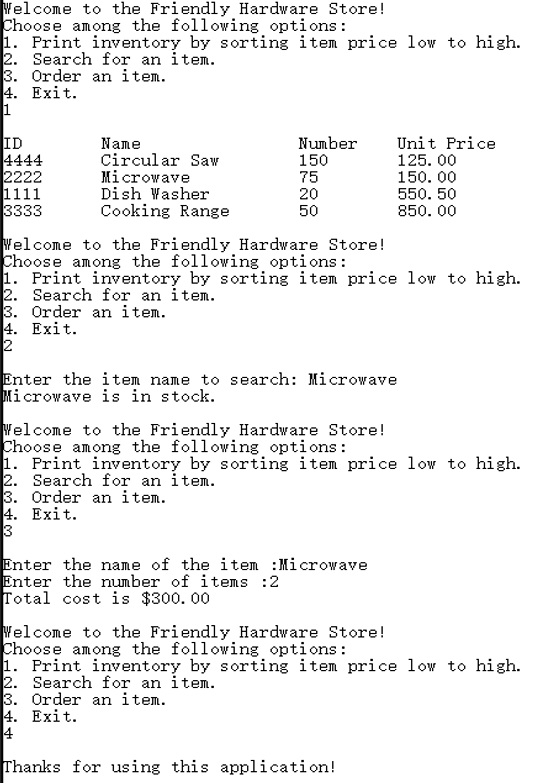
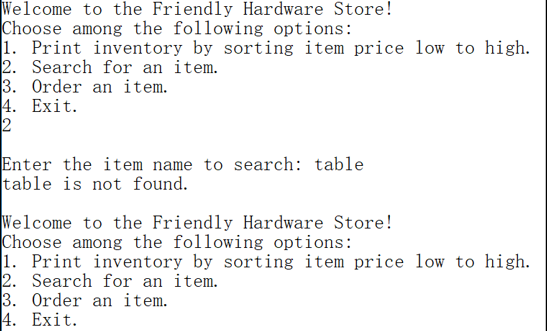
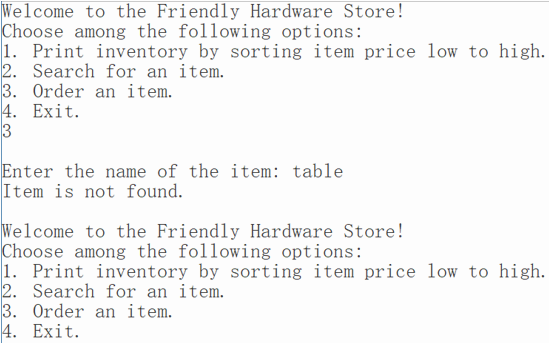
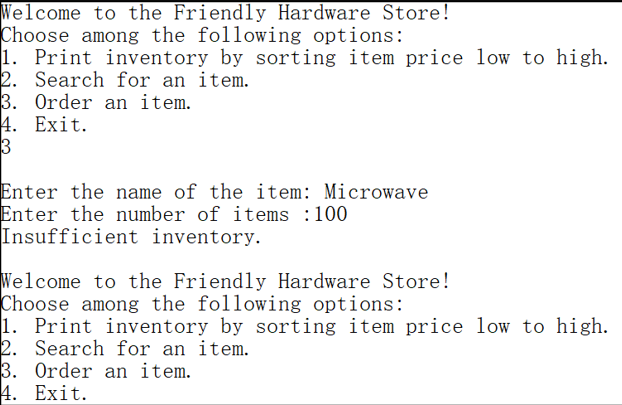

Welcome to the Friendly Hardware Store! Choose among the following options: 1. Print inventory by sorting item price low to high. 2. Search for an item. 3. Order an item. 4. Exit. 1 ID Name Number Unit Price 4444 Circular Saw 150 125. 00 2222 Microwave 75 150. 00 1111 Dish Washer 20 550. 50 3333 Cooking Range 50 850. 00 Welcome to the Friendly Hardware Store! Choose among the following options: 1. Print inventory by sorting item price low to high. 2. Search for an item. 3. Order an item. 14. Exit. Enter the item name to search: Microwave Microwave is in stock. Welcome to the Friendly Hardware Store! Choose among the following options: 1. Print inventory by sorting item price low to high. 2. Search for an item. 3. Order an item. 14. Exit. 3 Enter the name of the item :Microwave Enter the number of items :2 Total cost is $300. 00 Welcome to the Friendly Hardware Store! Choose among the following options: 1. Print inventory by sorting item price low to high. 2. Search for an item. 3. Order an item. 14. Exit. Thanks for using this application!Welcome to the Friendly Hardware Store! Choose among the following options: 1. Print inventory by sorting item price low to high. 2. Search for an item. 3. Order an item. 4. Exit. 2 Enter the item name to search: table table is not found. Welcome to the Friendly Hardware Store! Choose among the following options: 1. Print inventory by sorting item price low to high. 2. Search for an item. 3. Order an item. 4. Exit.Welcome to the Friendly Hardware Store! Choose among the following options: 1. Print inventory by sorting item price low to high 2. Search for an item. 3. Order an item 4. Exit. 3 Enter the name of the item: table Item is not found Welcome to the Friendly Hardware Store! Choose among the following options: 1. Print inventory by sorting item price low to high 2. Search for an item. 3. Order an item. 4. Exit Welcome to the Friendly Hardware Store! Choose among the following options: 1. Print inventory by sorting item price low to high. 2. Search for an item. 3. Order an item. 4. Exit 3 Enter the name of the item: Microwave Enter the number of items 1100 Insufficient inventory. Welcome to the Friendly Hardware Store! Choose among the following options: 1. Print inventory by sorting item price low to high. 2. Search for an item. 3. Order an item. 4 Exit ID Name Number Unit Price 4444 Circular Saw 150 125. 00 2222 Microwave 75 150. 00 1111 Dish Washer 20 550. 50 3333 Cooking Range 50 850. 00
Step by Step Solution
There are 3 Steps involved in it

Get step-by-step solutions from verified subject matter experts
 Study Help