







Question: THIS IS A INTRO LEVEL C++ program and please use ccc_win.h library for graphing because thats the only one we can use. Also use the
THIS IS A INTRO LEVEL C++ program and please use ccc_win.h library for graphing because thats the only one we can use. Also use the functions that are provided in the text below. THANK YOU
You are to implement a basic trip planner. First draw a graphical representation (simplified map) of the cities listed below. Then let a user choose a series of destinations in the map. Assuming the user will start the journey at Acapulco, after every click (representing the next destination), you should:
draw a line joining the current destination to the next destination;
display the distance (in Km) between the current and next destination; and
indicate graphically whether the user will be travelling east or west.
For this assignment you may assume that
the user will not click outside of the map; and
the user will end the trip when a location within 20 km of Mexico City is selected as the next destination.
Once the user has selected Mexico City as the next and final destination, you should report at the bottom of the screen, in a location outside of the map, the total distance traveled in Kilometers.
Also, since it is a well-known fact that Cuernavaca (my hometown) is the center of the universe, you should display a message indicating how many times the user passes within 50 Km of the center of the universe. Trips that start within 50 Km of Cuernavaca should not count as a pass.
Once this process has been completed you should ask the user whether or not s/he wants to continue, then proceed accordingly.
The locations of the cities that are to be represented are given below:
Cuernavaca (0,0)
Ciudad de Mxico (0,75)
Acapulco (-50,-225)
Ixtapa (-300,-200)
Salamanca (-225,-250)
Morelia (-250,125)
Casitas (300,225)
You should declare these points as global constants, but notice that you are not allowed to use any other global variables in your program.
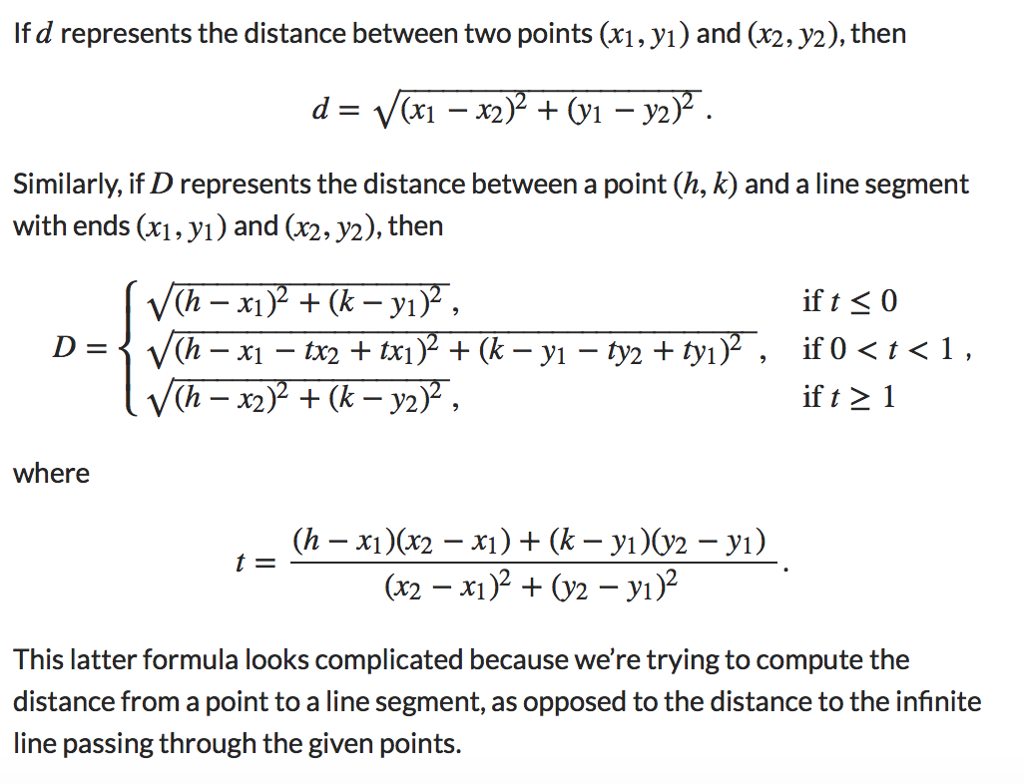
The formulas below might come in handy at some point: THE FORMULA IS IN ATTACHED IMAGE
Similarly, if D represents the distance between a point (h,k) and a line segment with ends (x1,y1) and (x2,y2), then
D=(hx1)2+(ky1)2,(hx1tx2+tx1)2+(ky1ty2+ty1)2,(hx2)2+(ky2)2,if t0if 0 where t=(hx1)(x2x1)+(ky1)(y2y1)(x2x1)2+(y2y1)2. This latter formula looks complicated because were trying to compute the distance from a point to a line segment, as opposed to the distance to the infinite line passing through the given points. Below is my interpretation of central Mxico. The first screenshot shows what initially appears on the screen. The other two screenshots show two possible routes. The bare minimum your program should show is listed below: The 7 cities listed above with their names; Tick marks every 100 Kilometers and labels every 200 Kilometers. Some graphical representation of the direction of travel (east or west). I have chosen to draw a truck facing left or right accordingly. Whatever you choose must not be a simple shape like an arrow or a message. The representation must include at least one rectangle and at least one circle. What is this assignment about? The purpose of this assignment is that you code your program efficiently using functions. Your program should demonstrate a knowledge and proficiency with modular programming. I strongly recommend using the following functions: drawMap to draw the basic map of central Mexico on the screen. drawTruck to draw a basic representation of the direction of travel. connectCities to draw a line between two adjacent destinations. distanceBetweenCities to compute the distance between two adjacent destinations. distanceToCuernavaca (alternatively: distanceToCenterOfTheUniverse) to compute the closest distance from a line segment to the center of the map. The choice of return values and parameters is up to you. You may wish to create other functions as well. I suggest getting the drawMapfunction working first, then planning your output around the map. The next step should be to work on the drawTruck function, making sure you can move your truck around and have it face east or west. As a third step you might want to implement the connectCities function (the following example might come in handy). The functions that compute distances are simple in comparison to the other functions but you need to make sure the computations are accurate. The final step of course would be to make sure the individual pieces work together as a whole.


Step by Step Solution
There are 3 Steps involved in it

Get step-by-step solutions from verified subject matter experts
 Study Help