Question: This is a java application program. Please help me with the codes. Thank you! Assignment 1: Notepad Editor UI The demonstration week for this assignment
This is a java application program. Please help me with the codes. Thank you!
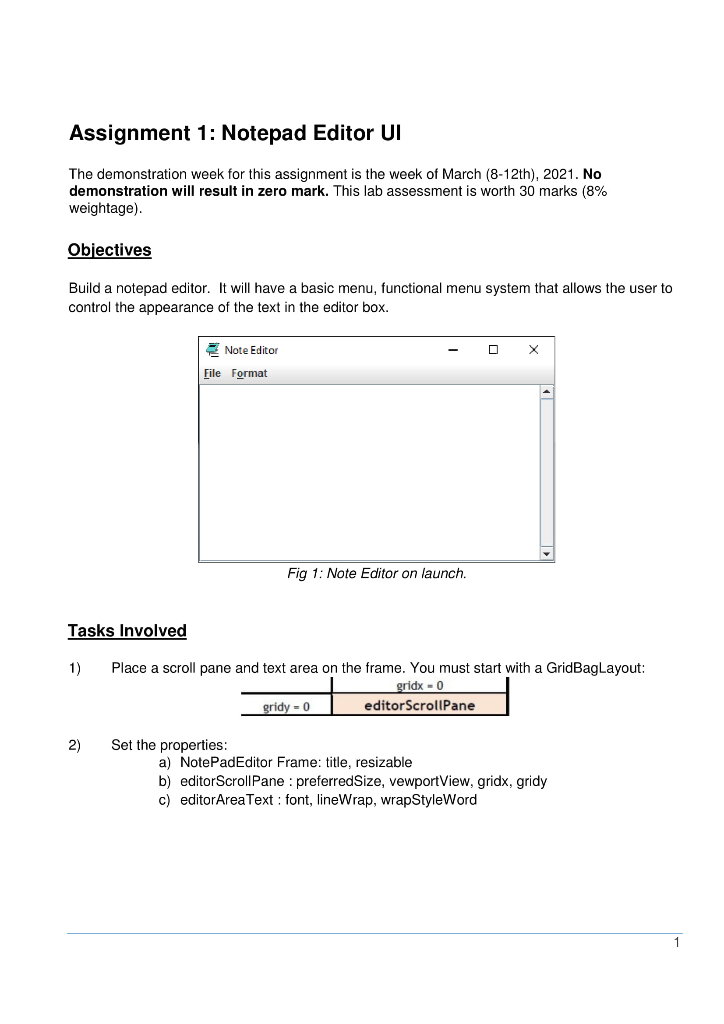
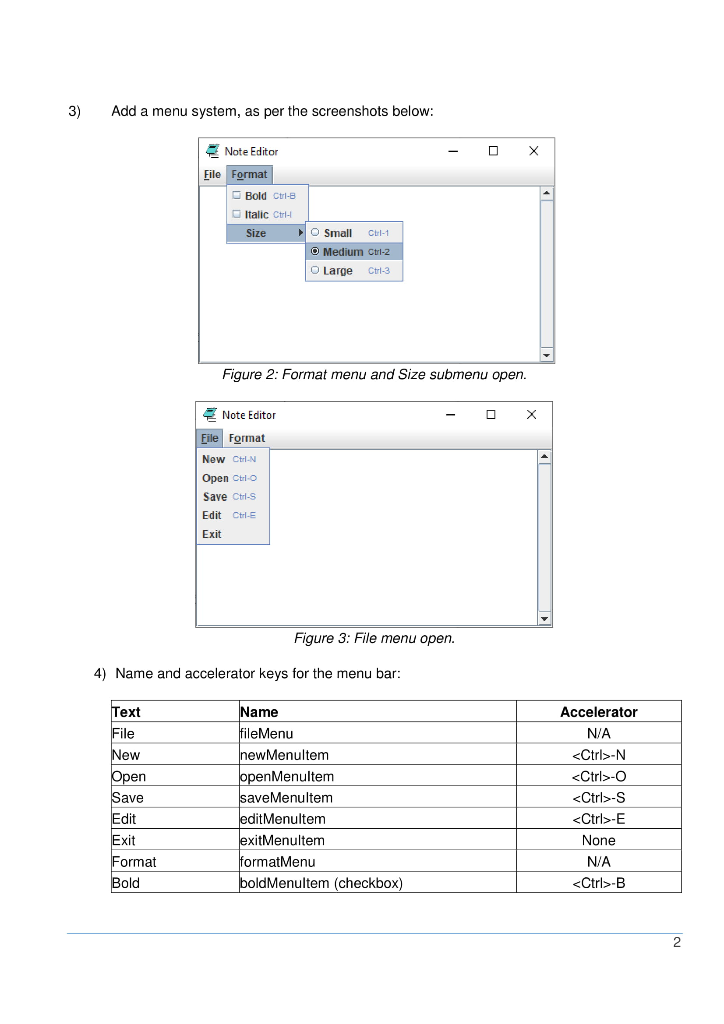
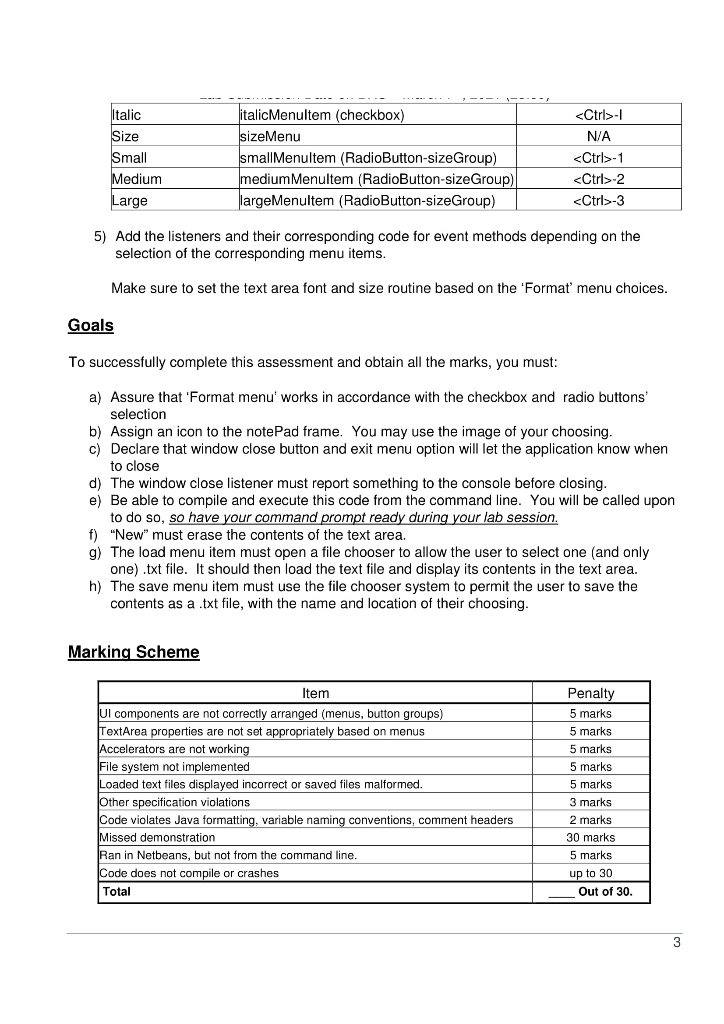
Assignment 1: Notepad Editor UI The demonstration week for this assignment is the week of March (8-12th), 2021. No demonstration will result in zero mark. This lab assessment is worth 30 marks (8% weightage). Objectives Build a notepad editor. It will have a basic menu, functional menu system that allows the user to control the appearance of the text in the editor box. Note Editor File Format Fig 1: Note Editor on launch. Tasks Involved 1) Place a scroll pane and text area on the frame. You must start with a GridBagLayout: gridx - 0 gridy - 0 editor Scrollpane 2) Set the properties: a) NotePadEditor Frame: title, resizable b) editor ScrollPane: preferredSize, vewportView, gridx, gridy c) editorArea Text : font, lineWrap, wrapStyleWord 3) Add a menu system, as per the screenshots below: X Note Editor File Format Bold Ctrl-B Italic Ctrl Size O Small CW-1 Medium Ctrl-2 O Large Ctrl-3 Figure 2: Format menu and Size submenu open. Note Editor File Format New Ctrl-N Open Culo Save Ctrl-s Edit Ctrl Exit Figure 3: File menu open. 4) Name and accelerator keys for the menu bar: Text File New Open Save Edit Name file Menu newMenuItem open Menultem saveMenultem edit Menultem exit Menultem formatMenu pold Menultem (checkbox) Accelerator N/A -N -O -S -E None N/A -B Exit Format Bold 2 Italic -1 N/A Size Small Medium Large italicMenultem (checkbox) size Menu smallMenultem (RadioButton-sizeGroup) medium Menultem (RadioButton-sizeGroup) largeMenultem (RadioButton-sizeGroup) -1 -2 -3 5) Add the listeners and their corresponding code for event methods depending on the selection of the corresponding menu items. Make sure to set the text area font and size routine based on the 'Format' menu choices. Goals To successfully complete this assessment and obtain all the marks, you must: a) Assure that 'Format menu' works in accordance with the checkbox and radio buttons selection b) Assign an icon to the notePad frame. You may use the image of your choosing. c) Declare that window close button and exit menu option will let the application know when to close d) The window close listener must report something to the console before closing. e) Be able to compile and execute this code from the command line. You will be called upon to do so, so have your command prompt ready during your lab session. f) "New" must erase the contents of the text area. g) The load menu item must open a file chooser to allow the user to select one (and only one).txt file. It should then load the text file and display its contents in the text area. h) The save menu item must use the file chooser system to permit the user to save the contents as a .txt file, with the name and location of their choosing. Marking Scheme Item Ul components are not correctly arranged (menus, button groups) TextArea properties are not set appropriately based on menus Accelerators are not working File system not implemented Loaded text files displayed incorrect or saved files malformed. Other specification violations Code violates Java formatting, variable naming conventions, comment headers Missed demonstration Ran in Netbeans, but not from the command line. Code does not compile or crashes Total Penalty 5 marks 5 marks 5 marks 5 marks 5 marks 3 marks 2 marks 30 marks 5 marks up to 30 Out of 30. 3









 Study Help