







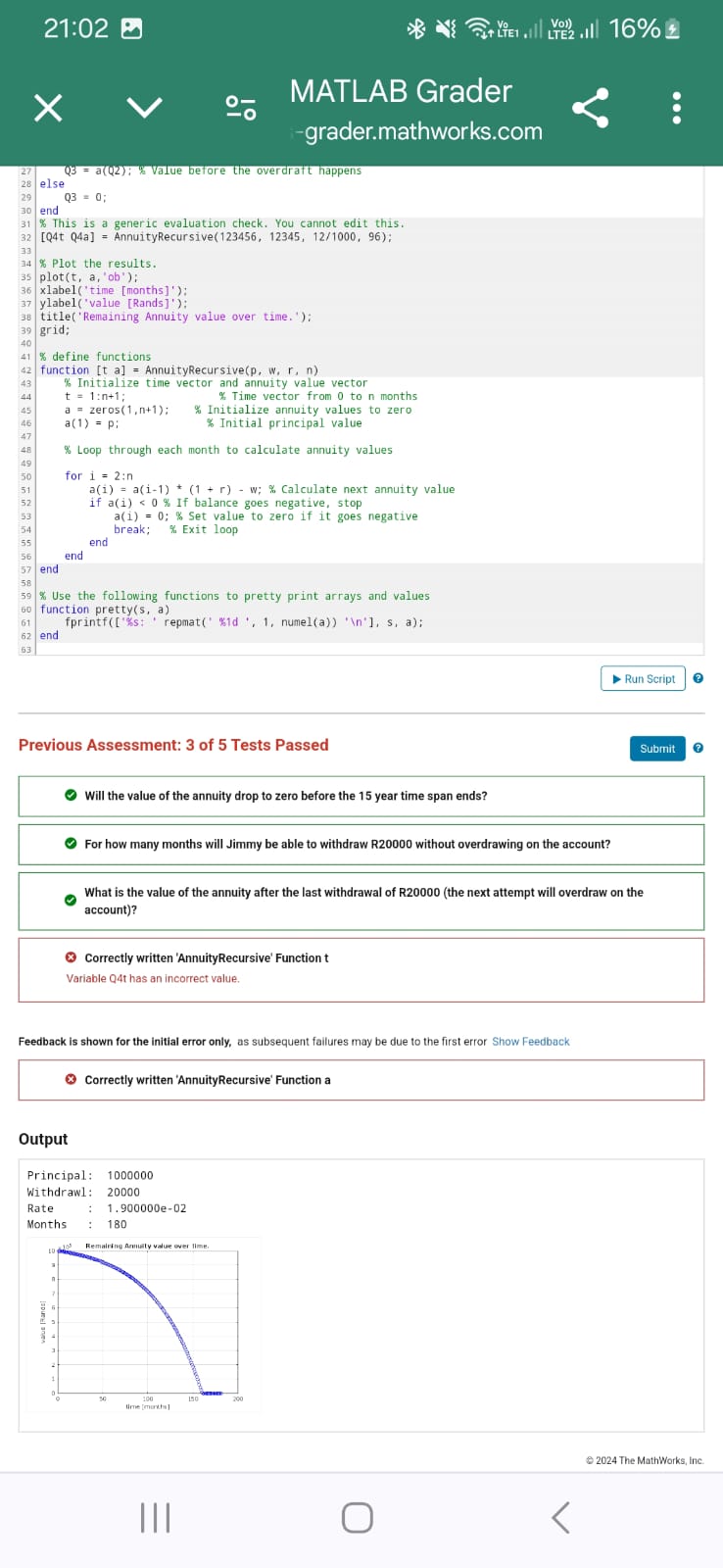
Question: this is a mathlab code the white spot on the image can be edited but the grey spots of this code cannot be changed how
this is a mathlab code the white spot on the image can be edited but the grey spots of this code cannot be changed how can i fix this code it is not meeting one of the grading criteria Annuity this matter proves to be related to the entire code meaning the problem has to be reset where everything on the white spot must be changed to make it work
immy starts an annuity with a principal value of Rone million Rands and plans to withdraw a fixed amount each month, starting one
month after opening the annuity account. Jimmy expects to draw Rtwenty thousand Rands from the annuity every month, for years
fifteen years Suppose the monthly interest rate is fixed at and that interest is computed each month on the annuity before the
withdrawal made. The annuity is overdrawn when its value drops below zero.
Answer the following questions:
Will the value of the annuity drop to zero before the year time span ends?
For how many months will Jimmy be able to withdraw R without overdrawing on the account?
What is the value of the annuity after the last withdrawal of R before the account is overdrawn?
Use the code below to help answer these questions. The function
AnnuityRecursive pwrn
takes as input the principle value p the monthly withdrawal amount w the iterest rate r and the number of months n and returns a vector t of
months and a vector a of annuity values such that ai is the value of the anuity at time t i
Note: This task will require several iterations to complete and several iterations to determine the necessary values. The code provided will
generate a plot of your simulation values to help you complete the task. You can run your code on the system before submitting your soulution
for grading.
Script o
set constants
P ; Principal in Rands
W; Withdrawal in Rands
R; Monthly interest rate
N ; Number of months years
pretty print outputs
prettyPrincipal P;
prettyWithdrawl w:
prettyRate R;
prettyMonths :N;
Call AnnuityRecursive to construct the t an a vectors
t a AnnuityRecursiveP W R N:
Answer questions below:
Will the value of the annuity drop to zero before the year time span ends?
Yes:
No:
Q; QYes if any value is below zero, No otherwise
For how many months will Jimny be able to withdraw R without overdrawing
on the account?
Q finda 'last': Find the last month where the balance is positive
What is the value of the annuity after the last withdrawal of R before
the account is overdrawn?
if Q lengtha
Q aQ: Value before the overdraft happens
else
Q;
end
This is a generic evaluation check. You cannot edit this.
Qt Qa AnnuityRecursive;
Plot the results.
plott aob:
xlabeltime months;
ylabelvalue Rands;
titleRemaining Annuity value over time. ;
grid;
define functions
function t a AnnuityRecursivep w r n
Initialize time vector and annuity value vector
t :n; Time vector from to n months
a zerosn; Initialize annuity values to zero
a pi Initial principal value
Loop through each month to calculate annuity values
for i :n
aiai r w; Calculate next annuity value
if ai If balance goes negative, stop
ai; Set value to zero if it goes negative
break: Exit loop
end
end
end
Use the following functions to pretty print arrays and values
function prettys a
end
fprintfs: repmatd numela
s a:
Output
Step by Step Solution
There are 3 Steps involved in it
1 Expert Approved Answer
Step: 1 Unlock

Question Has Been Solved by an Expert!
Get step-by-step solutions from verified subject matter experts
Step: 2 Unlock
Step: 3 Unlock
 Study Help