







Question: This is a MatLAB question. All parts needed. Will give thumbs up for correct answers. Problem 3: (Find function) Create the following vector in MATLAB
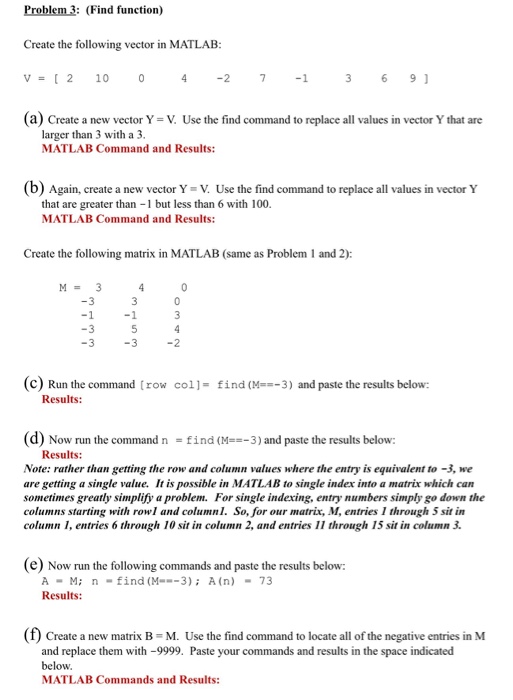
Problem 3: (Find function) Create the following vector in MATLAB v=[210 (a) Create a new vector Y V. Use the find command to replace all values in vector Y that are 7 36 9 larger than 3 with a 3 MATLAB Command and Results: (b) Again, create a new vector Y V. Use the find command to replace all values in vector Y that are greater than -1 but less than 6 with 100. MATLAB Command and Results: Create the following matrix in MATLAB (same as Problem 1 and 2): (C) Run the command [ row col ] = find (M==-3 ) and paste the results below: Results: (d) Now run the command n = find (M=-3 ) and paste the results below: Results: Note: rather than getting the row and column values where the entry is equivalent to -3, we are getting a single value. It is possible in MATLAB to single index into a matrix which can sometimes greatly simplify a problem. For single indexing, entry numbers simply go down the columns starting with rowl and columnI. So, for our matrix, M, entries 1 through 5 sit in column 1, entries 6 through 10 sit in column 2, and entries II through 15 sit in column 3 (e) Now run the following commands and paste the results below A- M: Results: n -find (M-=-3); A(n) -73 (f) Create a new matrix B M. Use the find command to locate all of the negative entries in M and replace them with-9999. Paste your commands and results in the space indicated below MATLAB Commands and Results
Step by Step Solution
There are 3 Steps involved in it

Get step-by-step solutions from verified subject matter experts
 Study Help