







Question: This is a MATLAB question At the beginning the image(provided below) is in the middle of the working area (e.g. 2000x1000). A list of movements
This is a MATLAB question
At the beginning the image(provided below) is in the middle of the working area (e.g. 2000x1000). A list of movements (moving, rotating, mirroring, scaling) is specified and the changed image is to be displayed. In addition, output a matrix that contains the information about the overall movement.
a) Try to create a problem specification (given, sought) that is as precise as possible.
b) Program a MATLAB function that implements the processing.
The main function could look like this:
[pic,M] = Transform...
(image,{'D',{150,'C'};'Sx',[];'T',[100,50];'S',[1.2,1.2];'T',[-50 ,-70]});
In the funktion:
image: a matrix into which an image was previously read with "imread".
The 2nd parameter is a CellArray, which makes it possible to write in a
"Matrix" to store data of different types and structures. The CellArray above describes a movement that consists:
1. a rotation of 150 (counterclockwise) around the center of the image (with 'U' instead of 'C' you can indicate that you want to rotate around the coordinate origin)
2. a reflection around the x-axis
3. a translation by [100,50]
4. a scaling by 1.2 in both directions and
5. a translation by [-50,-70]
As a result, the function returns the matrix pic, which contains the entire working area (as an image matrix) and the matrix M, which describes the resulting movement.
Also note that the indexing in the image matrix that you get when reading the image into MATLAB , (M(i,j) = pixel in the ith row and jth column) goes out from the top left corner of the image (1st line, 1st column is top left, see blue coordinate system). However, the coordinate system for the geometric operations has its origin in the middle of the workspace (see red coordinate system)! That means the "coordinates" (i,j) in the image matrix cannot be taken directly as coordinates (x,y) for the geometry.
Example:
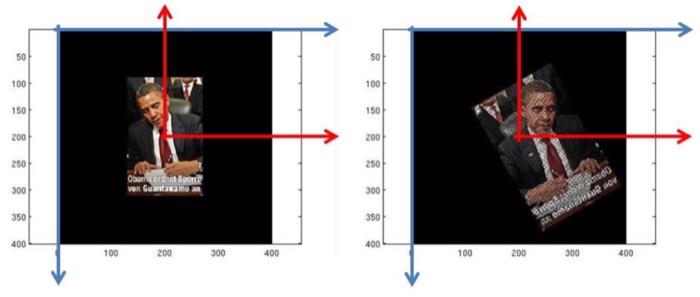
Image that need to be worked with for the assignment:

18
Step by Step Solution
There are 3 Steps involved in it
1 Expert Approved Answer
Step: 1 Unlock

Question Has Been Solved by an Expert!
Get step-by-step solutions from verified subject matter experts
Step: 2 Unlock
Step: 3 Unlock
 Study Help