







Question: This is a plinko game. using matter.js, in VS code with Brackets extension, and focus on matter.js physics engine (see static picture) I have loaded
This is a plinko game. using matter.js, in VS code with Brackets extension, and focus on matter.js physics engine (see static picture)
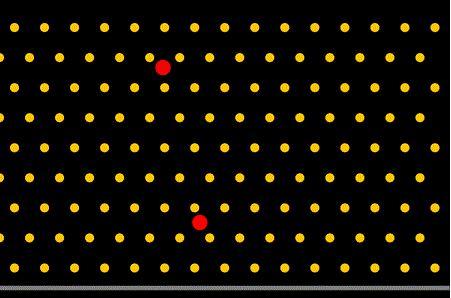
I have loaded code below: Javascript, libraries (matter.js, p5.min.js, p5.sound.min.js).
Here is also steps originally given in my brief:
1. Add code in setupGround() to draw a ground like in the image above.
2. Add code in drawGround() to draw the ground you created using the helper function drawVertices() like it's done inside the drawPins() function.
3. Add code to generateNewBall() to create a random ball that falls from the top that has a restitution of 1 so that it's really bouncy. Remember to push it on the balls array and add it to the world.
4. Add code to drawBalls() to loop over all balls and draw them using the drawVertices() function.
Please assist with making the random red balls being drawn and falling. I have created the ground.
-------------------------------------------------------------------------------------------------------------
sketch.js
>>>>>>>>>>>>>
// Example is based on examples from:
// http://brm.io/matter-js/
// https://github.com/shiffman/p5-matter
// https://github.com/b-g/p5-matter-examples
// module aliases
var Engine = Matter.Engine;
var Render = Matter.Render;
var World = Matter.World;
var Bodies = Matter.Bodies;
var engine;
var balls = [];
var ground;
var plinkos = [];
function setup() {
createCanvas(900, 600);
rectMode(CENTER); // specify centerpoint
engine = Engine.create(); // create an engine
// creating ground and plinko wall
// generateground();
ground = Bodies.rectangle(450, 580, 900, 10, {isStatic: true}); // location, size, options
setupPins();
// generateNewBall();
// add all bodies to the world
World.add(engine.world, [ground]);
}
///////////////////////////////////////////////////////////
function draw() {
background(0);
Engine.update(engine); // in every draw loop, engine is being updated
// drawGround();
drawPins();
// drawBalls();
fill(128);
drawVertices(ground.vertices);
// call the generateNewBall function
generateNewBall(width/2, 0);
// for loop that loops over circle - balls - as they are updated
for (var i = 0; i
drawVertices(balls[i].vertices);
fill(0,0,139);
drawVertices(balls.vertices);
}
}
///////////////////////////////////////////////////////////
function keyPressed(){
generateNewBall();
}
///////////////////////////////////////////////////////////
//function setupGround(){
//your code here
// optimised and added to function setup as part of engine
//}
///////////////////////////////////////////////////////////
//function drawGround(){
//your code here
// optimised and added to function draw as part of engine
//}
///////////////////////////////////////////////////////////
function setupPins(){
//plinko wall
var options = {isStatic: true, restitution: 1};
var cols = 15;
var rows = 9;
var spacing = width / cols;
for (var j = 0; j
for (var i = 0; i
var x = i * spacing;
if (j % 2 == 0) {
x += spacing / 2;
}
var y = spacing + j * spacing;
var p = Bodies.circle(x, y, 10, options);
World.add(engine.world, [p]);
plinkos.push(p);
}
}
}
///////////////////////////////////////////////////////////
function drawPins(){
fill(255,200,0);
for (var i=0; i drawVertices(plinkos[i].vertices); } } /////////////////////////////////////////////////////////// function generateNewBall(x, y) { //your code here var b = Bodies.circle(x, y, random(10, 30), random(10, 30), {restitution: 1}) // x, y, radius, options balls.push(b); // pushing circle bodies - balls - onto empty array World.add(engine.world, [b]); // add object to physics engine // optimised and added to function setup as part of engine } /////////////////////////////////////////////////////////// //function drawBalls(){ //your code here // optimised and added to function draw as part of engine //} /////////////////////////////////////////////////////////// // **** HELPER FUNCTIONS **** // DO NOT WRITE BELOW THIS LINE /////////////////////////////////////////////////////////// function drawVertices(vertices) { beginShape(); for (var i = 0; i vertex(vertices[i].x, vertices[i].y); } endShape(CLOSE); }
Step by Step Solution
There are 3 Steps involved in it

Get step-by-step solutions from verified subject matter experts
 Study Help