







Question: This is a program where the user enters a number and then either selects sine, cosine, or tangent and it cumputes it for them and
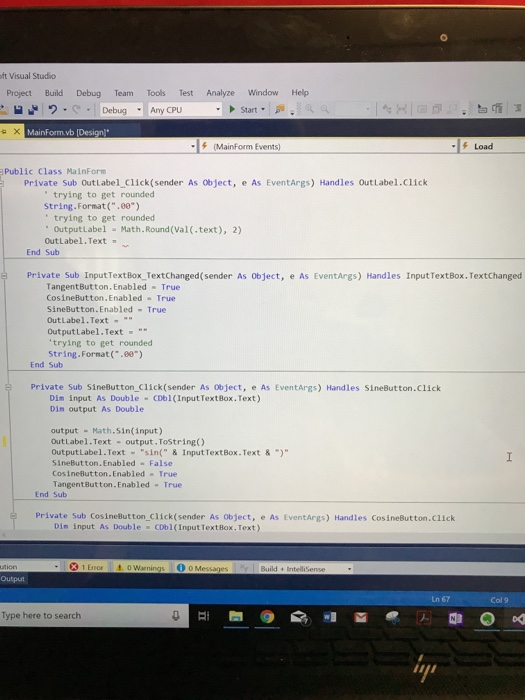
ft Visual Studio Project Build Debug Team Tools Test Analyze Window Help ?DebugAny CPU Start. MainForm.vb [Design (MainForm Events) Load Public Class MainForm Private Sub OutLabel Click (sender As object, e As EventArgs) Handles OutLabel.Click trying to get rounded String.Format(".80) trying to get rounded OutputLabe1 - Math.Round (Val(.text), 2) OutLabel . Text . End Sub Private Sub InputText Box-TextChanged(sender. As Object, e As EventArgs) Handles Input TextBox,TextChanged TangentButton. Enabled True CosineButton. Enabled True SineButton.Enabled True OutLabel.Text OutputLabel.Text trying to get rounded String.Format ( .00) End Sub Private Sub SineButton_Click(sender As object, e As EventArgs) Handles SineButton.Click Dim input As Double cDbl(Input TextBox. Text) Din output As Double output Hath. Sin(input) OutLabel.Text output. ToString) OutputLabel.Text "sin("& InputTextBox.Text &) SineButton.Enabled False CosineButton. Enabled True TangentButton.Enabled True End Sub Private Sub CosineButton_Click(sender As object, e As EventArgs) Handles CosineButton.click Din input As Double CObl(Input Text Box. Text) Warnings 00Me Output Ln 67 Col 9 Type here to search "y
Step by Step Solution
There are 3 Steps involved in it

Get step-by-step solutions from verified subject matter experts
 Study Help