







Question: This is all supposed to be written in Java. This is the Movie.Java public class Movie { // instance variables private int year; private String
This is all supposed to be written in Java.
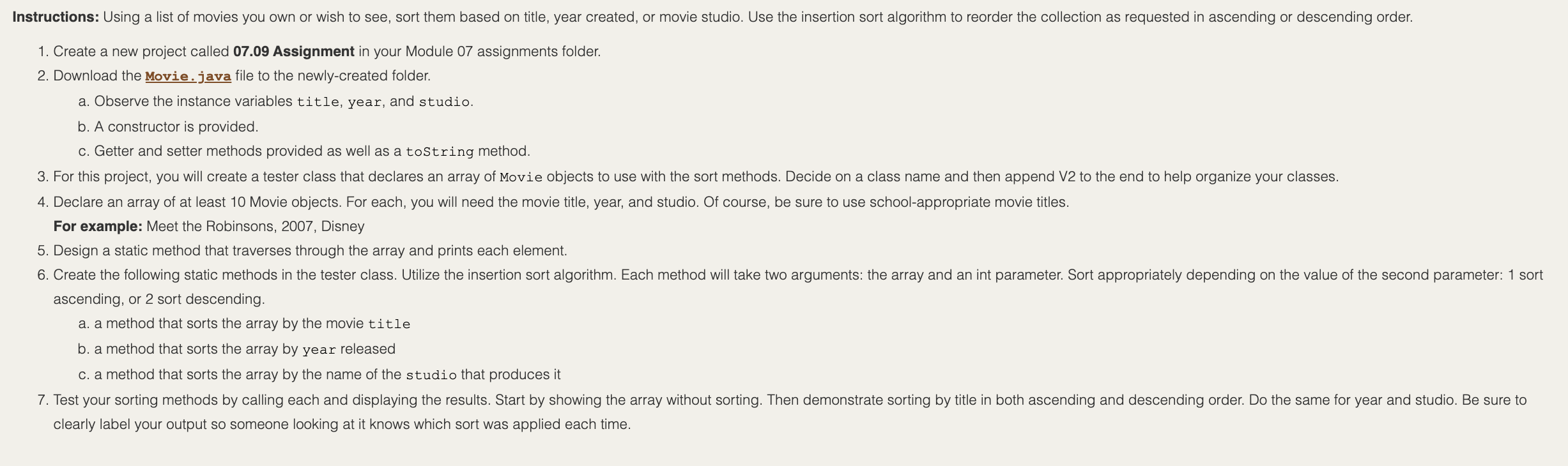 This is the Movie.Java
public class Movie { // instance variables private int year; private String title; private String studio;
// Constructor for objects of class Movie public Movie(String title, int year, String studio) { // initialize instance variables this.title = title; this.year = year; this.studio = studio; }
public String getTitle() { return title; } public void setTitle(String title) { this.title = title; } public String getStudio() { return studio; } public void setStudio(String studio) { this.studio = studio; } public int getYear() { return year; } public void setYear(int year) { this.year = year; } public String toString() { String str = String.format("%-30s %4d %-20s", title, year, studio); return str; } }
This is the Rubric under which the program will be graded.
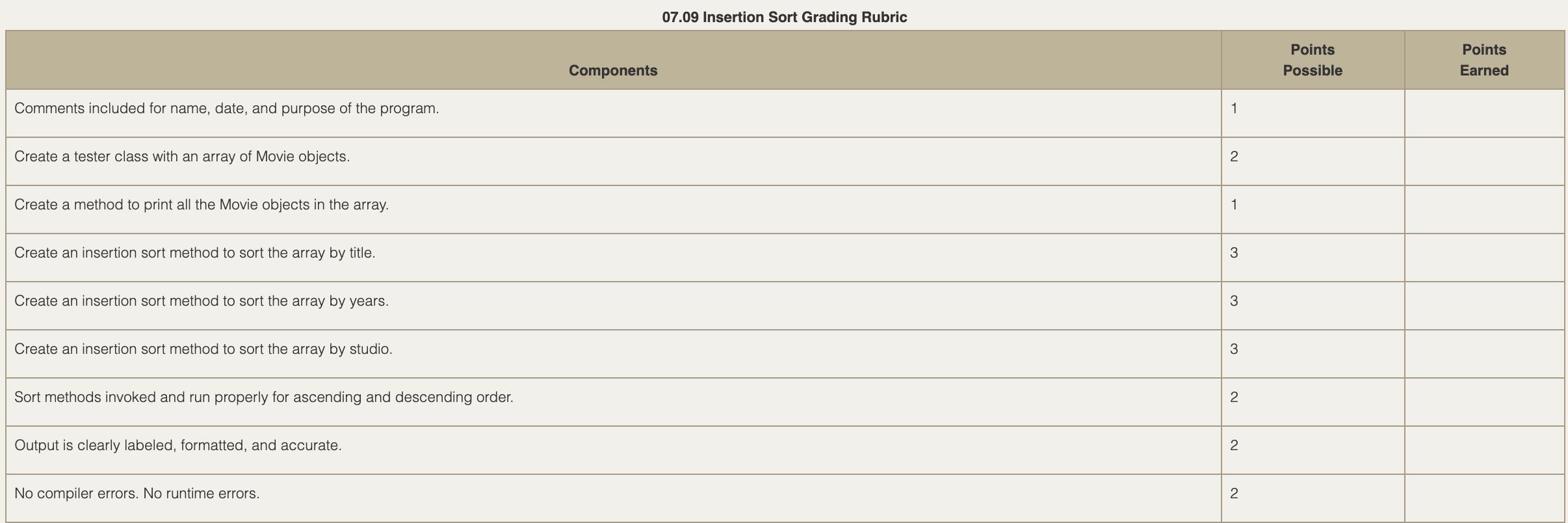
Instructions: Using a list of movies you own or wish to see, sort them based on title, year created, or movie studio. Use the insertion sort algorithm to reorder the collection as requested in ascending or descending order. 1. Create a new project called 07.09 Assignment in your Module 07 assignments folder. 2. Download the Movie.java file to the newly-created folder. a. Observe the instance variables title, year, and studio. b. A constructor is provided. c. Getter and setter methods provided as well as a toString method. 3. For this project, you will create a tester class that declares an array of Movie objects to use with the sort methods. Decide on a class name and then append V2 to the end to help organize your classes. 4. Declare an array of at least 10 Movie objects. For each, you will need the movie title, year, and studio. Of course, be sure to use school-appropriate movie titles. For example: Meet the Robinsons, 2007, Disney 5. Design a static method that traverses through the array and prints each element. 6. Create the following static methods in the tester class. Utilize the insertion sort algorithm. Each method will take two arguments: the array and an int parameter. Sort appropriately depending on the value of the second parameter: 1 sort ascending, or 2 sort descending. a. a method that sorts the array by the movie title b. a method that sorts the array by year released c. a method that sorts the array by the name of the studio that produces it 7. Test your sorting methods by calling each and displaying the results. Start by showing the array without sorting. Then demonstrate sorting by title in both ascending and descending order. Do the same for year and studio. Be sure to clearly label your output so someone looking at it knows which sort was applied each time. 07.09 Insertion Sort Grading Rubric Points Possible Points Earned Components Comments included for name, date, and purpose of the program. 1 Create a tester class with an array of Movie objects. 2 Create a method to print all the Movie objects in the array. 1 Create an insertion sort method to sort the array by title. 3 Create an insertion sort method to sort the array by years. 3 Create an insertion sort method to sort the array by studio. 3 Sort methods invoked and run properly for ascending and descending order. 2 Output is clearly labeled, formatted, and accurate. 2 No compiler errors. No runtime errors. 2
Step by Step Solution
There are 3 Steps involved in it

Get step-by-step solutions from verified subject matter experts
 Study Help