







Question: This is all that is provided for the assignment. If this cannot be answered through this service please contact me for a tutoring service. This
This is all that is provided for the assignment. If this cannot be answered through this service please contact me for a tutoring service. This code must be in c++. 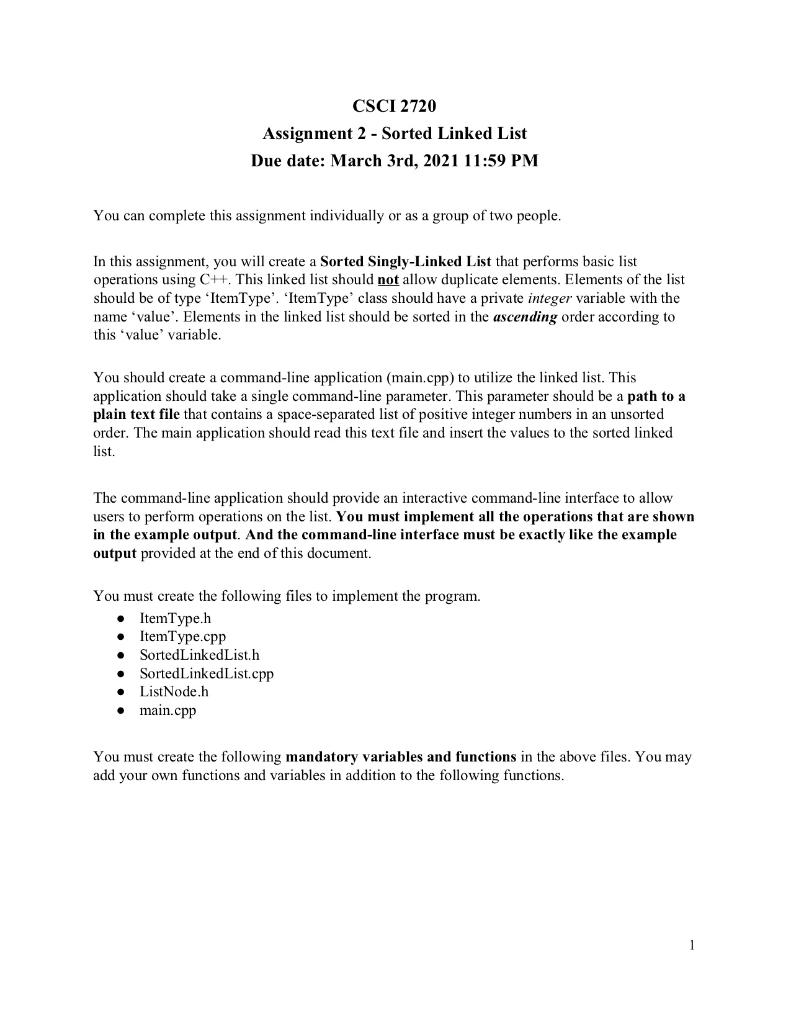
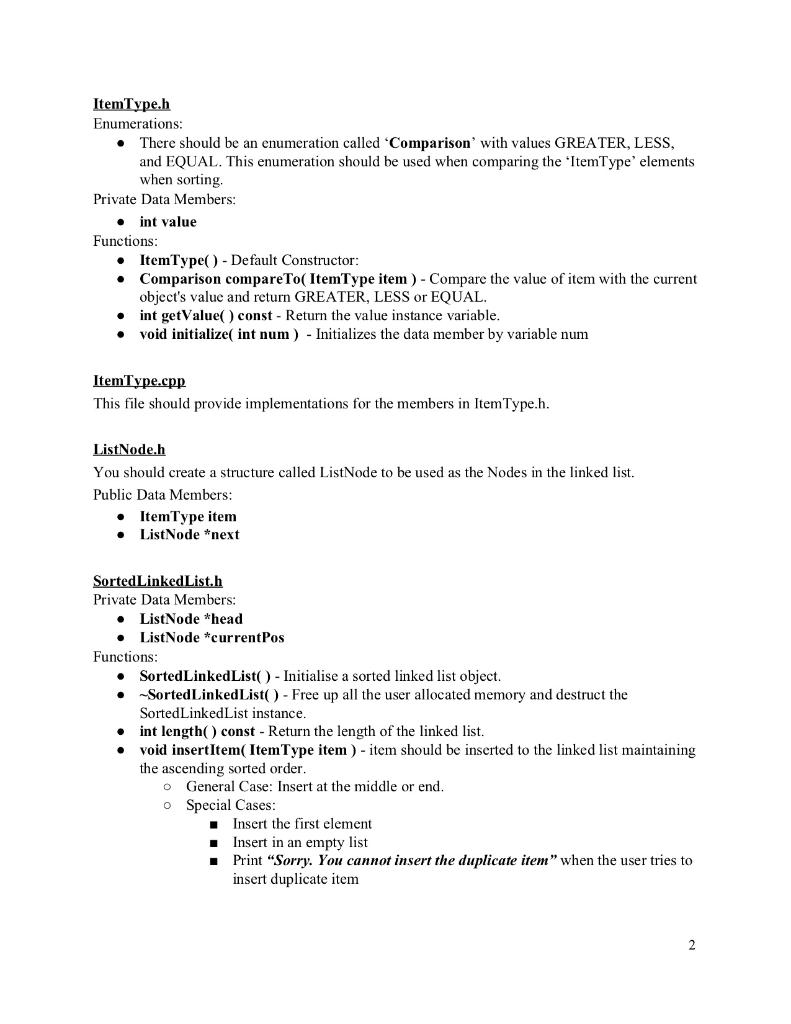
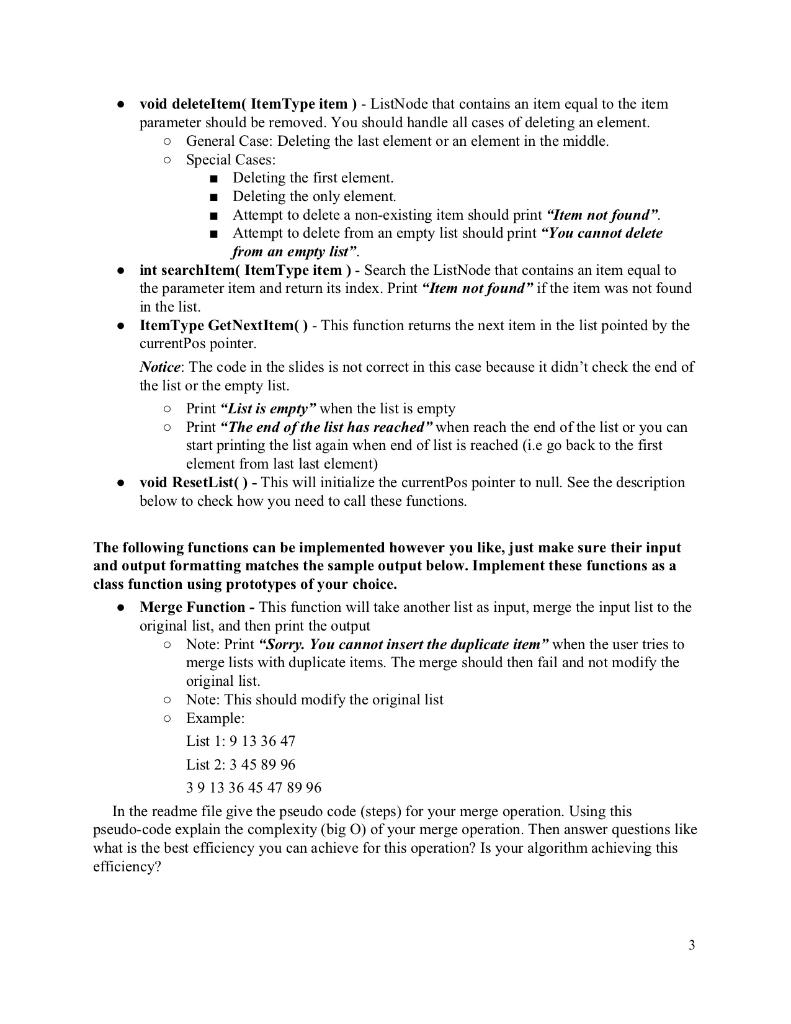
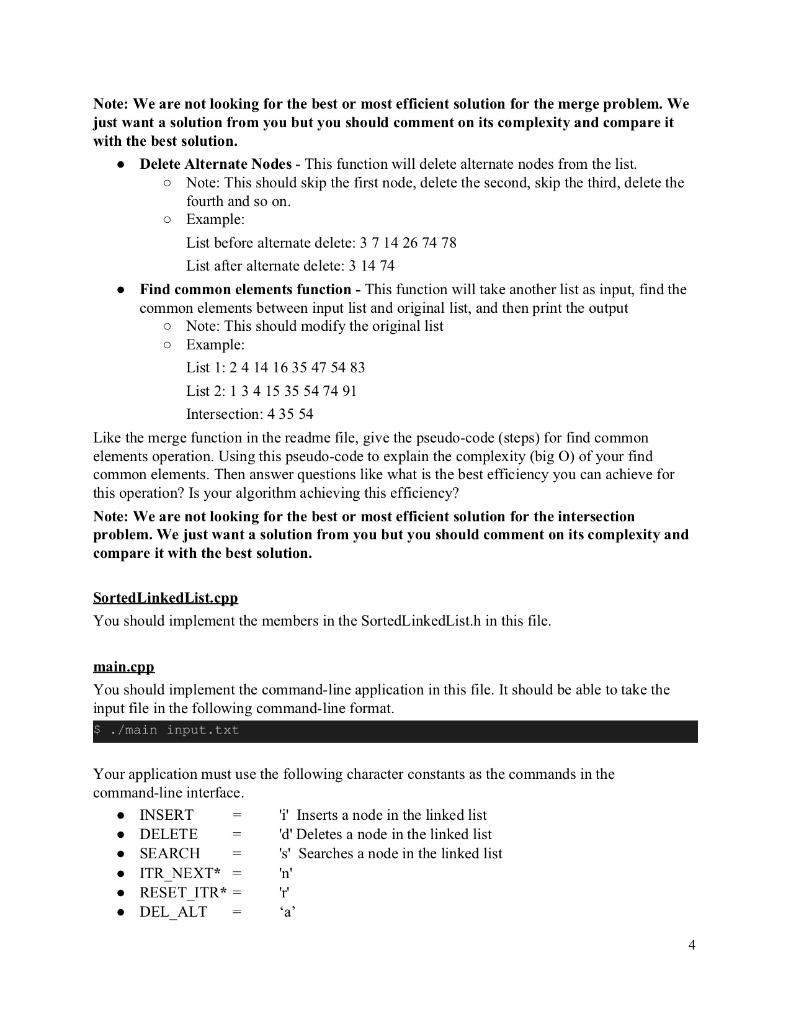
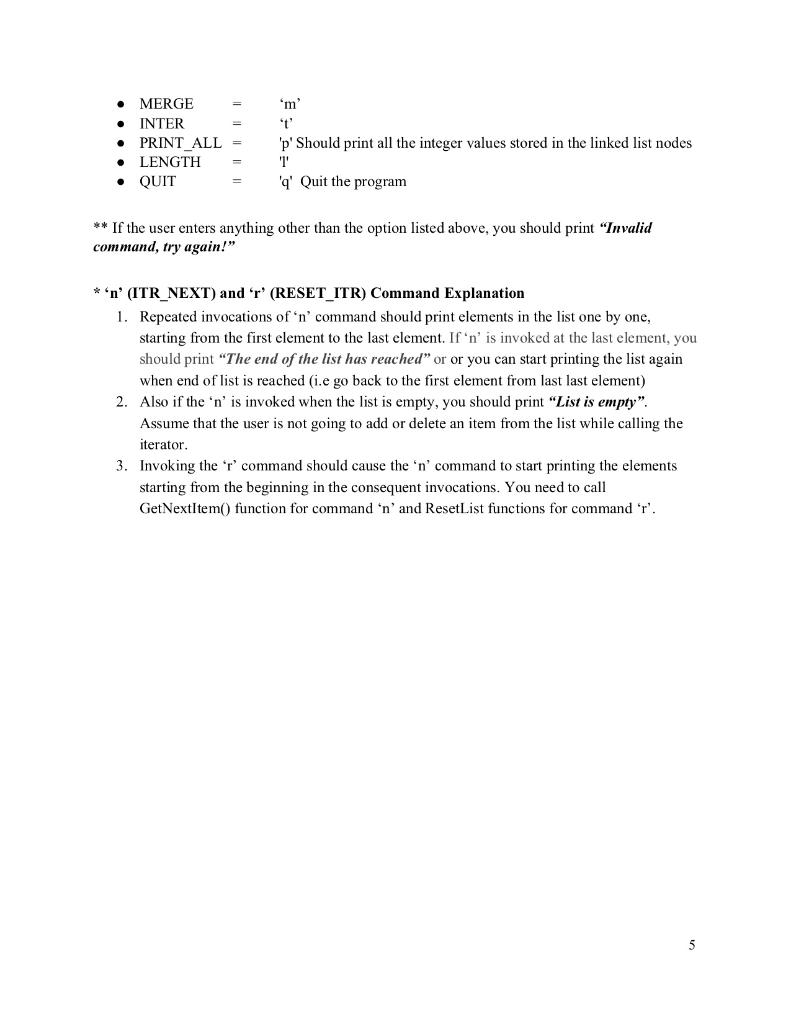
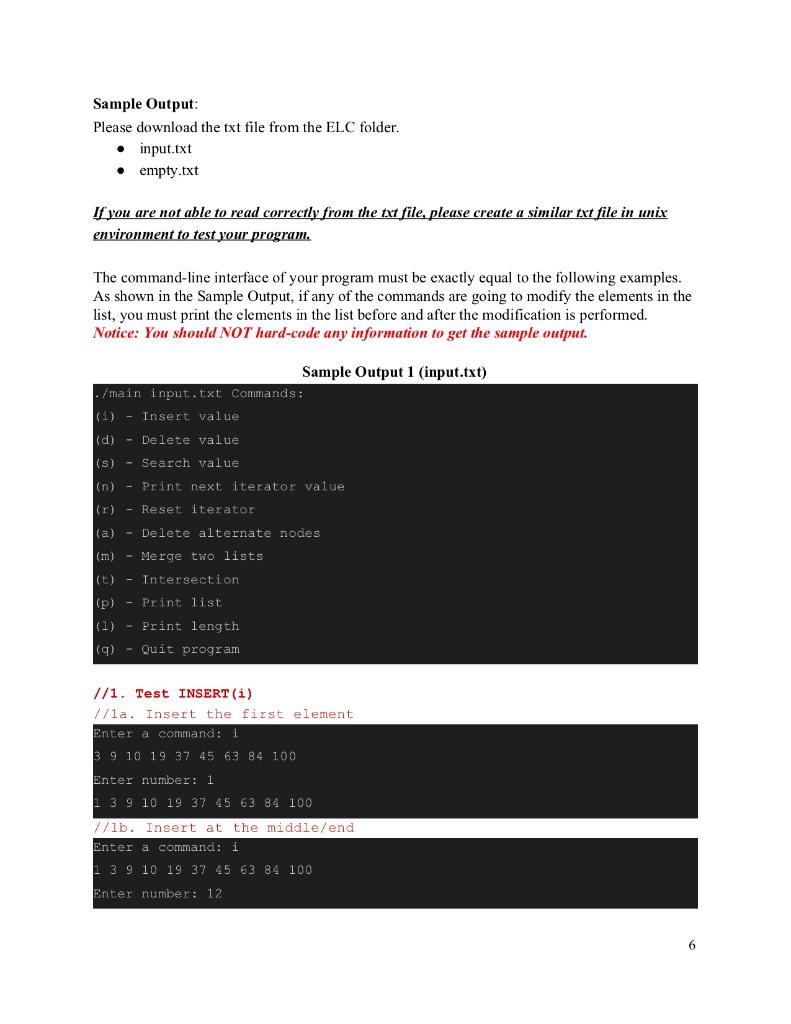
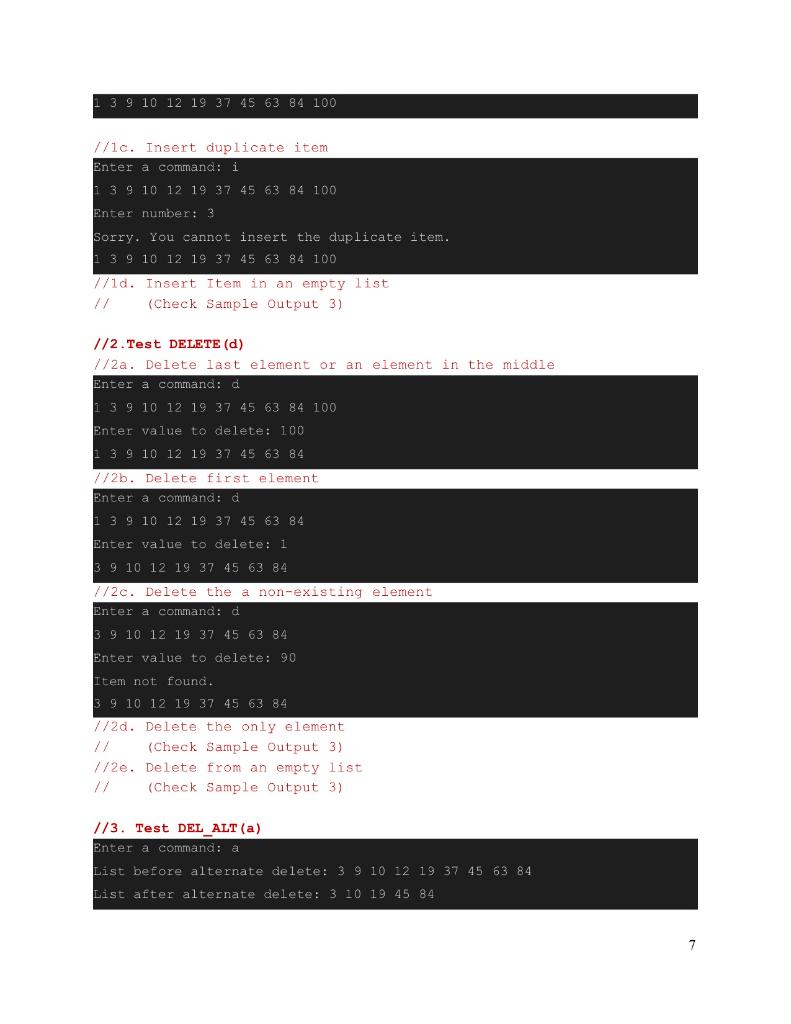
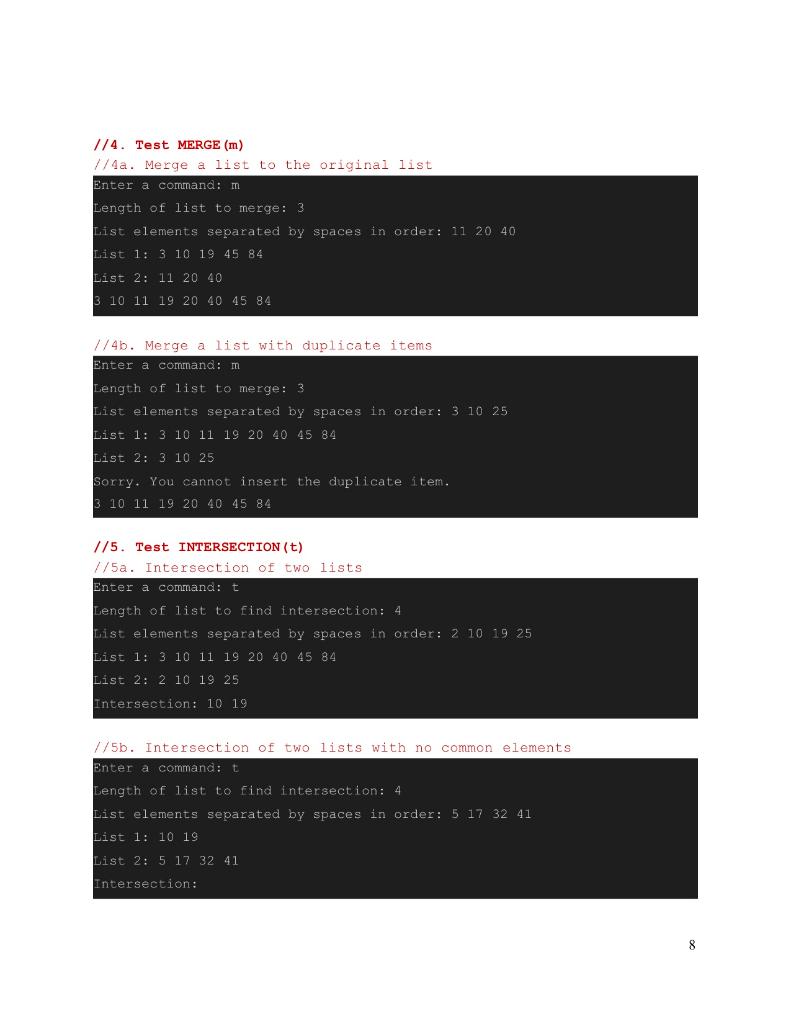
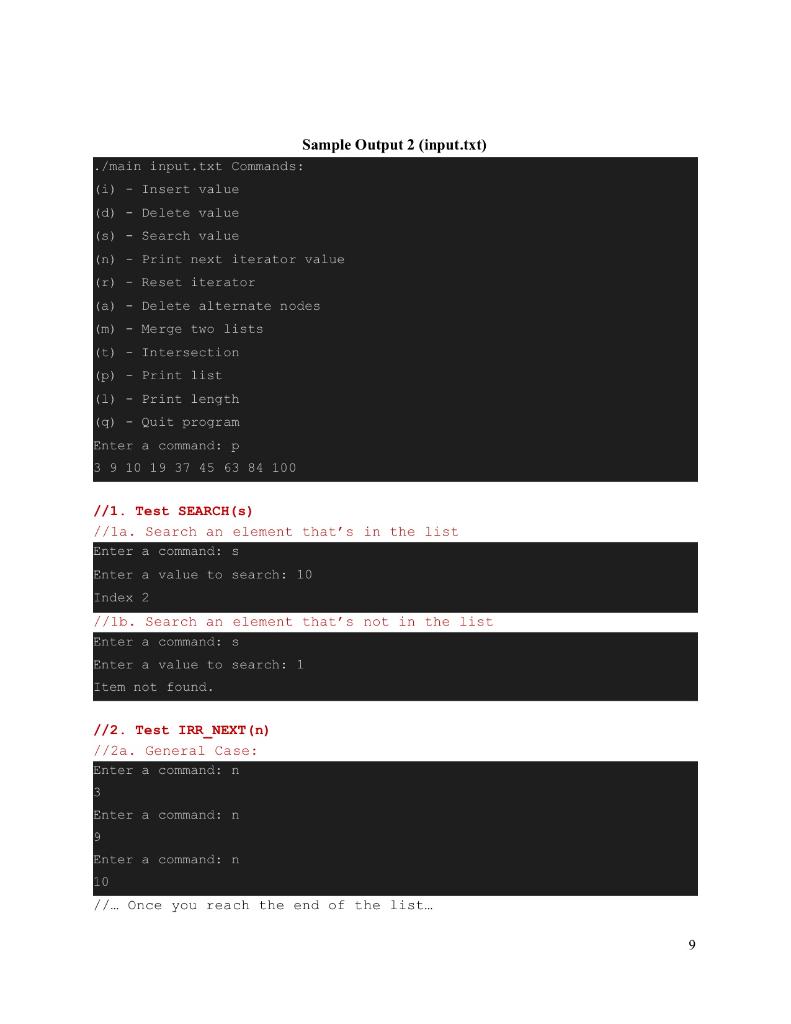
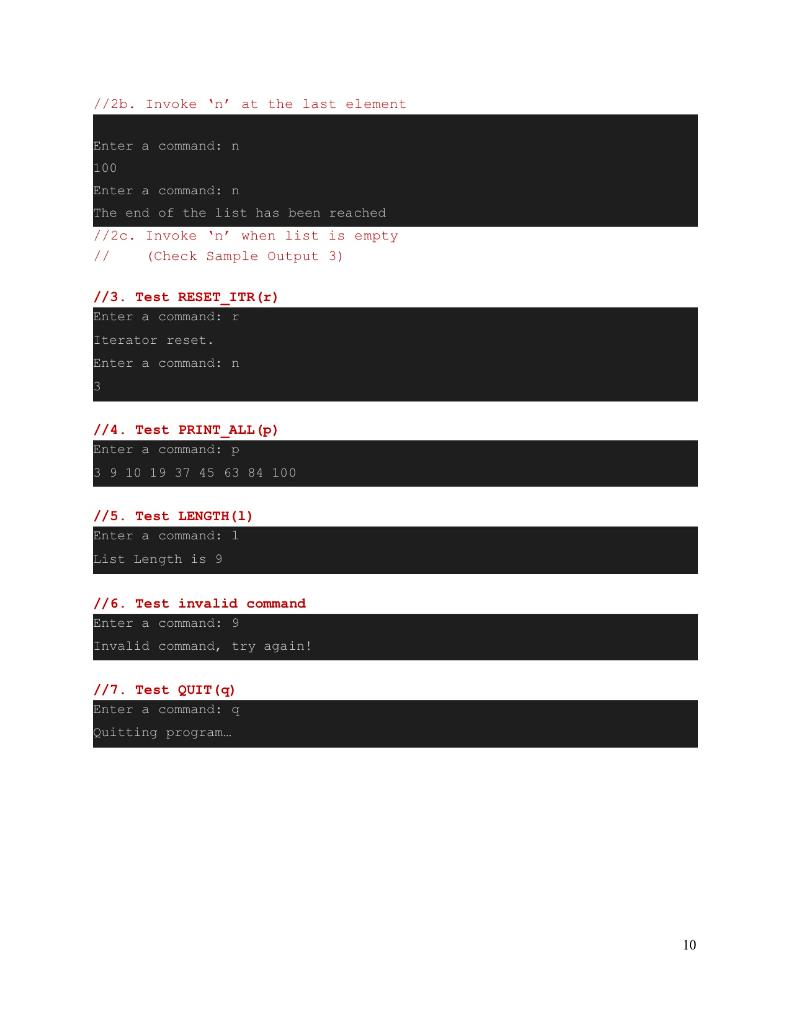
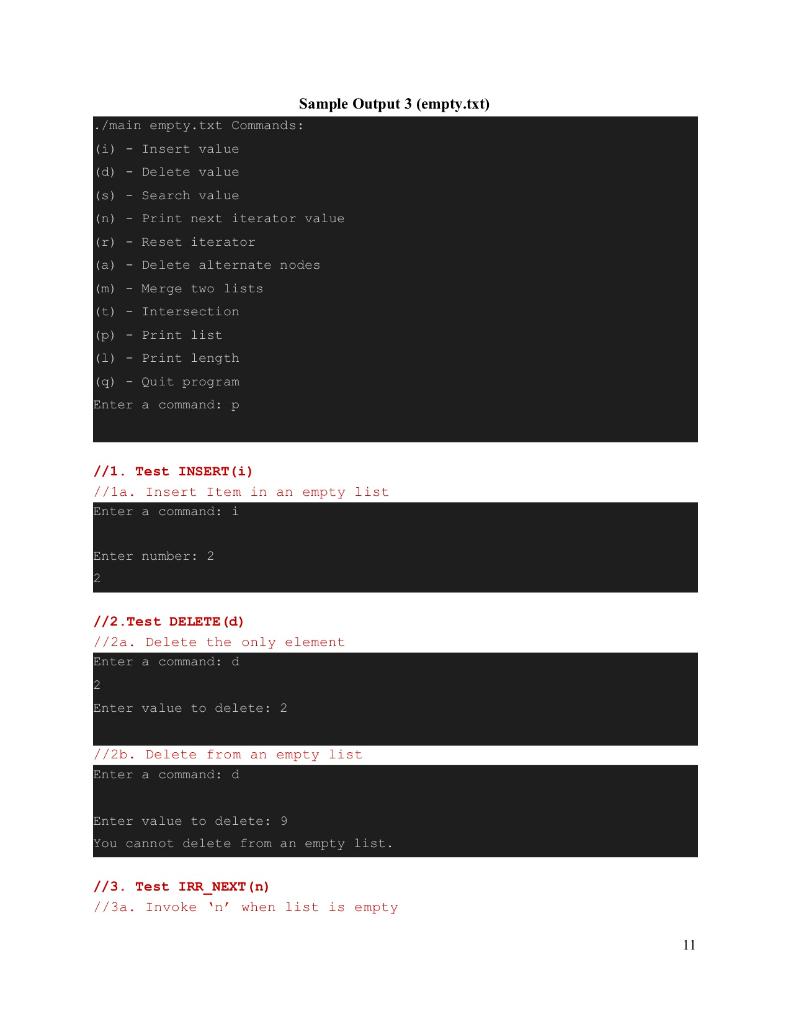
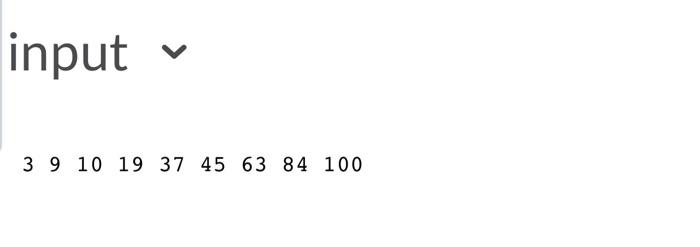
CSCI 2720 Assignment 2 - Sorted Linked List Due date: March 3rd, 2021 11:59 PM You can complete this assignment individually or as a group of two people. In this assignment, you will create a Sorted Singly-Linked List that performs basic list operations using CH. This linked list should not allow duplicate elements. Elements of the list should be of type "ItemType'. 'Item Type' class should have a private integer variable with the name 'value'. Elements in the linked list should be sorted in the ascending order according to this 'value' variable. You should create a command line application (main.cpp) to utilize the linked list. This application should take a single command-line parameter. This parameter should be a path to a plain text file that contains a space-separated list of positive integer numbers in an unsorted order. The main application should read this text file and insert the values to the sorted linked list. The command-line application should provide an interactive command-line interface to allow users to perform operations on the list. You must implement all the operations that are shown in the example output. And the command-line interface must be exactly like the example output provided at the end of this document. You must create the following files to implement the program. Item Type.h ItemType.cpp SortedLinkedList.h SortedLinkedList.cpp List Node.h main.cpp You must create the following mandatory variables and functions in the above files. You may add your own functions and variables in addition to the following functions. . ItemType.h Enumerations: There should be an enumeration called "Comparison with values GREATER, LESS, and EQUAL. This enumeration should be used when comparing the 'ItemType' elements when sorting. Private Data Members: int value Functions: Item Type() - Default Constructor: Comparison compareTo( ItemType item ) - Compare the value of item with the current object's value and return GREATER, LESS or EQUAL. int getValue() const - Return the value instance variable. void initialize( int num) - Initializes the data member by variable num ItemType.cpp This file should provide implementations for the members in Item Type.h. ListNode.h You should create a structure called ListNode to be used as the Nodes in the linked list. Public Data Members: Item Type item ListNode *next SortedLinkedList.h Private Data Members: ListNode *head ListNode *currentPos Functions: SortedLinkedList() - Initialise a sorted linked list object. -Sorted LinkedList() - Free up all the user allocated memory and destruct the SortedLinkedList instance. int length() const - Return the length of the linked list. void insert Item( Item Type item ) - item should be inserted to the linked list maintaining the ascending sorted order. o General Case: Insert at the middle or end. o Special Cases: Insert the first element Insert in an empty list Print "Sorry. You cannot insert the duplicate item" when the user tries to insert duplicate item . void deleteItem( Item Type item ) - ListNode that contains an item equal to the item parameter should be removed. You should handle all cases of deleting an element. o General Case: Deleting the last element or an element in the middle. o Special Cases: Deleting the first element. Deleting the only element, Attempt to delete a non-existing item should print "Item not found". Attempt to delete from an empty list should print "You cannot delete from an empty list". int searchItem( ItemType item ) - Search the ListNode that contains an item equal to the parameter item and return its index. Print "Item not found" if the item was not found in the list. Item Type GetNextItem() - This function returns the next item in the list pointed by the currentPos pointer. Notice: The code in the slides is not correct in this case because it didn't check the end of the list or the empty list. Print "List is empty" when the list is empty o Print "The end of the list has reached" when reach the end of the list or you can start printing the list again when end of list is reached (ie go back to the first element from last last element) void ResetList() - This will initialize the currentPos pointer to null. See the description below to check how you need to call these functions. . The following functions can be implemented however you like, just make sure their input and output formatting matches the sample output below. Implement these functions as a class function using prototypes of your choice. Merge Function - This function will take another list as input, merge the input list to the original list, and then print the output Note: Print "Sorry. You cannot insert the duplicate item" when the user tries to merge lists with duplicate items. The merge should then fail and not modify the original list. Note: This should modify the original list O Example: List 1: 9 13 36 47 List 2: 3 45 89 96 3 9 13 36 45 47 89 96 In the readme file give the pseudo code (steps) for your merge operation. Using this pseudo-code explain the complexity (big O) of your merge operation. Then answer questions like what is the best efficiency you can achieve for this operation? Is your algorithm achieving this efficiency? 3 . Note: We are not looking for the best or most efficient solution for the merge problem. We just want a solution from you but you should comment on its complexity and compare it with the best solution. Delete Alternate Nodes - This function will delete alternate nodes from the list. Note: This should skip the first node, delete the second, skip the third, delete the fourth and so on. Example: List before alternate delete: 3 7 14 26 74 78 List after alternate delete: 3 14 74 Find common elements function - This function will take another list as input, find the common elements between input list and original list, and then print the output o Note: This should modify the original list Example: List 1:24 14 16 35 47 54 83 List 2:13 4 15 35 54 74 91 Intersection: 435 54 Like the merge function in the readme file, give the pseudo-code (steps) for find common elements operation. Using this pseudo-code to explain the complexity (big C) of your find common elements. Then answer questions like what is the best efficiency you can achieve for this operation? Is your algorithm achieving this efficiency? Note: We are not looking for the best or most efficient solution for the intersection problem. We just want a solution from you but you should comment on its complexity and compare it with the best solution. Sorted LinkedList.cpp You should implement the members in the SortedLinkedList.h in this file. main.cpp You should implement the command-line application in this file. It should be able to take the input file in the following command-line format. ./main input.txt Your application must use the following character constants as the commands in the command-line interface. INSERT 'i' Inserts a node in the linked list DELETE 'd' Deletes a node in the linked list SEARCH 's' Searches a node in the linked list ITR NEXT* = 'n RESET ITR* = DEL_ALT a 4 MERGE INTER PRINT_ALL LENGTH QUIT m' 't 'p' Should print all the integer values stored in the linked list nodes T 'q' Quit the program ** If the user enters anything other than the option listed above, you should print "Invalid command, try again!" *'n' (ITR_NEXT) and 'r' (RESET_ITR) Command Explanation 1. Repeated invocations of 'n' command should print elements in the list one by one, starting from the first element to the last element. If'n' is invoked at the last element, you should print "The end of the list has reached" or or you can start printing the list again when end of list is reached (i.e go back to the first element from last last element) 2. Also if the 'n' is invoked when the list is empty, you should print "List is empty". Assume that the user is not going to add or delete an item from the list while calling the iterator. 3. Invoking the r' command should cause the 'n' command to start printing the elements starting from the beginning in the consequent invocations. You need to call GetNextItem() function for command 'n' and Reset List functions for command 'r'. 5 Sample Output: Please download the txt file from the ELC folder. input.txt empty.txt If you are not able to read correctly from the txt file, please create a similar txt file in unix environment to test your program. The command-line interface of your program must be exactly equal to the following examples. As shown in the Sample Output, if any of the commands are going to modify the elements in the list, you must print the elements in the list before and after the modification is performed. Notice: You should NOT hard-code any information to get the sample output. Sample Output 1 (input.txt) ./main input.txt Commands: (i) - Insert value (d) - Delete value (s) - Search value (n) Print next iterator value ir) - Reset iterator (a) - Delete alternate nodes (m) - Merge two lists (t) - Intersection (p) - Print list (1) Print length (9) - Quit program //1. Test INSERT (i) //la. Insert the first element Enter a command: i 3910 19 37 45 63 84 100 Enter number: 1 3 9 10 19 37 45 63 84 100 //lb. Insert at the middle/end Enter a command: i 1 3 9 10 19 37 45 63 84 100 Enter number: 12 1 3 9 10 12 19 37 45 63 84 100 //10. Insert duplicate item Enter a command: i 13 9 10 12 19 37 45 63 84 100 Enter number: 3 Sorry. You cannot insert the duplicate item. 1 3 9 10 12 19 37 45 63 84 100 //1d. Insert Item in an empty list // (Check Sample Output 3) //2. Test DELETE (d) //2a. Delete last element or an element in the middle Enter a command: d 13 9 10 12 19 37 45 63 84 100 Enter value to delete: 100 13 9 10 12 19 37 45 63 84 //2b. Delete first element Enter a command: a 13 9 10 12 19 37 45 63 84 Enter value to delete: 1 3 9 10 12 19 37 45 63 84 //2c. Delete the a non-existing element Enter a command: d 3 9 10 12 19 37 45 63 84 Enter value to delete: 90 Item not found. 3 9 10 12 19 37 45 63 84 //2d. Delete the only element // (Check Sample Output 3) //2e. Delete from an empty list (Check Sample Output 3) //3. Test DEL_ALT (a) Enter a command: a List before alternate delete: 3 9 10 12 19 37 45 63 84 List after alternate delete: 3 10 19 45 84 //4. Test MERGE (m) //4a. Merge a list to the original list Enter a command: m Length of list to merge: 3 List elements separated by spaces in order: 11 20 40 List 1: 3 10 19 45 84 List 2: 11 20 40 10 11 19 20 40 45 84 //4b. Merge a list with duplicate items Enter a command: m Length of list to merge: 3 List elements separated by spaces in order: 3 10 25 List 1: 3 10 11 19 20 40 45 84 List 2: 3 10 25 Sorry. You cannot insert the duplicate item. 10 11 19 20 40 45 84 //5. Test INTERSECTION (t) //5a. Intersection of two lists Enter a command: t Length of list to find intersection: 4 List elements separated by spaces in order: 2 10 19 25 List 1: 3 10 11 19 20 40 45 84 List 2: 2 10 19 25 Intersection: 10 19 //5b. Intersection of two lists with no common elements Enter a command: t Length of list to find intersection: 4 List elements separated by spaces in order: 5 17 32 41 List 1:10 19 List 2: 5 17 32 41 Intersection: Sample Output 2 (input.txt) ./main input.txt Commands: (i) Insert value (d) - Delete value (s) - Search value (n) - Print next iterator value (r) - Reset iterator (a) - Delete alternate nodes (m) - Merge two lists (t) - Intersection (p) Print list (1) - Print length (q) - Quit program Enter a command: P 3.9 10 19 37 45 63 84 100 //1. Test SEARCH(S) //la. Search an element that's in the list Enter a command: Enter a value to search: 10 Index 2 //lb. Search an element that's not in the list Enter a command: S Enter a value to search: 1 Item not found. 1/2. Test IRR NEXT (n) //2a. General Case: Enter a command: n 3 Enter a command: n Enter a command: ni 10 //... Once you reach the end of the list... //2b. Invoke 'n' at the last element Enter a command: n 100 Enter a command: n The end of the list has been reached //2c. Invoke'n' when list is empty // (Check Sample Output 3) 1/3. Test RESET_ITR () Enter a command: Iterator reset. Enter a commana: n 3 1/4. Test PRINT_ALL (P) Enter a command: P 3 9 10 19 37 45 63 84 100 //5. Test LENGTH (1) Enter a command: 1 List Length is 9 //6. Test invalid command Enter a command: 9 Invalid command, try again! //7. Test QUIT (9) Enter a command: 9 Quitting program... 10 Sample Output 3 (empty.txt) ./main empty.txt Commands: (i) - Insert value (d) - Delete value (s) - Search value (n) Print next iterator value (r) - Reset iterator (a) - Delete alternate nodes (m) - Merge two lists (t) - Intersection (p) - Print list (1) - Print length (q) - Quit program Enter a command: //1. Test INSERT (i) //la. Insert Item in an empty list Enter a command: i Enter number: 2 //2.Test DELETE (d) //2a. Delete the only element Enter a command: d 2 Enter value to delete: 2 //2b. Delete from an empty list Enter a command: d Enter value to delete: 9 You cannot delete from an empty list. 1/3. Test IRR_NEXT (n) //3a. Invoke 'n' when list is empty 11 input 3 9 10 19 37 45 63 84 100 empty
Step by Step Solution
There are 3 Steps involved in it

Get step-by-step solutions from verified subject matter experts
 Study Help