







Question: This is all written in Java. Follow all the steps and instructions to make sure the edited program follows the Rubric. Rubric Magpie4: public class
This is all written in Java.
Follow all the steps and instructions to make sure the edited program follows the Rubric.
 Rubric
 Magpie4:
public class Magpie4 { /** * Get a default greeting * @return a greeting */ public String getGreeting() { return "Hello, let's talk."; }
/** * Gives a response to a user statement * * @param statement * the user statement * @return a response based on the rules given */ public String getResponse(String statement) { String response = ""; if (statement.length() == 0) { response = "Say something, please."; }
else if (findKeyword(statement, "no") >= 0) { response = "Why so negative?"; } else if (findKeyword(statement, "mother") >= 0 || findKeyword(statement, "father") >= 0 || findKeyword(statement, "sister") >= 0 || findKeyword(statement, "brother") >= 0) { response = "Tell me more about your family."; }
// Responses which require transformations else if (findKeyword(statement, "I want to", 0) >= 0) { response = transformIWantToStatement(statement); }
else { // Look for a two word (you
if (position >= 0 && findKeyword(statement, "me", position) >= 0) { response = transformYouMeStatement(statement); } else { response = getRandomResponse(); } } return response; }
/** * Take a statement with "I want to
if (lastChar.equals(".")) { statement = statement.substring(0, statement.length() - 1); } int position = findKeyword (statement, "I want to", 0); String restOfStatement = statement.substring(position + 9).trim(); return "What would it mean to " + restOfStatement + "?"; }
/** * Take a statement with "you
if (lastChar.equals(".")) { statement = statement.substring(0, statement.length() - 1); }
int positionOfYou = findKeyword (statement, "you", 0); int positionOfMe = findKeyword (statement, "me", positionOfYou + 3);
String restOfStatement = statement.substring(positionOfYou + 3, positionOfMe).trim(); return "What makes you think that I " + restOfStatement + " you?"; }
/** * Search for one word in phrase. The search is not case sensitive. * This method will check that the given goal is not a substring of a longer string * (so, for example, "I know" does not contain "no"). * @param statement: the string to search * @param goal: the string to search for * @param startPos: the character of the string to begin the search at * @return the index of the first occurrence of goal in statement or -1 if it's not found */ private int findKeyword(String statement, String goal, int startPos) { String phrase = statement.trim(); // The only change to incorporate the startPos is in the line below int position = phrase.toLowerCase().indexOf(goal.toLowerCase(), startPos);
// Refinement--make sure the goal isn't part of a word while (position >= 0) { // Find the string of length 1 before and after the word String before = " ", after = " "; if (position > 0) { before = phrase.substring (position - 1, position).toLowerCase(); } if (position + goal.length()
// If before and after aren't letters, we've found the word if (((before.compareTo ("a") 0)) // before is not a letter && ((after.compareTo ("a") 0))) { return position; }
// The last position didn't work, so let's find the next, if there is one. position = phrase.indexOf(goal.toLowerCase(), position + 1);
}
return -1; }
/** * Search for one word in phrase. The search is not case sensitive. * This method will check that the given goal is not a substring of a longer string * (so, for example, "I know" does not contain "no"). The search begins at the beginning of the string. * @param statement: the string to search * @param goal: the string to search for * @return the index of the first occurrence of goal in statement or -1 if it's not found */ private int findKeyword(String statement, String goal) { return findKeyword (statement, goal, 0); }
/** * Pick a default response to use if nothing else fits. * @return a non-committal string */ private String getRandomResponse() { final int NUMBER_OF_RESPONSES = 4; double r = Math.random(); int whichResponse = (int)(r * NUMBER_OF_RESPONSES); String response = "";
if (whichResponse == 0) { response = "Interesting, tell me more."; } else if (whichResponse == 1) { response = "Hmmm."; } else if (whichResponse == 2) { response = "Do you really think so?"; } else if (whichResponse == 3) { response = "You don't say."; }
return response; }
}
MagpieRunner4:
import java.util.Scanner;
public class MagpieRunner4 {
/** * Create a Magpie, give it user input, and print its replies. */ public static void main(String[] args) { Magpie4 maggie = new Magpie4();
System.out.println (maggie.getGreeting()); Scanner in = new Scanner (System.in); String statement = in.nextLine();
while (!statement.equals("Bye")) { System.out.println (maggie.getResponse(statement)); statement = in.nextLine(); } }
}
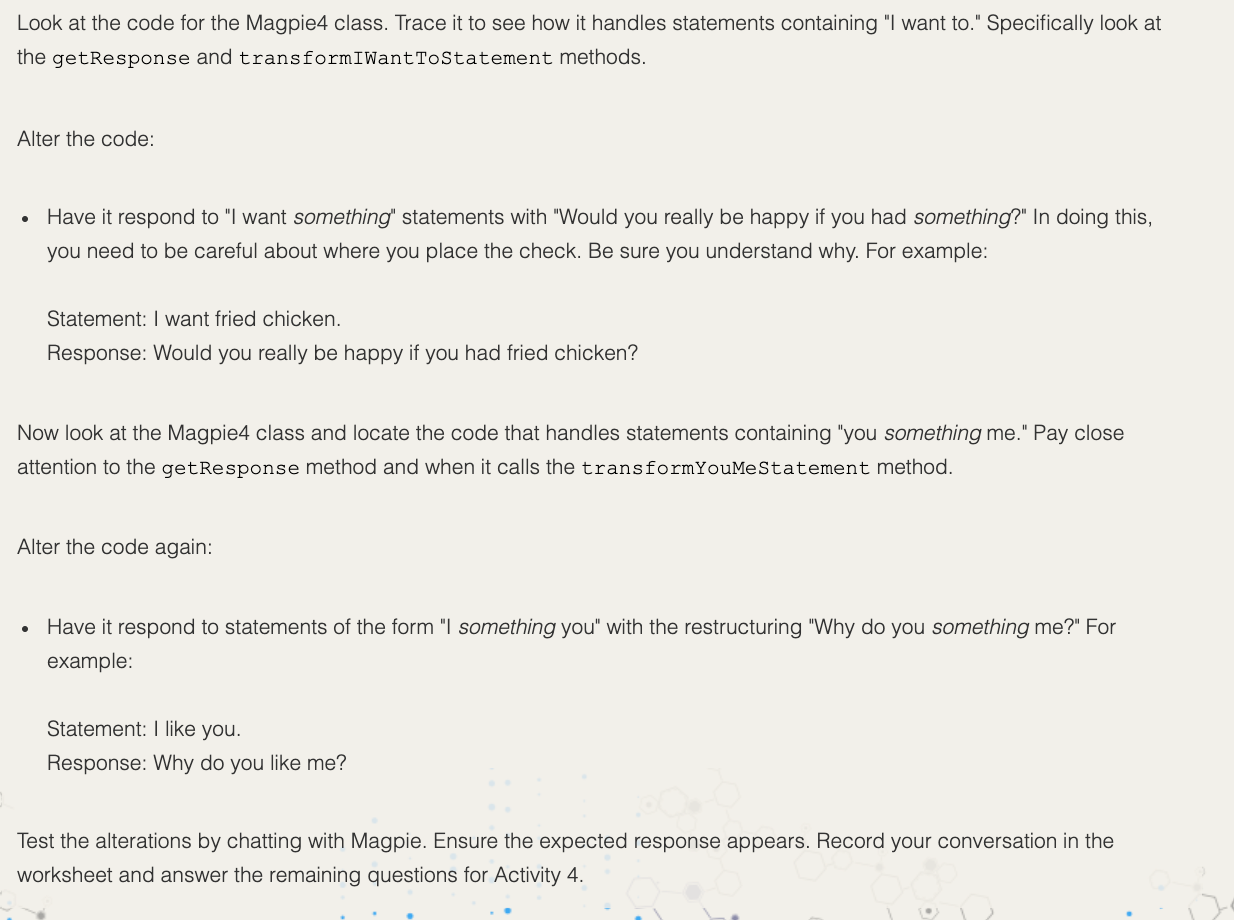
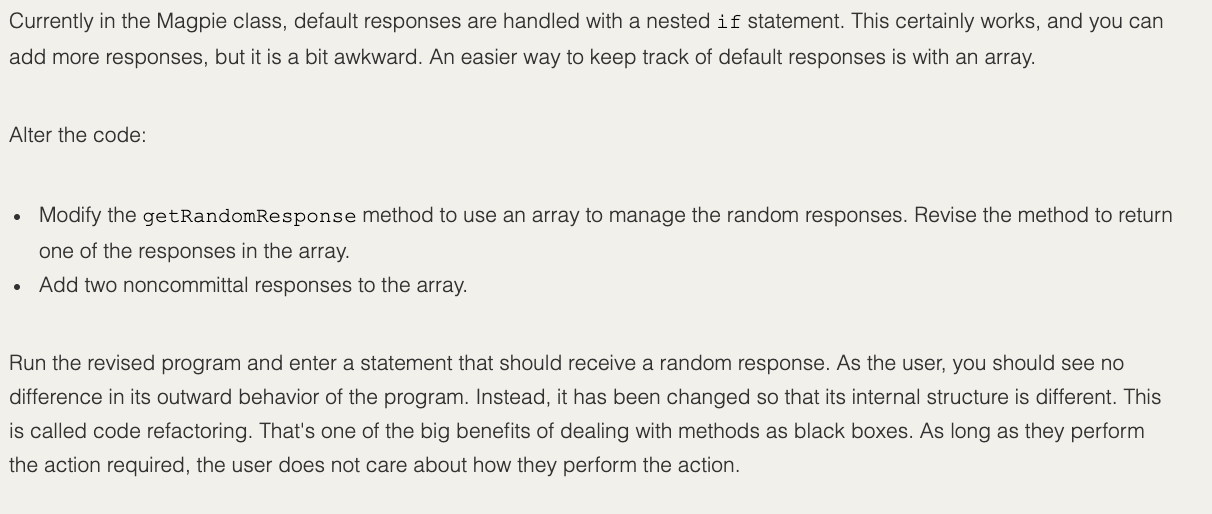
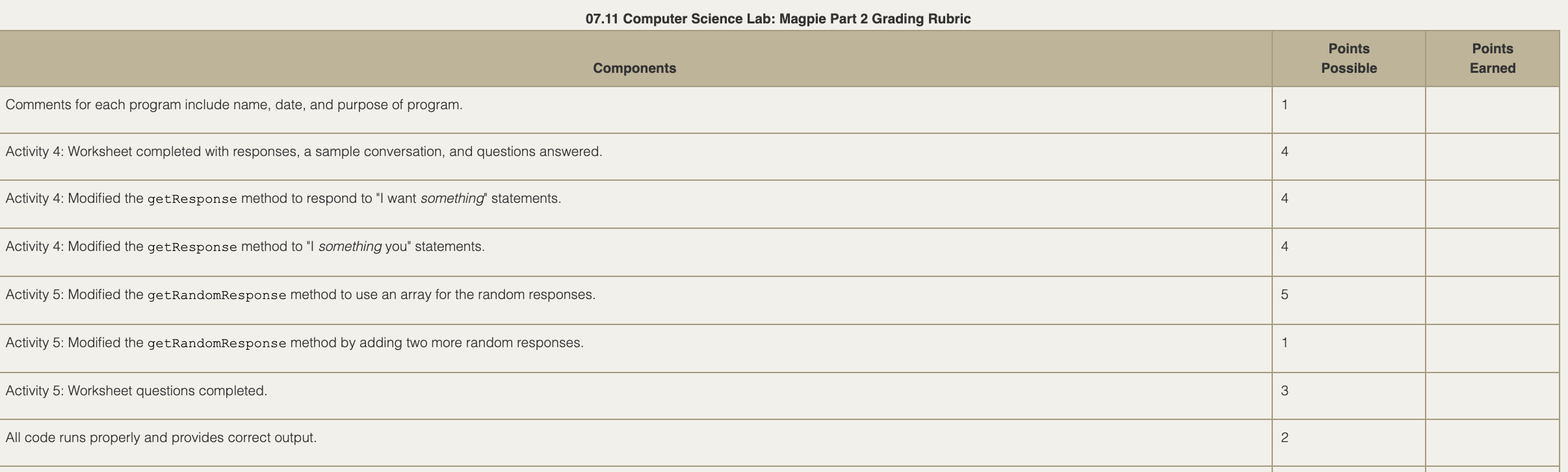
Look at the code for the Magpie4 class. Trace it to see how it handles statements containing "I want to." Specifically look at the getResponse and transformIWantToStatement methods. Alter the code: Have it respond to "I want something" statements with "Would you really be happy if you had something?" In doing this, you need to be careful about where you place the check. Be sure you understand why. For example: Statement: I want fried chicken. Response: Would you really be happy if you had fried chicken? Now look at the Magpie4 class and locate the code that handles statements containing "you something me." Pay close attention to the getResponse method and when it calls the transformYouMeStatement method. Alter the code again: Have it respond to statements of the form "I something you" with the restructuring "Why do you something me?" For example: Statement: I like you. Response: Why do you like me? Test the alterations by chatting with Magpie. Ensure the expected response appears. Record your conversation in the worksheet and answer the remaining questions for Activity 4. Currently in the Magpie class, default responses are handled with a nested if statement. This certainly works, and you can add more responses, but it is a bit awkward. An easier way to keep track of default responses is with an array. Alter the code: Modify the getRandomResponse method to use an array to manage the random responses. Revise the method to return one of the responses in the array. Add two noncommittal responses to the array. Run the revised program and enter a statement that should receive a random response. As the user, you should see no difference in its outward behavior of the program. Instead, it has been changed so that its internal structure is different. This is called code refactoring. That's one of the big benefits of dealing with methods as black boxes. As long as they perform the action required, the user does not care about how they perform the action. 07.11 Computer Science Lab: Magpie Part 2 Grading Rubric Points Possible Points Earned Components Comments for each program include name, date, and purpose of program. Activity 4: Worksheet completed with responses, a sample conversation, and questions answered. 4 Activity 4: Modified the getResponse method to respond to "I want something" statements. 4 Activity 4: Modified the getResponse method to "I something you" statements. 4. Activity 5: Modified the getRandomResponse method to use an array for the random responses. 5 Activity 5: Modified the getRandomResponse method by adding two more random responses. 1 Activity 5: Worksheet questions completed. 3 All code runs properly and provides correct output. 2 Look at the code for the Magpie4 class. Trace it to see how it handles statements containing "I want to." Specifically look at the getResponse and transformIWantToStatement methods. Alter the code: Have it respond to "I want something" statements with "Would you really be happy if you had something?" In doing this, you need to be careful about where you place the check. Be sure you understand why. For example: Statement: I want fried chicken. Response: Would you really be happy if you had fried chicken? Now look at the Magpie4 class and locate the code that handles statements containing "you something me." Pay close attention to the getResponse method and when it calls the transformYouMeStatement method. Alter the code again: Have it respond to statements of the form "I something you" with the restructuring "Why do you something me?" For example: Statement: I like you. Response: Why do you like me? Test the alterations by chatting with Magpie. Ensure the expected response appears. Record your conversation in the worksheet and answer the remaining questions for Activity 4. Currently in the Magpie class, default responses are handled with a nested if statement. This certainly works, and you can add more responses, but it is a bit awkward. An easier way to keep track of default responses is with an array. Alter the code: Modify the getRandomResponse method to use an array to manage the random responses. Revise the method to return one of the responses in the array. Add two noncommittal responses to the array. Run the revised program and enter a statement that should receive a random response. As the user, you should see no difference in its outward behavior of the program. Instead, it has been changed so that its internal structure is different. This is called code refactoring. That's one of the big benefits of dealing with methods as black boxes. As long as they perform the action required, the user does not care about how they perform the action. 07.11 Computer Science Lab: Magpie Part 2 Grading Rubric Points Possible Points Earned Components Comments for each program include name, date, and purpose of program. Activity 4: Worksheet completed with responses, a sample conversation, and questions answered. 4 Activity 4: Modified the getResponse method to respond to "I want something" statements. 4 Activity 4: Modified the getResponse method to "I something you" statements. 4. Activity 5: Modified the getRandomResponse method to use an array for the random responses. 5 Activity 5: Modified the getRandomResponse method by adding two more random responses. 1 Activity 5: Worksheet questions completed. 3 All code runs properly and provides correct output. 2
Step by Step Solution
There are 3 Steps involved in it

Get step-by-step solutions from verified subject matter experts
 Study Help