







Question: This is an Excel question. 3 energy graphs needed, the excel worksheet completed with the IF statements used. Will give thumbs up for correct answers.
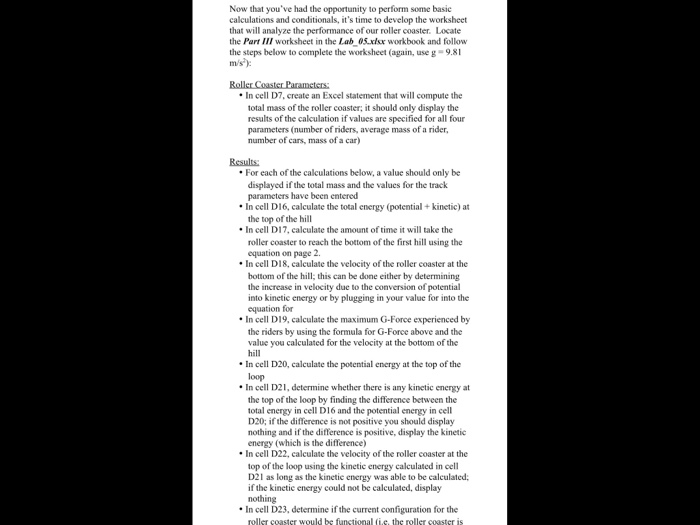
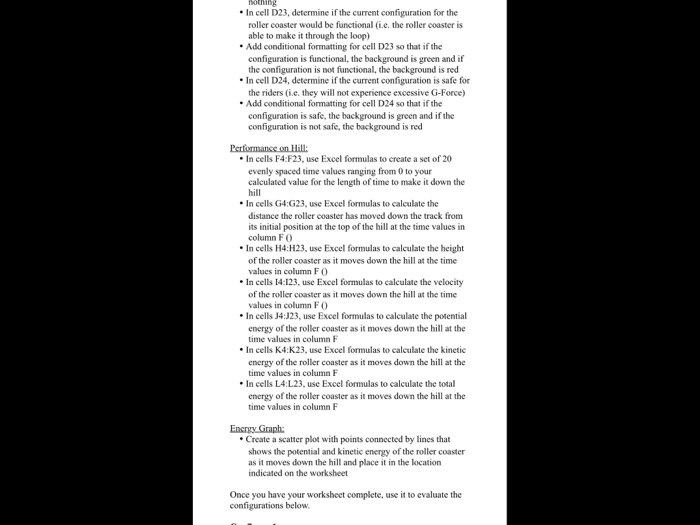
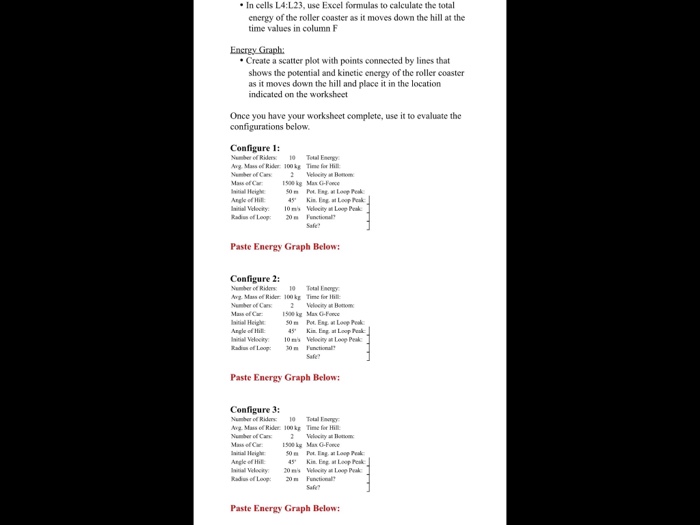
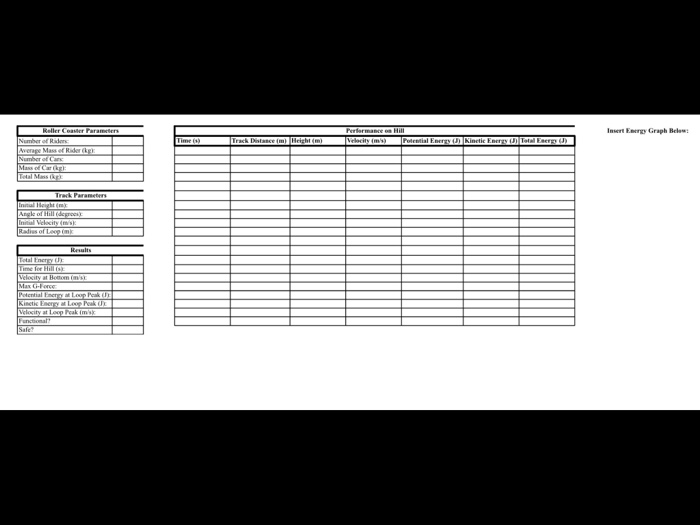
Now that you've had the opportunity to perform some basic calculations and conditionals, it's time to develop the worksheet that will analyze the performance of our roller coaster. Locate the Part III worksheet in the Lab 05 xx workbook and follow the steps below to complete the worksheet (again, use g-9.81 In cell D7, create an Excel statement that will compute the total mass of the roller coaster, it should only display the results of the calculation if values are specified for all four parameters (number of riders, average mass of a rider, number of cars, mass of a car) For each of the calculations below, a value should only be displayed if the total mass and the values for the track parameters have been entered In cell DI6, calculate the total energy (potential+ kinetic) at the top of the hill In cell D17, calculate the amount of time it will take the roller coaster to reach the bottom of the first hill using the equation on page 2. In cell DI8, calculate the velocity of the roller coaster at the bottom of the hill; this can be done either by determining the increase in velocity due to the conversion of potential into kinetic equation for energy or by plugging in your value for into the In cell D 19, calculate the maximum, G-Force experienced by the riders by using the formula for G-Force above and the value you calculated for the velocity at the bottom of the In cell D20, calculate tbe potential energy at the top of the In cell D21, determine whether there is any kinetic energy at the top of the loop by finding the difference between the total energy in cell D16 and the potential energy in cell D20; if the difference is not positive you should display nothing and if the difference is positive, display the kinetic energy (which is the difference) In cell D22, calculate the velocity of the roller coaster at the top of the loop using the kinetie energy calculated in cell D21 as long as the kinetie energy was able to be calculated if the kinetic energy could not be calculated, display In cell D23, determine if the current configuration for the Now that you've had the opportunity to perform some basic calculations and conditionals, it's time to develop the worksheet that will analyze the performance of our roller coaster. Locate the Part III worksheet in the Lab 05 xx workbook and follow the steps below to complete the worksheet (again, use g-9.81 In cell D7, create an Excel statement that will compute the total mass of the roller coaster, it should only display the results of the calculation if values are specified for all four parameters (number of riders, average mass of a rider, number of cars, mass of a car) For each of the calculations below, a value should only be displayed if the total mass and the values for the track parameters have been entered In cell DI6, calculate the total energy (potential+ kinetic) at the top of the hill In cell D17, calculate the amount of time it will take the roller coaster to reach the bottom of the first hill using the equation on page 2. In cell DI8, calculate the velocity of the roller coaster at the bottom of the hill; this can be done either by determining the increase in velocity due to the conversion of potential into kinetic equation for energy or by plugging in your value for into the In cell D 19, calculate the maximum, G-Force experienced by the riders by using the formula for G-Force above and the value you calculated for the velocity at the bottom of the In cell D20, calculate tbe potential energy at the top of the In cell D21, determine whether there is any kinetic energy at the top of the loop by finding the difference between the total energy in cell D16 and the potential energy in cell D20; if the difference is not positive you should display nothing and if the difference is positive, display the kinetic energy (which is the difference) In cell D22, calculate the velocity of the roller coaster at the top of the loop using the kinetie energy calculated in cell D21 as long as the kinetie energy was able to be calculated if the kinetic energy could not be calculated, display In cell D23, determine if the current configuration for the
Step by Step Solution
There are 3 Steps involved in it

Get step-by-step solutions from verified subject matter experts
 Study Help