







Question: this is computer engineering drawing multiple choice questions, 1. Multiple choice questions (15 questions in total, 1 point for each question, 15 points in total)
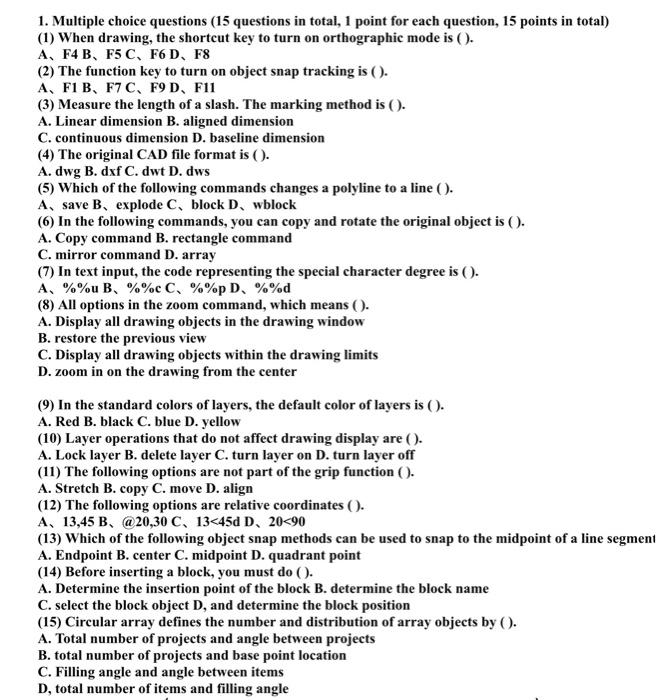
1. Multiple choice questions (15 questions in total, 1 point for each question, 15 points in total) (1) When drawing, the shortcut key to turn on orthographic mode is (). A, F4, F5C, F6D, F8 (2) The function key to turn on object snap tracking is (). A, F1 B, F7C, F9 D, F11 (3) Measure the length of a slash. The marking method is (). A. Linear dimension B. aligned dimension C. continuous dimension D. baseline dimension (4) The original CAD file format is (). A. dwg B. dxf C. dwt D. dws (5) Which of the following commands changes a polyline to a line (). A, save B, explode C, block D, wblock (6) In the following commands, you can copy and rotate the original object is (). A. Copy command B. rectangle command C. mirror command D. array (7) In text input, the code representing the special character degree is (). A, %%u B, %%c C, %%p D. %%d (8) All options in the zoom command, which means (). A. Display all drawing objects in the drawing window B. restore the previous view C. Display all drawing objects within the drawing limits D. zoom in on the drawing from the center (9) In the standard colors of layers, the default color of layers is (). A. Red B. black C. blue D. yellow (10) Layer operations that do not affect drawing display are(). A. Lock layer B. delete layer C. turn layer on D. turn layer off (11) The following options are not part of the grip function (). A. Stretch B. copy C. move D. align (12) The following options are relative coordinates (). A, 13,45 B, @20,30 C, 13
Step by Step Solution
There are 3 Steps involved in it

Get step-by-step solutions from verified subject matter experts
 Study Help