







Question: This is done in assembly for LC-3 Simulator. 6.1 Problem Statement Write a faster multiplication subroutine using the shift-and-add method. 6.1.1 Inputs The integers X
This is done in assembly for LC-3 Simulator.
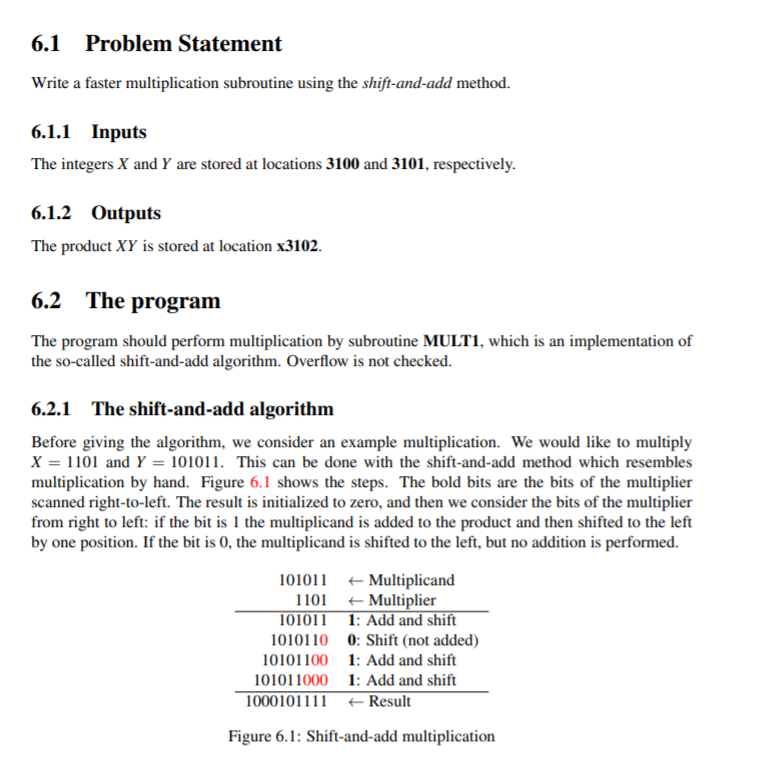
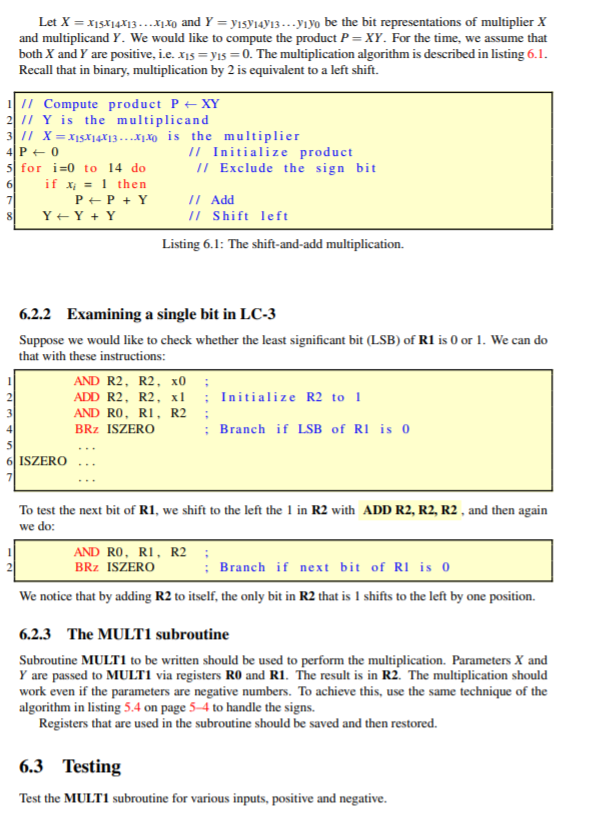
6.1 Problem Statement Write a faster multiplication subroutine using the shift-and-add method. 6.1.1 Inputs The integers X and Y are stored at locations 3100 and 3101, respectively. 6.1.2 Outputs The product XY is stored at location x3102. 6.2 The program The program should perform multiplication by subroutine MULT1, which is an implementation of the so-called shift-and-add algorithm. Overflow is not checked. 6.2.1 The shift-and-add algorithm Before giving the algorithm, we consider an example multiplication. We would like to multiply X = 1101 and Y = 101011. This can be done with the shift-and-add method which resembles multiplication by hand. Figure 6.1 shows the steps. The bold bits are the bits of the multiplier scanned right-to-left. The result is initialized to zero, and then we consider the bits of the multiplier from right to left: if the bit is 1 the multiplicand is added to the product and then shifted to the left by one position. If the bit is 0, the multiplicand is shifted to the left, but no addition is performed. 101011 Multiplicand 1101 + Multiplier 101011 1: Add and shift 1010110 0: Shift (not added) 101011001: Add and shift 1010110001: Add and shift 1000101111 + Result Figure 6.1: Shift-and-add multiplication Let X = x15x14x13....X1.0 and Y = y15y14713 ...Yyo be the bit representations of multiplier X and multiplicand Y. We would like to compute the product P = XY. For the time, we assume that both X and Y are positive, i.e. X15 = ys = 0. The multiplication algorithm is described in listing 6.1. Recall that in binary, multiplication by 2 is equivalent to a left shift. 11 11 Compute product P = XY 211 Y is the multiplicand 311 X = X15X14813 ...X1.0 is the multiplier 4P=0 11 Initialize product 5 for i=0 to 14 do 11 Exclude the sign bit 6 if x = 1 then 71 P+ P + Y 11 Add 81Y Y+Y 11 Shift left Listing 6.1: The shift-and-add multiplication. 6.2.2 Examining a single bit in LC-3 Suppose we would like to check whether the least significant bit (LSB) of R1 is 0 or 1. We can do that with these instructions: AND R2, R2, 0 ADD R2, R2, xl ; Initialize R2 to 1 AND RO, RI, R2; BRZ ISZERO Branch if LSB of Rl is 0 6 ISZERO ... To test the next bit of R1, we shift to the left the 1 in R2 with ADD R2, R2, R2, and then again we do: AND RO, RI, R2 BRZ ISZERO Branch if next bit of Rl is o We notice that by adding R2 to itself, the only bit in R2 that is I shifts to the left by one position. 6.2.3 The MULTI subroutine Subroutine MULT1 to be written should be used to perform the multiplication. Parameters X and Y are passed to MULTI via registers RO and R1. The result is in R2. The multiplication should work even if the parameters are negative numbers. To achieve this, use the same technique of the algorithm in listing 5.4 on page 5-4 to handle the signs. Registers that are used in the subroutine should be saved and then restored. 6.3 Testing Test the MULT1 subroutine for various inputs, positive and negative. 6.1 Problem Statement Write a faster multiplication subroutine using the shift-and-add method. 6.1.1 Inputs The integers X and Y are stored at locations 3100 and 3101, respectively. 6.1.2 Outputs The product XY is stored at location x3102. 6.2 The program The program should perform multiplication by subroutine MULT1, which is an implementation of the so-called shift-and-add algorithm. Overflow is not checked. 6.2.1 The shift-and-add algorithm Before giving the algorithm, we consider an example multiplication. We would like to multiply X = 1101 and Y = 101011. This can be done with the shift-and-add method which resembles multiplication by hand. Figure 6.1 shows the steps. The bold bits are the bits of the multiplier scanned right-to-left. The result is initialized to zero, and then we consider the bits of the multiplier from right to left: if the bit is 1 the multiplicand is added to the product and then shifted to the left by one position. If the bit is 0, the multiplicand is shifted to the left, but no addition is performed. 101011 Multiplicand 1101 + Multiplier 101011 1: Add and shift 1010110 0: Shift (not added) 101011001: Add and shift 1010110001: Add and shift 1000101111 + Result Figure 6.1: Shift-and-add multiplication Let X = x15x14x13....X1.0 and Y = y15y14713 ...Yyo be the bit representations of multiplier X and multiplicand Y. We would like to compute the product P = XY. For the time, we assume that both X and Y are positive, i.e. X15 = ys = 0. The multiplication algorithm is described in listing 6.1. Recall that in binary, multiplication by 2 is equivalent to a left shift. 11 11 Compute product P = XY 211 Y is the multiplicand 311 X = X15X14813 ...X1.0 is the multiplier 4P=0 11 Initialize product 5 for i=0 to 14 do 11 Exclude the sign bit 6 if x = 1 then 71 P+ P + Y 11 Add 81Y Y+Y 11 Shift left Listing 6.1: The shift-and-add multiplication. 6.2.2 Examining a single bit in LC-3 Suppose we would like to check whether the least significant bit (LSB) of R1 is 0 or 1. We can do that with these instructions: AND R2, R2, 0 ADD R2, R2, xl ; Initialize R2 to 1 AND RO, RI, R2; BRZ ISZERO Branch if LSB of Rl is 0 6 ISZERO ... To test the next bit of R1, we shift to the left the 1 in R2 with ADD R2, R2, R2, and then again we do: AND RO, RI, R2 BRZ ISZERO Branch if next bit of Rl is o We notice that by adding R2 to itself, the only bit in R2 that is I shifts to the left by one position. 6.2.3 The MULTI subroutine Subroutine MULT1 to be written should be used to perform the multiplication. Parameters X and Y are passed to MULTI via registers RO and R1. The result is in R2. The multiplication should work even if the parameters are negative numbers. To achieve this, use the same technique of the algorithm in listing 5.4 on page 5-4 to handle the signs. Registers that are used in the subroutine should be saved and then restored. 6.3 Testing Test the MULT1 subroutine for various inputs, positive and negative
Step by Step Solution
There are 3 Steps involved in it

Get step-by-step solutions from verified subject matter experts
 Study Help