







Question: this is done on Linux Exercise #2: Creating a partition Add a new virtual hard drive in your Ubuntu virtual machine as demonstrated in the
this is done on Linux
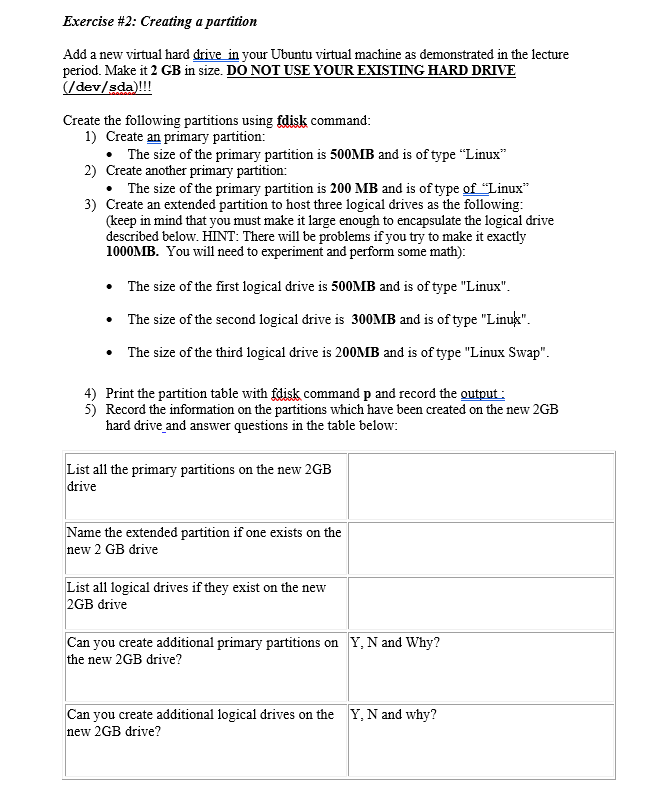
Exercise #2: Creating a partition Add a new virtual hard drive in your Ubuntu virtual machine as demonstrated in the lecture period. Make it 2 GB in size. DO NOT USE YOUR EXISTING HARD DRIVE dev/sda)!!! Create the following partitions using fdisk command 1) Create an primary partition: The size of the primary partition is 500MB and is of type "Linux Create another primary partition: . 2) The size of the primary partition is 200 MB and is of type of "Linux Create an extended partition to host three logical drives as the following (keep in mind that you must make it large enough to encapsulate the logical drive described below. HINT: There will be problems if you try to make it exactly 1000MB. You will need to experiment and perform some math) . 3) . The size of the first logical drive is 500MB and is of type "Linux" * The size of the second logical drive is 300MB and is of type "Linux * The size of the third logical drive is 200MB and is of type "Linux Swap" 4) 5) Print the partition table with fdisk command p and record the output Record the information on the partitions which have been created on the new 2GB hard drive and answer questions in the table below: List all the primary partitions on the new 2GB drive ame the extended partition if one exists on the new 2 GB drive List all logical drives if they exist on the new GB drive Can you create additional primary partitions on Y, N and Why? the new 2GB drive? Can you create additional logical drives on the new 2GB drive? Y,N and why? Exercise #2: Creating a partition Add a new virtual hard drive in your Ubuntu virtual machine as demonstrated in the lecture period. Make it 2 GB in size. DO NOT USE YOUR EXISTING HARD DRIVE dev/sda)!!! Create the following partitions using fdisk command 1) Create an primary partition: The size of the primary partition is 500MB and is of type "Linux Create another primary partition: . 2) The size of the primary partition is 200 MB and is of type of "Linux Create an extended partition to host three logical drives as the following (keep in mind that you must make it large enough to encapsulate the logical drive described below. HINT: There will be problems if you try to make it exactly 1000MB. You will need to experiment and perform some math) . 3) . The size of the first logical drive is 500MB and is of type "Linux" * The size of the second logical drive is 300MB and is of type "Linux * The size of the third logical drive is 200MB and is of type "Linux Swap" 4) 5) Print the partition table with fdisk command p and record the output Record the information on the partitions which have been created on the new 2GB hard drive and answer questions in the table below: List all the primary partitions on the new 2GB drive ame the extended partition if one exists on the new 2 GB drive List all logical drives if they exist on the new GB drive Can you create additional primary partitions on Y, N and Why? the new 2GB drive? Can you create additional logical drives on the new 2GB drive? Y,N and why
Step by Step Solution
There are 3 Steps involved in it

Get step-by-step solutions from verified subject matter experts
 Study Help