







Question: This is for C# using microsoft visual studio. Please copy and paste the working code below CHAPTER 14 Files and Streamis Exercises Programming Exercises 692
This is for C# using microsoft visual studio. Please copy and paste the working code below
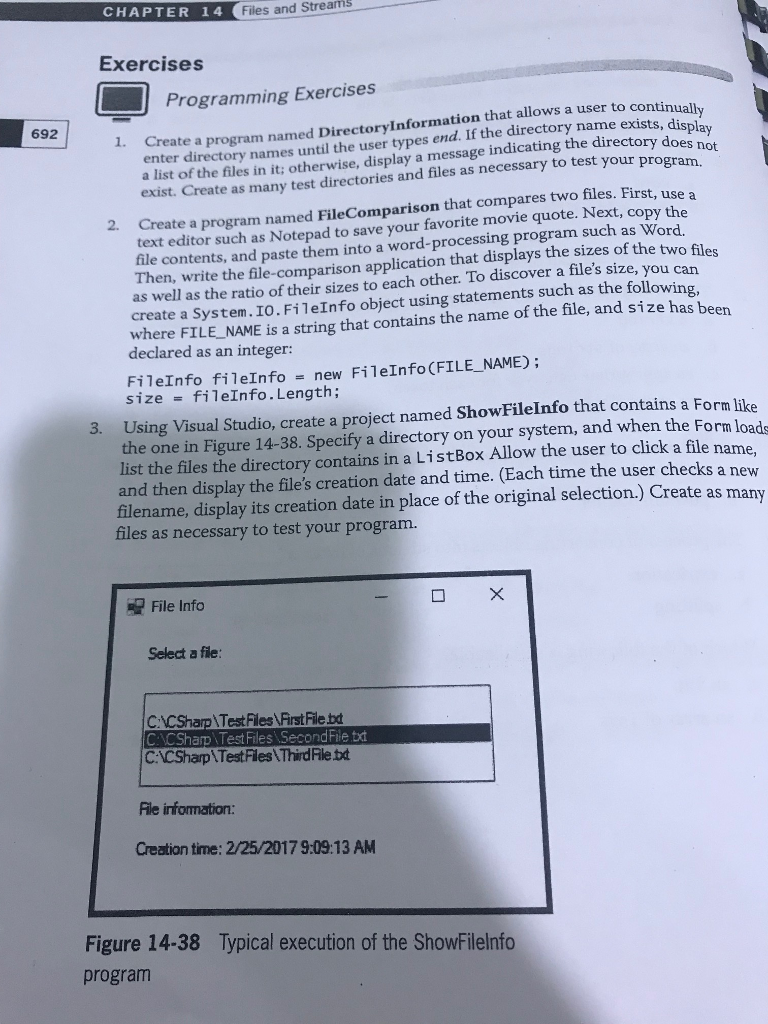
CHAPTER 14 Files and Streamis Exercises Programming Exercises 692 1. Create a program named Directorylnformation that allows a user to contin does not enter directory names until the user types end. If the directory name exists, a list of the files in it: otherwise, display a message indicating the directoryo your program. exist. Create as many test directories and files as necessary to test 2. Crea te a program named FileComparison that compares two files. First, use a text editor such as Notepad to save your favorite movie quote. Next, copy the a word-processing program such as Word file contents, and paste them into Then, as well as the ratio of their sizes to each other. To discover a file's size, create a System. IO.Fi1eInfo object using statements such as the following, where FILE_NAME is a string that contains the name of the file, and size has been declared as an integer: write the file-comparison application that displays the sizes of the two fil ou can FileInfo fileInfonew FileInfo (FILE_NAME); size = fileInfo. Length; 3. Using Visual Studio, create a project named ShowFilelnfo that contains a Form like the one in Figure 14-38. Specify a directory on your system, and when the Form load list the files the directory contains in a ListBox Allow the user to click a file name. and then display the file's creation date and time. (Each time the user checks a new filename, display its creation date in place of the original selection.) Create as m files as necessary to test your program. File Info Select a fle: CACSharp\ TestFiles First Flebd CACSharp TestFiles SecondFile txt C:CSharp\Test Files ThirdFilebd File infommation: Creation time: 2/25/20179:09:13 AM Figure 14-38 Typical execution of the ShowFilelnfo program CHAPTER 14 Files and Streamis Exercises Programming Exercises 692 1. Create a program named Directorylnformation that allows a user to contin does not enter directory names until the user types end. If the directory name exists, a list of the files in it: otherwise, display a message indicating the directoryo your program. exist. Create as many test directories and files as necessary to test 2. Crea te a program named FileComparison that compares two files. First, use a text editor such as Notepad to save your favorite movie quote. Next, copy the a word-processing program such as Word file contents, and paste them into Then, as well as the ratio of their sizes to each other. To discover a file's size, create a System. IO.Fi1eInfo object using statements such as the following, where FILE_NAME is a string that contains the name of the file, and size has been declared as an integer: write the file-comparison application that displays the sizes of the two fil ou can FileInfo fileInfonew FileInfo (FILE_NAME); size = fileInfo. Length; 3. Using Visual Studio, create a project named ShowFilelnfo that contains a Form like the one in Figure 14-38. Specify a directory on your system, and when the Form load list the files the directory contains in a ListBox Allow the user to click a file name. and then display the file's creation date and time. (Each time the user checks a new filename, display its creation date in place of the original selection.) Create as m files as necessary to test your program. File Info Select a fle: CACSharp\ TestFiles First Flebd CACSharp TestFiles SecondFile txt C:CSharp\Test Files ThirdFilebd File infommation: Creation time: 2/25/20179:09:13 AM Figure 14-38 Typical execution of the ShowFilelnfo program
Step by Step Solution
There are 3 Steps involved in it

Get step-by-step solutions from verified subject matter experts
 Study Help