







Question: * * This is for Matlab * * . This is what I have so far, but changing the values using indexing isn't working so
This is for Matlab This is what I have so far, but changing the values using indexing isn't working so Im not sure what Im doing wrong:
clear clear previously defined variables from environment
clc clear command window
BOARD DIAGRAMS
boardStart
page boardStart
page page
page page
page page
page page
page page
fullGame catpage page page page page page;
These are the directions:
Imagine you observed a very short chess match between two players. Your script will diagram what the board looked like after each move and will analyze the amount of time each player took for each move.
Start the script with opening comments that briefly describe what the program does and give your name and the date. These comments should include the coding scheme that well use for pieces on the chessboard: white pawn white rook white knight white bishop white queen white king corresponding negative numbers for the black pieces black pawn black rook etc. and empty square
After the opening comments, clear any previously defined variables from memory.
Also clear the command window.
Divide the remainder of the program into two major sections: BOARD DIAGRAMS and ANALYSIS. Each section should have a prominent heading. For example: BOARD DIAGRAMS
IN THE "BOARD DIAGRAMS" SECTION OF YOUR SCRIPT:
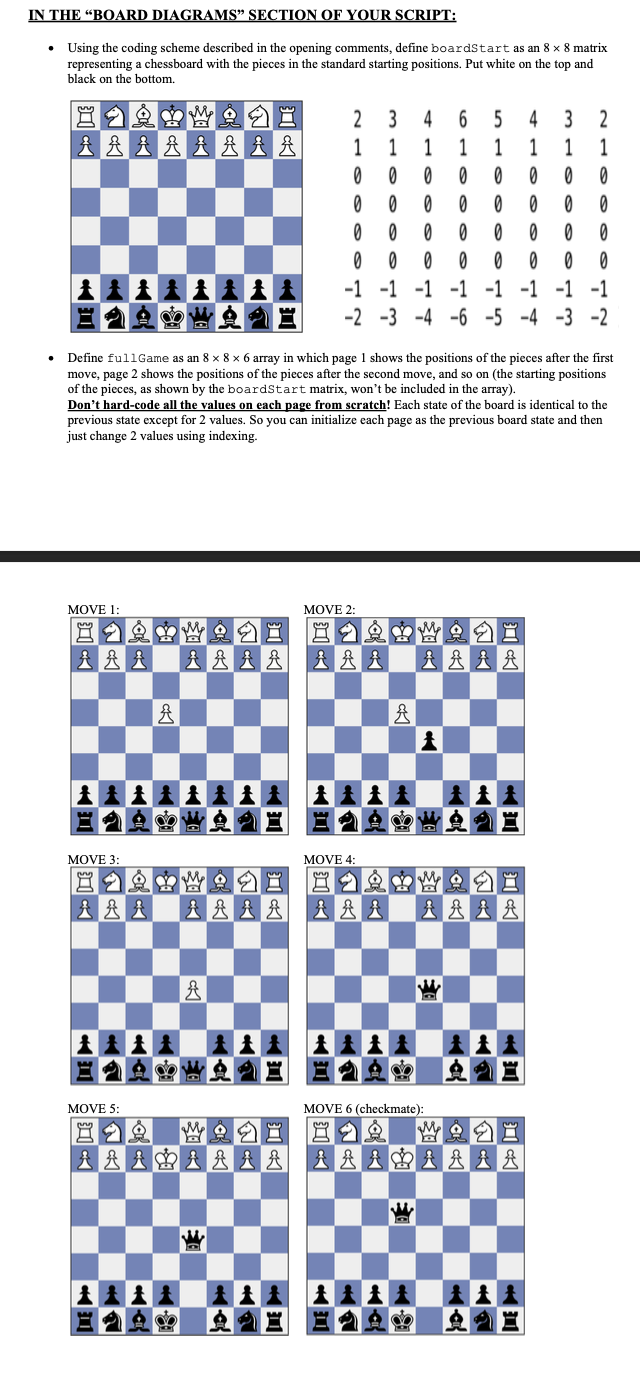
Using the coding scheme described in the opening comments, define boardStart as an matrix representing a chessboard with the pieces in the standard starting positions. Put white on the top and black on the bottom.
Define fullGame as an array in which page shows the positions of the pieces after the first move, page shows the positions of the pieces after the second move, and so on the starting positions of the pieces, as shown by the boardStart matrix, won't be included in the array
Don't hardcode all the values on each page from scratch! Each state of the board is identical to the previous state except for values. So you can initialize each page as the previous board state and then just change values using indexing.
Step by Step Solution
There are 3 Steps involved in it
1 Expert Approved Answer
Step: 1 Unlock

Question Has Been Solved by an Expert!
Get step-by-step solutions from verified subject matter experts
Step: 2 Unlock
Step: 3 Unlock
 Study Help