







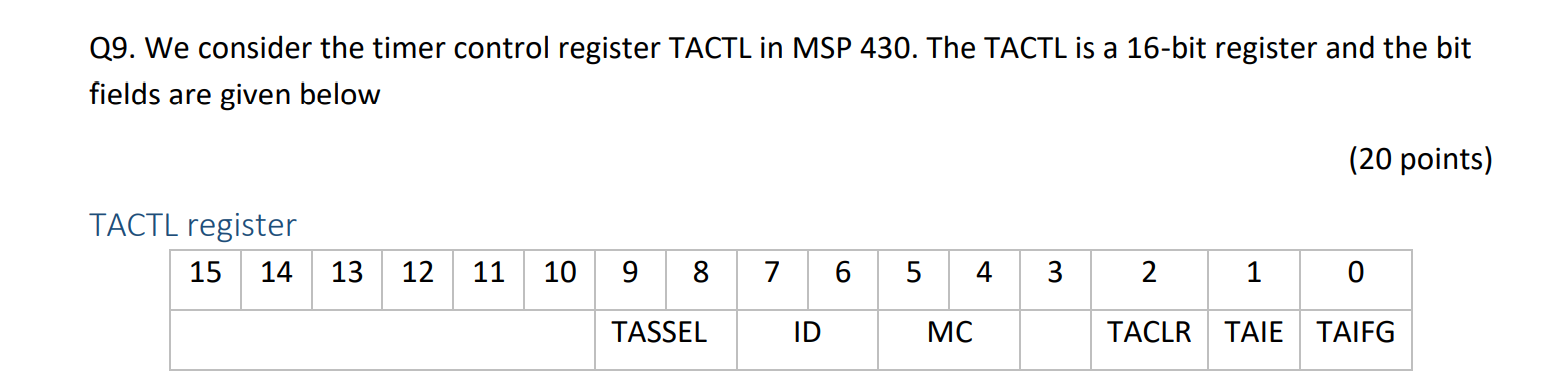
Question: this is for MSP430FR6989 Q9. We consider the timer control register TACTL in MSP 430. The TACTL is a 16-bit register and the bit fields
 this is for MSP430FR6989
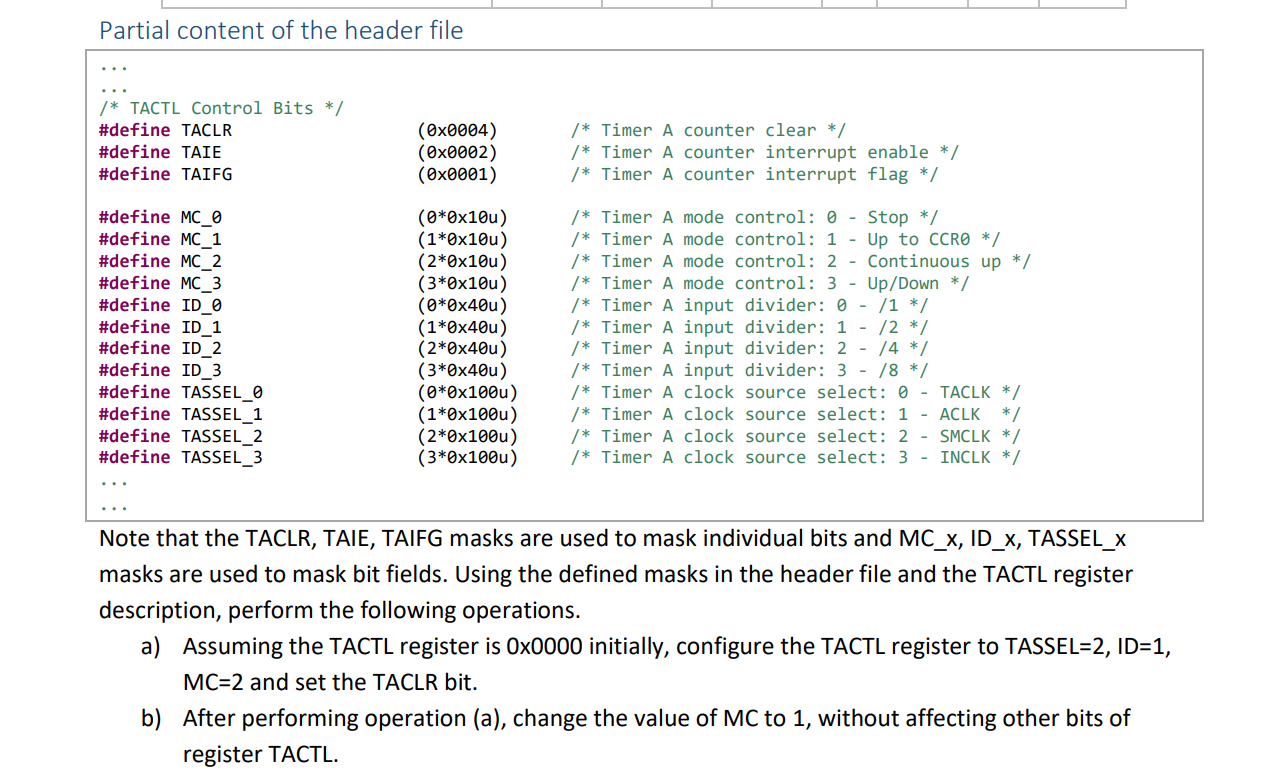
Q9. We consider the timer control register TACTL in MSP 430. The TACTL is a 16-bit register and the bit fields are given below (20 points) TACTL register 15 14 13 12 11 10 9 8 7 6 5 4 3 3 2 1 0 TASSEL ID MC TACLR TAIE TAIFG Partial content of the header file /* TACTL Control Bits */ #define TACLR #define TAIE #define TAIFG (OX0004) (0x0002) (0x0001) /* Timer A counter clear */ /* Timer A counter interrupt enable */ /* Timer A counter interrupt flag */ #define MC_0 #define MC_1 #define MC_2 #define MC_3 #define ID_ #define ID_1 #define ID_2 #define ID_3 #define TASSEL_0 #define TASSEL_1 #define TASSEL_2 #define TASSEL_3 (0*0x10u) (1*0x10u) (2*0x10u) (3*0x10u) (0*0x40u) (1*0x40u) (2*0x40u) (3*0x40u) (0*0x100u) (1*0x100u) (2*0x100u) (3*0x1000) /* Timer A mode control: 0 Stop */ /* Timer A mode control: 1 - Up to CCRO */ /* Timer A mode control: 2 - Continuous up */ /* Timer A mode control: 3 - Up/Down */ /* Timer A input divider: 0 - /1 */ /* Timer A input divider: 1 - /2 */ /* Timer A input divider: 2 - /4 */ /* Timer A input divider: 3 - /8 */ /* Timer A clock source select: 0 - TACLK */ /* Timer A clock source select: 1 - ACLK */ /* Timer A clock source select: 2 - SMCLK */ /* Timer A clock source select: 3 - INCLK */ Note that the TACLR, TAIE, TAIFG masks are used to mask individual bits and MC_x, ID_X, TASSEL_X masks are used to mask bit fields. Using the defined masks in the header file and the TACTL register description, perform the following operations. a) Assuming the TACTL register is 0x0000 initially, configure the TACTL register to TASSEL=2, ID=1, MC=2 and set the TACLR bit. b) After performing operation (a), change the value of MC to 1, without affecting other bits of register TACTL
Step by Step Solution
There are 3 Steps involved in it

Get step-by-step solutions from verified subject matter experts
 Study Help