







Question: This is for Operating Systems using Ubuntu, Help Please! Perform the steps in the order listed. 1. Create a folder on your home directory fileAct_yourFirstName.
 This is for Operating Systems using Ubuntu, Help Please!
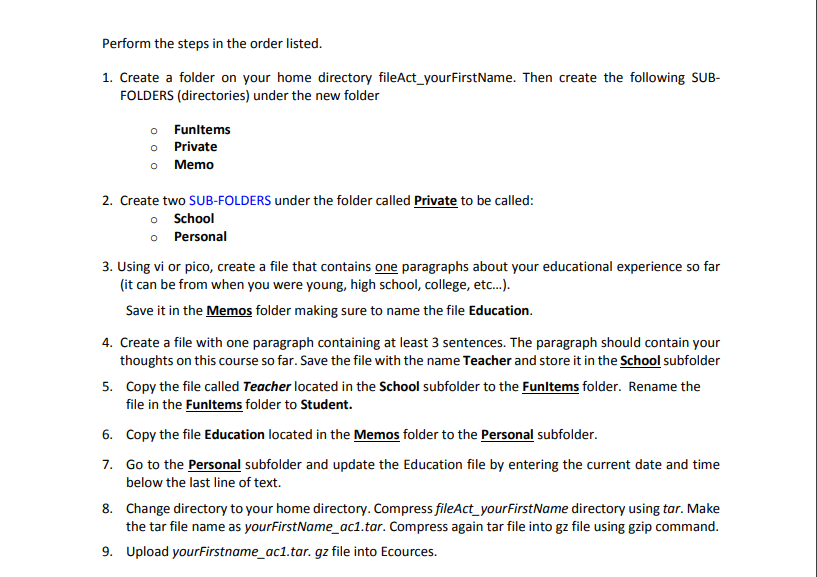
Perform the steps in the order listed. 1. Create a folder on your home directory fileAct_yourFirstName. Then create the following SUB- FOLDERS (directories) under the new folder o Funltems o Private o Memo 2. Create two SUB-FOLDERS under the folder called Private to be called: o School o Personal 3. Using vi or pico, create a file that contains one paragraphs about your educational experience so far it can be from when you were young, high school, college, etc...). Save it in the Memos folder making sure to name the file Education. thoughts on this course so far. Save the file with the name Teacher and store it in the School subfolder file in the Funltems folder to Student. 4. Create a file with one paragraph containing at least 3 sentences. The paragraph should contain your 5 Copy the file called Teacher located in the School subfolder to the Funltems folder. Rename the 6. Copy the file Education located in the Memos folder to the Personal subfolder. 7. Go to the Personal subfolder and update the Education file by entering the current date and time 8. Change directory to your home directory. Compress fileAct_yourFirstName directory using tar. Make 9. Upload yourFirstname_ac1.tar. gz file into Ecources. below the last line of text. the tar file name as yourFirstName_aci.tar. Compress again tar file into gz file using gzip command. Perform the steps in the order listed. 1. Create a folder on your home directory fileAct_yourFirstName. Then create the following SUB- FOLDERS (directories) under the new folder o Funltems o Private o Memo 2. Create two SUB-FOLDERS under the folder called Private to be called: o School o Personal 3. Using vi or pico, create a file that contains one paragraphs about your educational experience so far it can be from when you were young, high school, college, etc...). Save it in the Memos folder making sure to name the file Education. thoughts on this course so far. Save the file with the name Teacher and store it in the School subfolder file in the Funltems folder to Student. 4. Create a file with one paragraph containing at least 3 sentences. The paragraph should contain your 5 Copy the file called Teacher located in the School subfolder to the Funltems folder. Rename the 6. Copy the file Education located in the Memos folder to the Personal subfolder. 7. Go to the Personal subfolder and update the Education file by entering the current date and time 8. Change directory to your home directory. Compress fileAct_yourFirstName directory using tar. Make 9. Upload yourFirstname_ac1.tar. gz file into Ecources. below the last line of text. the tar file name as yourFirstName_aci.tar. Compress again tar file into gz file using gzip command
Step by Step Solution
There are 3 Steps involved in it

Get step-by-step solutions from verified subject matter experts
 Study Help