





Question: This is for programming with the java language. Please follow the instructions below. I have included the Node constructor program needed for the search program
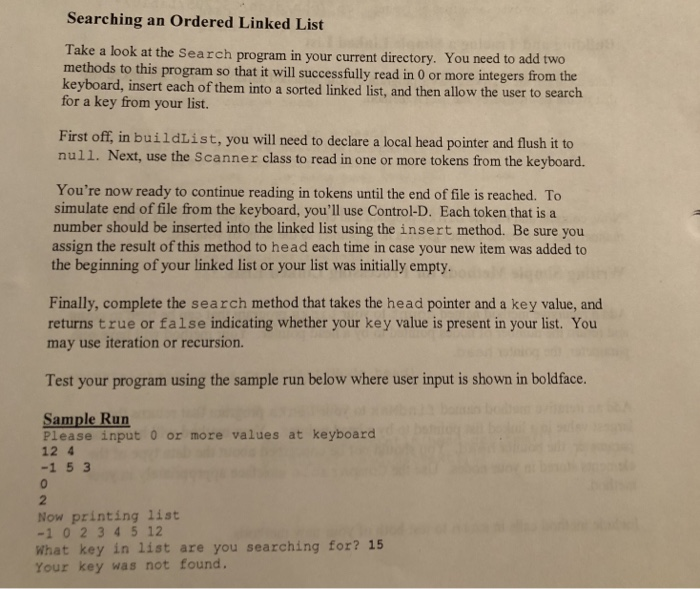
This is for programming with the java language. Please follow the instructions below. I have included the Node constructor program needed for the search program which I have also provided. Use given programs for this assignment please. Thank you for your help  This is for programming with the java language. Please follow the
//below is the Node constructor program needed for the search program.
//below is the search.java program provided by the professor, need to follow assignment and add what it wants.
//////////////////////////////////////////////////////////////////////
//Node.java constructor program
public class Node {
private Object item;
private Node next;
public Node(Object newItem) {
item = newItem;
next = null;
} // end constructor
public Node(Object newItem, Node nextNode) {
item = newItem;
next = nextNode;
} // end constructor
public void setItem(Object newItem) {
item = newItem;
} // end setItem
public Object getItem() {
return item;
} // end getItem
public void setNext(Node nextNode) {
next = nextNode;
} // end setNext
public Node getNext() {
return next;
} // end getNext
} // end class Node
///////////////////////////////////////////
//Search.java program
import java.io.*;
import java.util.*;
public class Search {
public static void main(String argv[]) throws IOException {
Scanner stdin = new Scanner(System.in);
System.out.println("Please input 0 or more values at keyboard");
Node head = buildList();
System.out.println("Now printing list");
printList(head);
System.out.println(" What key in list are you searching for? ");
int key = stdin.nextInt();
System.out.print("Your key was ");
if (search(head, key))
System.out.println("found.");
else
System.out.println("not found.");
}
private static void printList(Node head)
{
if (head != null)
{
System.out.print(head.getItem() + " ");
printList(head.getNext());
}
}
private static Node buildList() throws IOException
{
Scanner in = new Scanner(System.in);
Node head;
if(in.hasNext())
{
head = new Node(new Integer(in.nextInt()),null);
}
else
{
head = new Node(null,null);
return head;
}
while(in.hasNext())
head = insert(head,new Integer(in.nextInt()));
return head;
}
private static Node insert(Node head, Comparable newValue)
{
Node prev, curr = head;
for (prev = null, curr = head;
curr != null && newValue.compareTo(curr.getItem()) > 0;
prev = curr, curr = curr.getNext() ) {}
Node newNode = new Node(newValue, curr);
if (prev != null)
{
prev.setNext(newNode);
return head;
}
else
return newNode;
}
private static boolean search(Node head, Comparable key)
{
// PRE: head points to the front of linked list; list may be
// empty or non-empty; key is item searching for
// POST: returns true or false regarding whether key is found in
// list
}
}

Searching an Ordered Linked List Take a look at the Search program in your current directory. You need to add two ods to this program so that it will successfully read in 0 or more integers from the keyboard, insert each of them into a sorted linked list, and then allow the user to search for a key from your list. First off, in buildList, you will need to declare a local head pointer and flush it to null. Next, use the Scanner class to read in one or more tokens from the keyboard. You're now ready to continue reading in tokens until the end of file is reached. To simulate end of file from the keyboard, you'll use Control-D. Each token that is a number should be inserted into the linked list using the insert method. Be sure you assign the result of this method to head each time in case your new item was added to the beginning of your linked list or your list was initially empty. Finally, complete the search method that takes the head pointer and a key value, and returns true or false indicating whether your key value is present in your list. You may use iteration or recursion. Test your program using the sample run below where user input is shown in boldface. Sample Run Please input o or more values at keyboard 12 4 -1 5 3 Now printing list -1 0 2 34 5 12 What key in list are you searching for? 15 Your key was not found

Step by Step Solution

There are 3 Steps involved in it

1 Expert Approved Answer
Step: 1 Unlock blur-text-image
Question Has Been Solved by an Expert!

Get step-by-step solutions from verified subject matter experts

Step: 2 Unlock
Step: 3 Unlock

Students Have Also Explored These Related Databases Questions!