







Question: This is from my Computer Networks and Data Communication Class: Please Provide me all the details as it asks in the assignment (If you fail
This is from my Computer Networks and Data Communication Class:
Please Provide me all the details as it asks in the assignment (If you fail to provide details i will loose massive points)
I want everything that is ask.
PLEASE GIVE ME EVERYTHING AS IT ASKS. (i have provided everything from my end, if you need anything else let me know)
Below is the assignment guidelines on how i want
------------------------------
below is the .py files
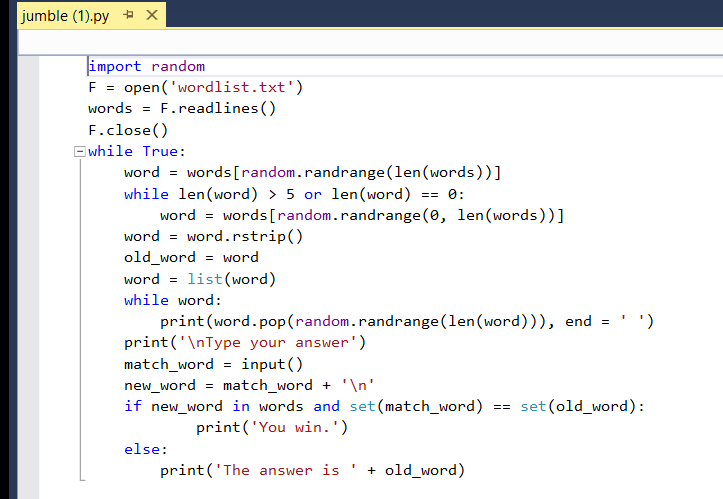
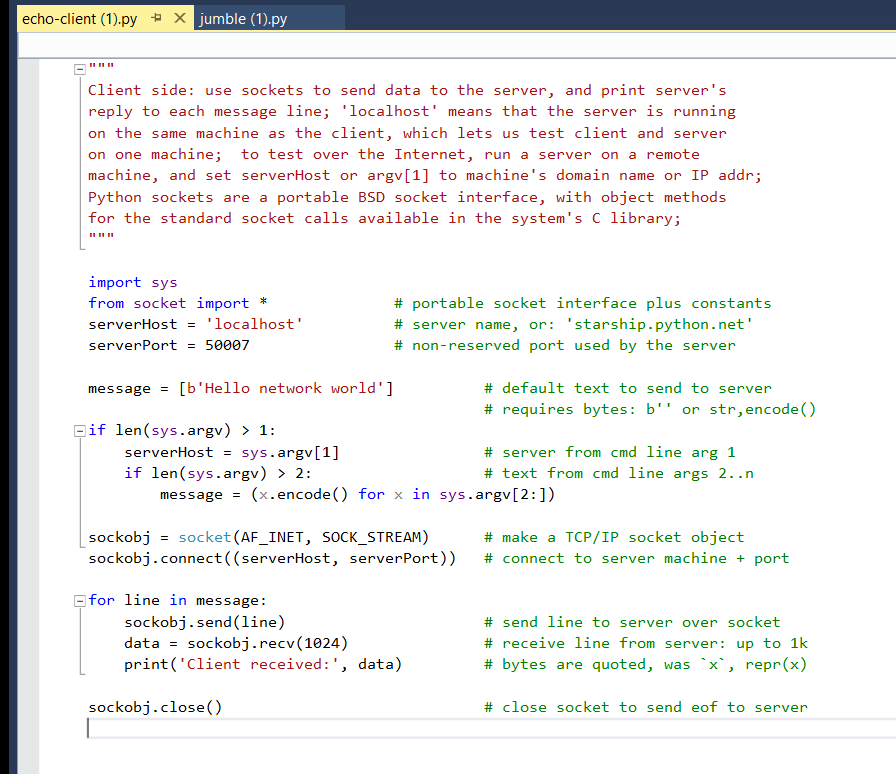
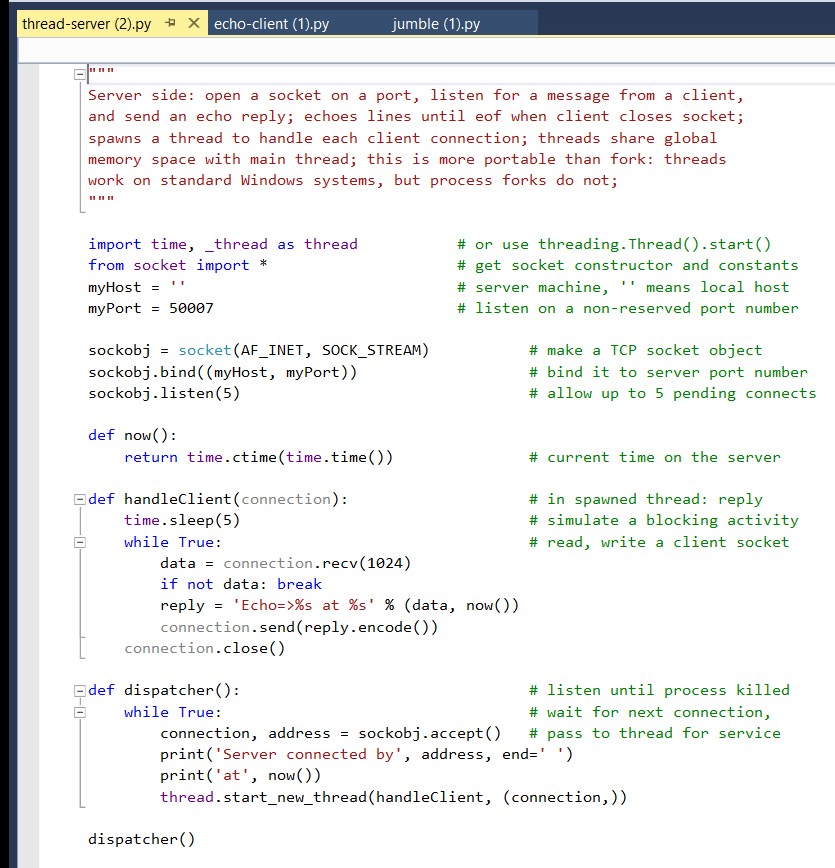
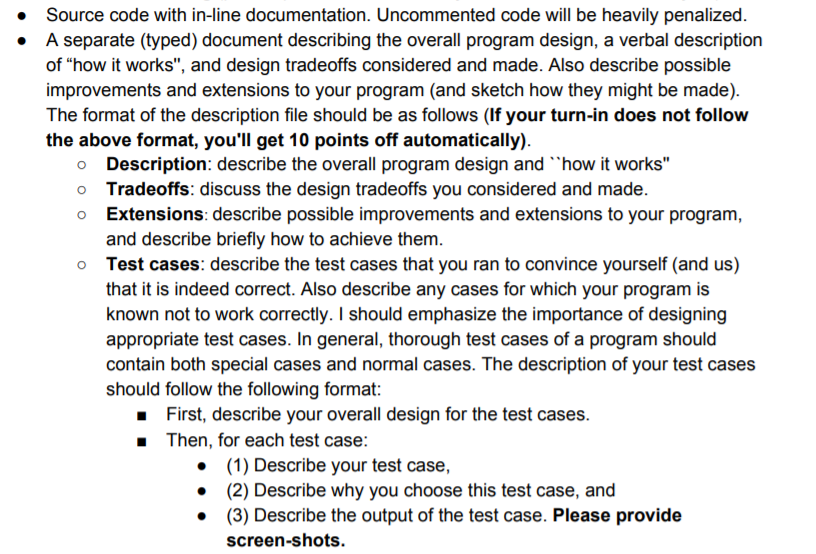
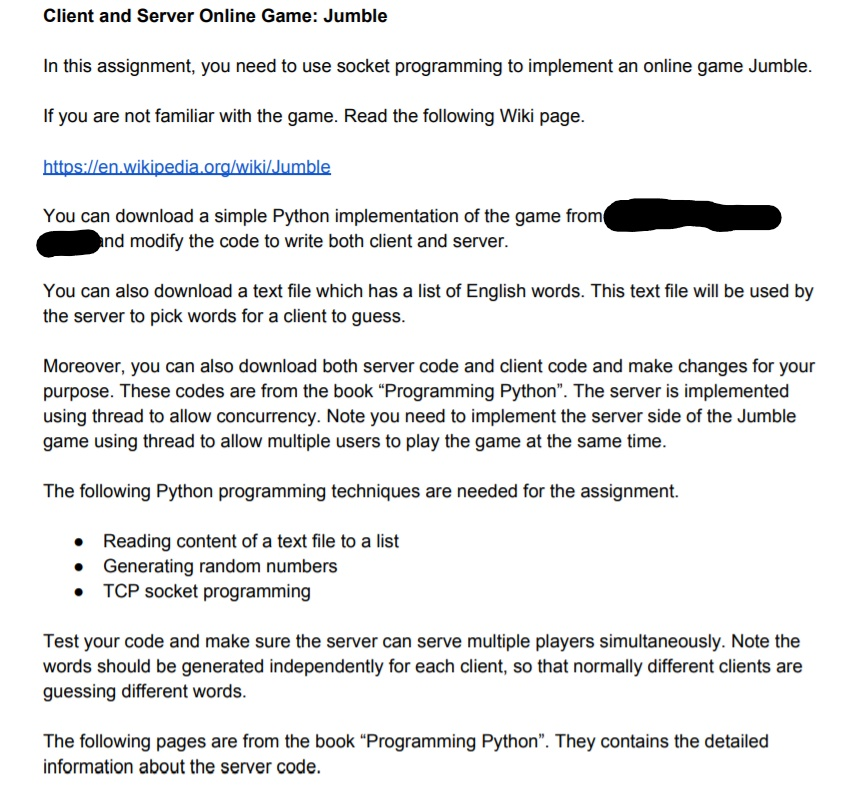
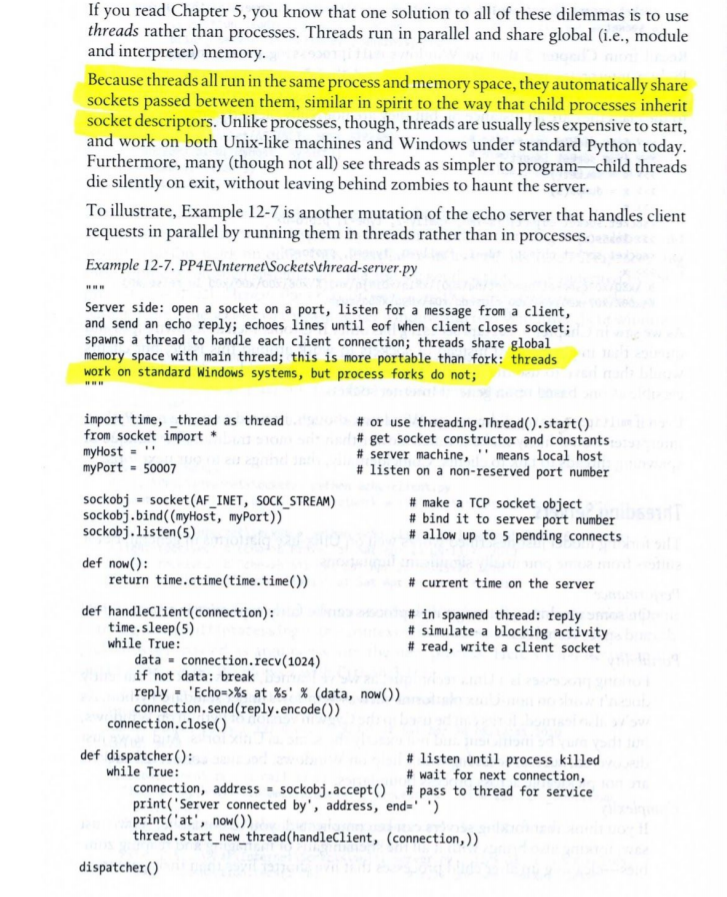
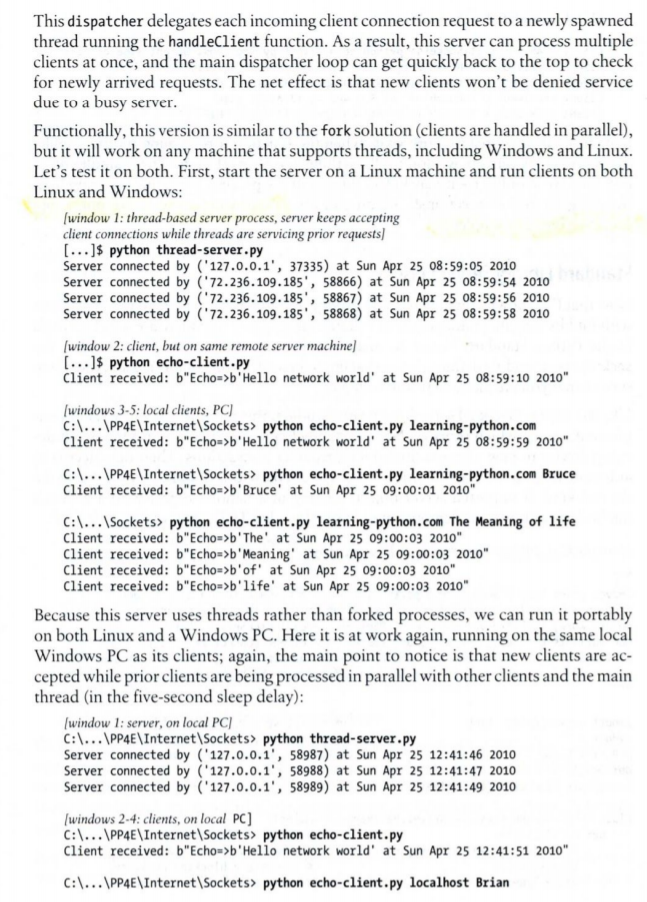
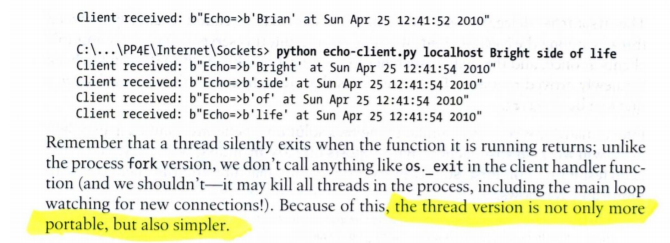
Source code with in-line documentation. Uncommented code will be heavily penalized A separate (typed) document describing the overall program design, a verbal description of "how it works", and design tradeoffs considered and made. Also describe possible improvements and extensions to your program (and sketch how they might be made) The format of the description file should be as follows (If your turn-in does not follow the above format, you'll get 10 points off automatically) o Description: describe the overall program design and how it works" o Tradeoffs: discuss the design tradeoffs you considered and made o Extensions: describe possible improvements and extensions to your program, and describe briefly how to achieve them Test cases: describe the test cases that you ran to convince yourself (and us) that it is indeed correct. Also describe any cases for which your program is known not to work correctly. I should emphasize the importance of designing appropriate test cases. In general, thorough test cases of a program should contain both special cases and normal cases. The description of your test cases should follow the following format o First, describe your overall design for the test cases Then, for each test case (1) Describe your test case, (2) Describe why you choose this test case, and (3) Describe the output of the test case. Please provide screen-shots. . Client and Server Online Game: Jumble In this assignment, you need to use socket programming to implement an online game Jumble. If you are not familiar with the game. Read the following Wiki page. httos:/len.wikipedia ora/wikiJumble You can download a simple Python implementation of the game from nd modify the code to write both client and server. You can also download a text file which has a list of English words. This text file will be used by the server to pick words for a client to guess. Moreover, you can also download both server code and client code and make changes for your purpose. These codes are from the book "Programming Python". The server is implemented using thread to allow concurrency. Note you need to implement the server side of the Jumble game using thread to allow multiple users to play the game at the same time. The following Python programming techniques are needed for the assignment. Reading content of a text file to a list Generating random numbers TCP socket programming . . Test your code and make sure the server can serve multiple players simultaneously. Note the words should be generated independently for each client, so that normally different clients are guessing different words. The following pages are from the book "Programming Python". They contains the detailed information about the server code. If you read Chapter 5, you know that one solution to all of these dilemmas is to use threads rather than processes. Threads run in parallel and share global (i.e., module and interpreter) memory. ecause threads all run in the same process and memory space, they automatically share sockets passed between them, similar in spirit to the way that child processes inherit socket descriptors. Unlike processes, though, threads are usually less expensive to start, and work on both Unix-like machines and Windows under standard Python today Furthermore, many (though not all) see threads as simpler to program- child threads die silently on exit, without leaving behind zombies to haunt the server. To illustrate, Example 12-7 is another mutation of the echo server that handles client requests in parallel by running them in threads rather than in processes. Example 12-7. PP4EnternetSockets' thread-server-py Server side: open a socket on a port, listen for a message from a client and send an echo reply; echoes lines until eof when client closes socket spawns a thread to handle each client connection; threads share global memory space with main thread; this is more portable than fork: threads work on standard Windows systems, but process forks do not; import time, thread as thread from socket import myHost'" myPort 5000 # or use threading. Thread(), start() # get socket constructor and constants # server machine,'' means local host # listen on a non-reserved port number sockobj socket (AF_INET, SoCK STREAM) sockobj.bind((myHost, myPort)) sockobj.listen(5) # make a TCP socket object # bind it to server port number # allow up to 5 pending connects def now(): return time.ctime(time.time()) # current time on the server def handleClient(connection): time.sleep (5) while True: # in spawned thread: reply # simulate a blocking activity # read, write a client socket data - connection.recv (1024) if not data: break reply-Echo->%s at %s' % (data, now()) connection.send (reply.encode()) connection.close() def dispatcher(): # listen until process killed # wait for next connection, while True: connection, address . sockobj"accept() # pass to thread for service print ( Server connected by', address, end-'') print (at', now)) thread.start new thread(handleclient, (connection,)) dispatcher() This dispatcher delegates each incoming client connection request to a newly spawned thread running the handleClient function. As a result, this server can process multiple clients at once, and the main dispatcher loop can get quickly back to the top to check for newly arrived requests. The net effect is that new clients won't be denied service due to a busy server Functionally, this version is similar to the fork solution (clients are handled in parallel), but it will work on any machine that supports threads, including Windows and Linux Let's test it on both. First, start the server on a Linux machine and run clients on both Linux and Windows: window 1: thread-based server process, server keeps accepting client connections while threads are servicing prior requests $ python thread-server.py Server connected by '127.0.0.1', 37335) at Sun Apr 25 08:59:05 2010 Server connected by ("72.236.109.185', 58866) at Sun Apr 25 08:59:54 2010 Server connected by 72.236.109.185', 58867) at Sun Apr 25 08:59:56 2010 Server connected by 72.236.109.185', 58868) at Sun Apr 25 08:59:58 2010 window 2: client, but on same remote server machinel [...]$ python echo-client.py Client received: b"Echo>b'Hello network world' at Sun Apr 25 08:59:10 2010" windows 3-5: local clients, PC) C:.PP4E\InternetSockets> python echo-client.py learning-python.com Client received: b"Echo>b'Hello network world' at Sun Apr 25 08:59:59 2010" C:..PP4EInternet\Sockets> python echo-client.py learning-python.com Bruce Client received: b"Echo >b'Bruce at Sun Apr 25 09:00:01 2010" C:Sockets> python echo-client.py learning-python.com The Meaning of life Client received: b"Echo >b'The' at Sun Apr 25 09:00:03 2010" Client received: b"Echo >b'Meaning' at Sun Apr 25 09:00:03 2010 Client received: b"Echo >b'of' at Sun Apr 25 09:00:03 2010 Client received: b"Echo >b'life' at Sun Apr 25 09:00:03 2010 Because this server uses threads rather than forked processes, we can run it portably on both Linux and a Windows PC. Here it is at work again, running on the same local Windows PC as its clients; again, the main point to notice is that new clients are ac- cepted while prior clients are being processed in parallel with other clients and the main thread (in the five-second sleep delay) window 1: server, on local PC C:..PP4E\InternetSockets> python thread-server.py Server connected by 127.0.0.1, 58987) at Sun Apr 25 12:41:46 2010 Server connected by 127.0.0.1, 58988) at Sun Apr 25 12:41:47 2010 Server connected by 127.0.0.1', 58989) at Sun Apr 25 12:41:49 2010 windows 2-4: clients, on local PC C:1...PP4E\InternetSockets> python echo-client.py Client received: b"Echo >b'Hello network world' at Sun Apr 25 12:41:51 2010" C:...PP4E\Internet Sockets> python echo-client.py localhost Brian Client received: b"Echo->b'Brian' at Sun Apr 25 12:41:52 2010 C:\...IPP4E\InternetISockets python echo-client.py localhost Bright side of life Client received: b"Echo->b'Bright' at Sun Apr 25 12:41:54 2010" Client received: b"Echo >b'side' at Sun Apr 25 12:41:54 2010" Client received: b"Echo >b'ofat Sun Apr 25 12:41:54 2010" Client received: b"Echo->b'life'at Sun Apr 25 12:41:54 2010" Remember that a thread silently exits when the function it is running returns; unlike the process fork version, we don't call anything like os._exit in the client handler func- tion (and we shouldn't-it may kill all threads in the process, including the main loop watching for new connections!). Because of this, the thread version is not only more portable, but also simpler. jumble (1).py X import random Fopen ('wordlist.txt') words - F.readlines() F.close() Ewhile True: word = words[random.randrange (1en (words))] while len (word) > 5 or len (word) 0: word- words [random.randrange (, len (words))] word -word.rstrip() old wordword word - list(word) while word: print (word.pop (random.randrange(len (word))), end'') print('InType your answer') match-word input ( ) new wordmatch word'n if new word in words and set (match word) == set (old word print('You win.') else print('The answer is 'old_word) echo-client (1).pyH X jumble (1).py Client side: use sockets to send data to the server, and print server's reply to each message line; 'localhost' means that the server is running on the same machine as the client, which lets us test client and server on one machine; to test over the Internet, run a server on a remote machine, and set serverHost or argv[1] to machine's domain name or IP addr; Python sockets are a portable BSD socket interface, with object methods for the standard socket calls available in the system's C library; import sys from socket import* serverHost = ' localhost' serverPort 50007 # portable socket interface plus constants # server name, or: 'starship.python.net # non-reserved port used by the server message [b'Hello network world'] # default text to send to server # requires bytes: b.. or str,encode() aif len (sys.argv) > 1: serverHostsys.argv[1] if len(sys.argv) > 2: # server from cmd line arg 1 # text from cmd line args 2..n message-x.encode) for x in sys.argv[2:]) soc kobi socket (AF_INET, SOCK_STREAM) sockobj.connect( (serverHost, serverPort)) # make a TCP/IP socket object # connect to server machine + port for line in message: sockobj.send (line) datasockobj.recv(1024) print('Client received: ', data) # send line to server over socket # receive line from server: up to 1k # bytes are quoted, was x, repr(x) sockobj.close() # close socket to send eof to server thread-server (2).py echo-client (1).py jumble (1).py Server side: open a socket on a port, listen for a message from a client, and send an echo reply; echoes lines until eof when client closes socket; spawns a thread to handle each client connection; threads share global memory space with main thread; this is more portable than fork: threads work on standard Windows systems, but process forks do not; # or use threading . Thread(). start() # get socket constructor and constants # server machine, '' means local host # listen on a non-reserved port number import time, _thread as thread from socket import* myPort 500017 sockobj socket (AF_INET, SOCK_STREAM) sockobj.bind( (myHost, myPort)) sockobj.listen(5) # make a TCP socket object # bind it to server port number # allow up to 5 pending connects def now(): return time.ctime(time.time()) # current time on the server adef handleClient (connection time.sleep(5) while True: # in spawned thread: reply # simulate a blocking activity # read, write a client socket dataconnection.recv(1024) if not data: break reply 'Echo-)%s at %s' % (data, connection.send (reply.encode()) now()) connection.close() adef dispatcher(): # listen until process killed # wait for next connection while True : connection, address soc kobi.accept() # pass to thread for service print( 'Server connected by', address, end-'') print ('at', now)) thread.start new thread(handleClient, (connection,) dispatcher( Source code with in-line documentation. Uncommented code will be heavily penalized A separate (typed) document describing the overall program design, a verbal description of "how it works", and design tradeoffs considered and made. Also describe possible improvements and extensions to your program (and sketch how they might be made) The format of the description file should be as follows (If your turn-in does not follow the above format, you'll get 10 points off automatically) o Description: describe the overall program design and how it works" o Tradeoffs: discuss the design tradeoffs you considered and made o Extensions: describe possible improvements and extensions to your program, and describe briefly how to achieve them Test cases: describe the test cases that you ran to convince yourself (and us) that it is indeed correct. Also describe any cases for which your program is known not to work correctly. I should emphasize the importance of designing appropriate test cases. In general, thorough test cases of a program should contain both special cases and normal cases. The description of your test cases should follow the following format o First, describe your overall design for the test cases Then, for each test case (1) Describe your test case, (2) Describe why you choose this test case, and (3) Describe the output of the test case. Please provide screen-shots. . Client and Server Online Game: Jumble In this assignment, you need to use socket programming to implement an online game Jumble. If you are not familiar with the game. Read the following Wiki page. httos:/len.wikipedia ora/wikiJumble You can download a simple Python implementation of the game from nd modify the code to write both client and server. You can also download a text file which has a list of English words. This text file will be used by the server to pick words for a client to guess. Moreover, you can also download both server code and client code and make changes for your purpose. These codes are from the book "Programming Python". The server is implemented using thread to allow concurrency. Note you need to implement the server side of the Jumble game using thread to allow multiple users to play the game at the same time. The following Python programming techniques are needed for the assignment. Reading content of a text file to a list Generating random numbers TCP socket programming . . Test your code and make sure the server can serve multiple players simultaneously. Note the words should be generated independently for each client, so that normally different clients are guessing different words. The following pages are from the book "Programming Python". They contains the detailed information about the server code. If you read Chapter 5, you know that one solution to all of these dilemmas is to use threads rather than processes. Threads run in parallel and share global (i.e., module and interpreter) memory. ecause threads all run in the same process and memory space, they automatically share sockets passed between them, similar in spirit to the way that child processes inherit socket descriptors. Unlike processes, though, threads are usually less expensive to start, and work on both Unix-like machines and Windows under standard Python today Furthermore, many (though not all) see threads as simpler to program- child threads die silently on exit, without leaving behind zombies to haunt the server. To illustrate, Example 12-7 is another mutation of the echo server that handles client requests in parallel by running them in threads rather than in processes. Example 12-7. PP4EnternetSockets' thread-server-py Server side: open a socket on a port, listen for a message from a client and send an echo reply; echoes lines until eof when client closes socket spawns a thread to handle each client connection; threads share global memory space with main thread; this is more portable than fork: threads work on standard Windows systems, but process forks do not; import time, thread as thread from socket import myHost'" myPort 5000 # or use threading. Thread(), start() # get socket constructor and constants # server machine,'' means local host # listen on a non-reserved port number sockobj socket (AF_INET, SoCK STREAM) sockobj.bind((myHost, myPort)) sockobj.listen(5) # make a TCP socket object # bind it to server port number # allow up to 5 pending connects def now(): return time.ctime(time.time()) # current time on the server def handleClient(connection): time.sleep (5) while True: # in spawned thread: reply # simulate a blocking activity # read, write a client socket data - connection.recv (1024) if not data: break reply-Echo->%s at %s' % (data, now()) connection.send (reply.encode()) connection.close() def dispatcher(): # listen until process killed # wait for next connection, while True: connection, address . sockobj"accept() # pass to thread for service print ( Server connected by', address, end-'') print (at', now)) thread.start new thread(handleclient, (connection,)) dispatcher() This dispatcher delegates each incoming client connection request to a newly spawned thread running the handleClient function. As a result, this server can process multiple clients at once, and the main dispatcher loop can get quickly back to the top to check for newly arrived requests. The net effect is that new clients won't be denied service due to a busy server Functionally, this version is similar to the fork solution (clients are handled in parallel), but it will work on any machine that supports threads, including Windows and Linux Let's test it on both. First, start the server on a Linux machine and run clients on both Linux and Windows: window 1: thread-based server process, server keeps accepting client connections while threads are servicing prior requests $ python thread-server.py Server connected by '127.0.0.1', 37335) at Sun Apr 25 08:59:05 2010 Server connected by ("72.236.109.185', 58866) at Sun Apr 25 08:59:54 2010 Server connected by 72.236.109.185', 58867) at Sun Apr 25 08:59:56 2010 Server connected by 72.236.109.185', 58868) at Sun Apr 25 08:59:58 2010 window 2: client, but on same remote server machinel [...]$ python echo-client.py Client received: b"Echo>b'Hello network world' at Sun Apr 25 08:59:10 2010" windows 3-5: local clients, PC) C:.PP4E\InternetSockets> python echo-client.py learning-python.com Client received: b"Echo>b'Hello network world' at Sun Apr 25 08:59:59 2010" C:..PP4EInternet\Sockets> python echo-client.py learning-python.com Bruce Client received: b"Echo >b'Bruce at Sun Apr 25 09:00:01 2010" C:Sockets> python echo-client.py learning-python.com The Meaning of life Client received: b"Echo >b'The' at Sun Apr 25 09:00:03 2010" Client received: b"Echo >b'Meaning' at Sun Apr 25 09:00:03 2010 Client received: b"Echo >b'of' at Sun Apr 25 09:00:03 2010 Client received: b"Echo >b'life' at Sun Apr 25 09:00:03 2010 Because this server uses threads rather than forked processes, we can run it portably on both Linux and a Windows PC. Here it is at work again, running on the same local Windows PC as its clients; again, the main point to notice is that new clients are ac- cepted while prior clients are being processed in parallel with other clients and the main thread (in the five-second sleep delay) window 1: server, on local PC C:..PP4E\InternetSockets> python thread-server.py Server connected by 127.0.0.1, 58987) at Sun Apr 25 12:41:46 2010 Server connected by 127.0.0.1, 58988) at Sun Apr 25 12:41:47 2010 Server connected by 127.0.0.1', 58989) at Sun Apr 25 12:41:49 2010 windows 2-4: clients, on local PC C:1...PP4E\InternetSockets> python echo-client.py Client received: b"Echo >b'Hello network world' at Sun Apr 25 12:41:51 2010" C:...PP4E\Internet Sockets> python echo-client.py localhost Brian Client received: b"Echo->b'Brian' at Sun Apr 25 12:41:52 2010 C:\...IPP4E\InternetISockets python echo-client.py localhost Bright side of life Client received: b"Echo->b'Bright' at Sun Apr 25 12:41:54 2010" Client received: b"Echo >b'side' at Sun Apr 25 12:41:54 2010" Client received: b"Echo >b'ofat Sun Apr 25 12:41:54 2010" Client received: b"Echo->b'life'at Sun Apr 25 12:41:54 2010" Remember that a thread silently exits when the function it is running returns; unlike the process fork version, we don't call anything like os._exit in the client handler func- tion (and we shouldn't-it may kill all threads in the process, including the main loop watching for new connections!). Because of this, the thread version is not only more portable, but also simpler. jumble (1).py X import random Fopen ('wordlist.txt') words - F.readlines() F.close() Ewhile True: word = words[random.randrange (1en (words))] while len (word) > 5 or len (word) 0: word- words [random.randrange (, len (words))] word -word.rstrip() old wordword word - list(word) while word: print (word.pop (random.randrange(len (word))), end'') print('InType your answer') match-word input ( ) new wordmatch word'n if new word in words and set (match word) == set (old word print('You win.') else print('The answer is 'old_word) echo-client (1).pyH X jumble (1).py Client side: use sockets to send data to the server, and print server's reply to each message line; 'localhost' means that the server is running on the same machine as the client, which lets us test client and server on one machine; to test over the Internet, run a server on a remote machine, and set serverHost or argv[1] to machine's domain name or IP addr; Python sockets are a portable BSD socket interface, with object methods for the standard socket calls available in the system's C library; import sys from socket import* serverHost = ' localhost' serverPort 50007 # portable socket interface plus constants # server name, or: 'starship.python.net # non-reserved port used by the server message [b'Hello network world'] # default text to send to server # requires bytes: b.. or str,encode() aif len (sys.argv) > 1: serverHostsys.argv[1] if len(sys.argv) > 2: # server from cmd line arg 1 # text from cmd line args 2..n message-x.encode) for x in sys.argv[2:]) soc kobi socket (AF_INET, SOCK_STREAM) sockobj.connect( (serverHost, serverPort)) # make a TCP/IP socket object # connect to server machine + port for line in message: sockobj.send (line) datasockobj.recv(1024) print('Client received: ', data) # send line to server over socket # receive line from server: up to 1k # bytes are quoted, was x, repr(x) sockobj.close() # close socket to send eof to server thread-server (2).py echo-client (1).py jumble (1).py Server side: open a socket on a port, listen for a message from a client, and send an echo reply; echoes lines until eof when client closes socket; spawns a thread to handle each client connection; threads share global memory space with main thread; this is more portable than fork: threads work on standard Windows systems, but process forks do not; # or use threading . Thread(). start() # get socket constructor and constants # server machine, '' means local host # listen on a non-reserved port number import time, _thread as thread from socket import* myPort 500017 sockobj socket (AF_INET, SOCK_STREAM) sockobj.bind( (myHost, myPort)) sockobj.listen(5) # make a TCP socket object # bind it to server port number # allow up to 5 pending connects def now(): return time.ctime(time.time()) # current time on the server adef handleClient (connection time.sleep(5) while True: # in spawned thread: reply # simulate a blocking activity # read, write a client socket dataconnection.recv(1024) if not data: break reply 'Echo-)%s at %s' % (data, connection.send (reply.encode()) now()) connection.close() adef dispatcher(): # listen until process killed # wait for next connection while True : connection, address soc kobi.accept() # pass to thread for service print( 'Server connected by', address, end-'') print ('at', now)) thread.start new thread(handleClient, (connection,) dispatcher(
Step by Step Solution
There are 3 Steps involved in it

Get step-by-step solutions from verified subject matter experts
 Study Help