







Question: This is from the textbook Linux+ and LPIC-1 Guide to Linux Certification, please solve this problem. In this hands-on project, you use the grep and
This is from the textbook Linux+ and LPIC-1 Guide to Linux Certification, please solve this problem.
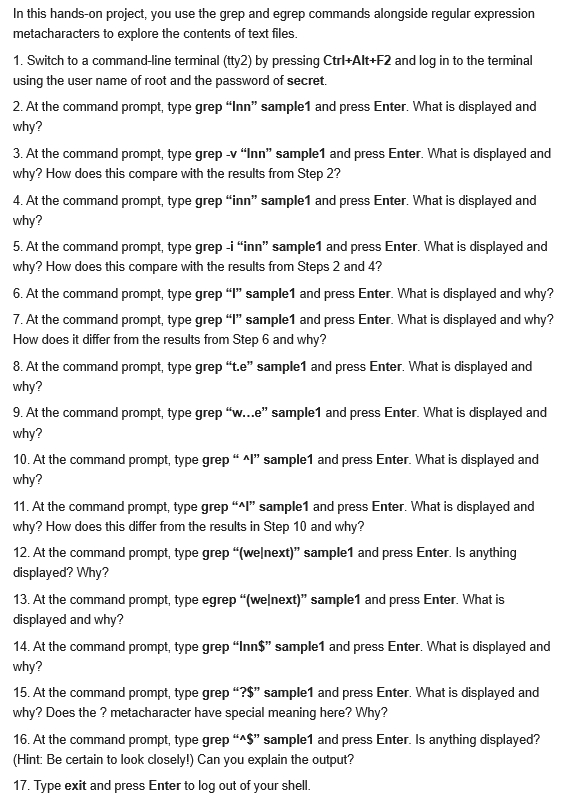
In this hands-on project, you use the grep and egrep commands alongside regular expression metacharacters to explore the contents of text files. 1. Switch to a command-line terminal (tty2) by pressing Ctrl+Alt+F2 and log in to the terminal using the user name of root and the password of secret. 2. At the command prompt, type grep "Inn" sample1 and press Enter. What is displayed and why? 3. At the command prompt, type grep -v "Inn" sample1 and press Enter. What is displayed and why? How does this compare with the results from Step 2? 4. At the command prompt, type grep "inn" sample1 and press Enter. What is displayed and why? 5. At the command prompt, type grep -i "inn" sample 1 and press Enter. What is displayed and why? How does this compare with the results from Steps 2 and 4? 6. At the command prompt, type grep "L" sample1 and press Enter. What is displayed and why? 7. At the command prompt, type grep "1" sample1 and press Enter. What is displayed and why? How does it differ from the results from Step 6 and why? 8. At the command prompt, type grep "te" sample1 and press Enter. What is displayed and why? 9. At the command prompt, type grep "w...e" sample1 and press Enter. What is displayed and why? 10. At the command prompt, type grep " Al" Sample 1 and press Enter. What is displayed and why? 11. At the command prompt, type grep "Al" sample1 and press Enter. What is displayed and why? How does this differ from the results in Step 10 and why? 12. At the command prompt, type grep "(wenext)" sample1 and press Enter. Is anything displayed? Why? 13. At the command prompt, type egrep "welnext)" sample1 and press Enter. What is displayed and why? 14. At the command prompt, type grep "Inn$" sample 1 and press Enter. What is displayed and why? 15. At the command prompt, type grep "?$" sample1 and press Enter. What is displayed and why? Does the ? metacharacter have special meaning here? Why? 16. At the command prompt, type grep "A$" sample1 and press Enter. Is anything displayed? (Hint: Be certain to look closely!) Can you explain the output? 17. Type exit and press Enter to log out of your shell. In this hands-on project, you use the grep and egrep commands alongside regular expression metacharacters to explore the contents of text files. 1. Switch to a command-line terminal (tty2) by pressing Ctrl+Alt+F2 and log in to the terminal using the user name of root and the password of secret. 2. At the command prompt, type grep "Inn" sample1 and press Enter. What is displayed and why? 3. At the command prompt, type grep -v "Inn" sample1 and press Enter. What is displayed and why? How does this compare with the results from Step 2? 4. At the command prompt, type grep "inn" sample1 and press Enter. What is displayed and why? 5. At the command prompt, type grep -i "inn" sample 1 and press Enter. What is displayed and why? How does this compare with the results from Steps 2 and 4? 6. At the command prompt, type grep "L" sample1 and press Enter. What is displayed and why? 7. At the command prompt, type grep "1" sample1 and press Enter. What is displayed and why? How does it differ from the results from Step 6 and why? 8. At the command prompt, type grep "te" sample1 and press Enter. What is displayed and why? 9. At the command prompt, type grep "w...e" sample1 and press Enter. What is displayed and why? 10. At the command prompt, type grep " Al" Sample 1 and press Enter. What is displayed and why? 11. At the command prompt, type grep "Al" sample1 and press Enter. What is displayed and why? How does this differ from the results in Step 10 and why? 12. At the command prompt, type grep "(wenext)" sample1 and press Enter. Is anything displayed? Why? 13. At the command prompt, type egrep "welnext)" sample1 and press Enter. What is displayed and why? 14. At the command prompt, type grep "Inn$" sample 1 and press Enter. What is displayed and why? 15. At the command prompt, type grep "?$" sample1 and press Enter. What is displayed and why? Does the ? metacharacter have special meaning here? Why? 16. At the command prompt, type grep "A$" sample1 and press Enter. Is anything displayed? (Hint: Be certain to look closely!) Can you explain the output? 17. Type exit and press Enter to log out of your shell
Step by Step Solution
There are 3 Steps involved in it

Get step-by-step solutions from verified subject matter experts
 Study Help