







Question: This is in C# Create a SINGLE method that each of the buttons call when clicked The method will need to return a number back
This is in C#
Create a SINGLE method that each of the buttons call when clicked
The method will need to return a number back to the calling method.
The method will need to receive 3 parameters.
Two of which are the numbers (not strings) from the textboxes.
The third parameter is to represent the operation to be preformed
The operations performed values are provided for you as constants in the project and named such. Look for the comment in the code.
When you call your method, one parameter should be one of those constants.
When in the method, you will use one of the parameters that you sent into the method to determine which operation to do. This will be achieve by use of control code. Think decision diamonds from flow charting.
Have a single return point in the method. Do not return in the middle, only at the end
Exising code:
namespace Module6MethodsProjectDL { public partial class frmActors : Form { // Public Contsants to use const byte ADD = 0; const byte SUBTRACT = 1; const byte MULTIPLY = 2; const byte DIVIDE = 3; const byte MODULUS = 4;
public frmActors() { InitializeComponent(); }
private void btnModulo_Click(object sender, EventArgs e) { decimal dLeft = 0.0m; decimal dRight = 0.0m; decimal dAnswer = 0.0m; string szLeft = ""; string szRight = ""; string szAnswer = ""; string szEquation = "";
szLeft = txtLeftOperand.Text; szRight = txtRightOperand.Text;
dLeft = Convert.ToDecimal(szLeft); dRight = Convert.ToDecimal(szRight);
dAnswer = dLeft % dRight;
szAnswer = dAnswer.ToString();
szEquation = szLeft + " % " + szRight + " = " + szAnswer;
lblAnswer.Text = ""; lblAnswer.Text = szEquation;
}
private void btnDivide_Click(object sender, EventArgs e) { decimal dLeft = 0.0m; decimal dRight = 0.0m; decimal dAnswer = 0.0m; string szLeft = ""; string szRight = ""; string szAnswer = ""; string szEquation = "";
szLeft = txtLeftOperand.Text; szRight = txtRightOperand.Text;
dLeft = Convert.ToDecimal(szLeft); dRight = Convert.ToDecimal(szRight);
dAnswer = dLeft / dRight;
szAnswer = dAnswer.ToString();
szEquation = szLeft + " / " + szRight + " = " + szAnswer;
lblAnswer.Text = ""; lblAnswer.Text = szEquation;
}
private void btnMultiply_Click(object sender, EventArgs e) { decimal dLeft = 0.0m; decimal dRight = 0.0m; decimal dAnswer = 0.0m; string szLeft = ""; string szRight = ""; string szAnswer = ""; string szEquation = "";
szLeft = txtLeftOperand.Text; szRight = txtRightOperand.Text;
dLeft = Convert.ToDecimal(szLeft); dRight = Convert.ToDecimal(szRight);
dAnswer = dLeft * dRight;
szAnswer = dAnswer.ToString();
szEquation = szLeft + " * " + szRight + " = " + szAnswer;
lblAnswer.Text = ""; lblAnswer.Text = szEquation;
}
private void btnMinus_Click(object sender, EventArgs e) { decimal dLeft = 0.0m; decimal dRight = 0.0m; decimal dAnswer = 0.0m; string szLeft = ""; string szRight = ""; string szAnswer = ""; string szEquation = "";
szLeft = txtLeftOperand.Text; szRight = txtRightOperand.Text;
dLeft = Convert.ToDecimal(szLeft); dRight = Convert.ToDecimal(szRight);
dAnswer = dLeft - dRight;
szAnswer = dAnswer.ToString();
szEquation = szLeft + " - " + szRight + " = " + szAnswer;
lblAnswer.Text = ""; lblAnswer.Text = szEquation;
}
private void btnPlus_Click(object sender, EventArgs e) { decimal dLeft = 0.0m; decimal dRight = 0.0m; decimal dAnswer = 0.0m; string szLeft = ""; string szRight = ""; string szAnswer = ""; string szEquation = "";
szLeft = txtLeftOperand.Text; szRight = txtRightOperand.Text;
dLeft = Convert.ToDecimal(szLeft); dRight = Convert.ToDecimal(szRight);
dAnswer = dLeft + dRight;
szAnswer = dAnswer.ToString();
szEquation = szLeft + " + " + szRight + " = " + szAnswer;
lblAnswer.Text = ""; lblAnswer.Text = szEquation;
} } }
image of form:
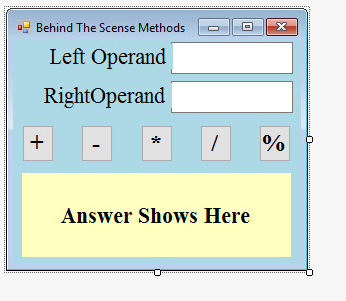
Behind The Scense Methods Left Operand RightOperand Answer Shows Here
Step by Step Solution
There are 3 Steps involved in it

Get step-by-step solutions from verified subject matter experts
 Study Help