







Question: This is in C. The purpose of this programming assignment is to give you some experience with simple input/output and processes. In the assignment you
This is in C. The purpose of this programming assignment is to give you some experience with simple input/output and processes. In the assignment you will employ a few of the most common system calls used for performing input/output and manipulating processes. In particular, you will need to use at least the access, fork, execve, dup (and/or dup2), pipe, read, write and exit system calls. Make certain you read and understand all of the material in the assignment.
The program you are to write is a simple command line interpreter, or shell. It will not have nearly as much functionality as a normal shell. Instead, it will deal only with creating processes, arranging for them to execute specified programs and connecting the standard input and output of the processes with a pipe.
Specifically, your program will repeatedly perform the steps shown below. Additional details on each of these steps are provided in the next section, and a significant part of the work (in particular, much of the string manipulation) is already done in the partial solution provided for you. For now, just make certain you understand the basic steps.
1. Read a command line from the standard input. If the line contains only blanks and/or tab characters, ignore it and repeat this step. If the end of file is encountered, just terminate your program.
2. Identify the words on the command line read in step 1. Each word is a sequence of non- whitespace characters (whitespace means blanks or tabs here). In this shell we will assume at least one whitespace character is used to separate words from each other.
3. Determine if one of the words consists of just the single character '|' (that is, the pipe symbol). If no pipe symbol is present, then there is only a single command to be processed. For example, if the input line was
echo one two three
there are four words, none of which is the pipe symbol. In this case, your shell will create a new process to execute the command, as described below.
But if the input line was
echo one two three | wc -l
then there are seven words, and one of them (the fifth, in particular) is the pipe symbol. Therefore there are two commands to be processed. The first command consists of the words to the left of the pipe symbol (specifically echo one two three), and the second command consists of the words to the right of the pipe symbol (specifically wc l). The pipe symbol, of course, is not part of either command, but instead indicates (to the shell) that the output written to the standard output (associated with file descriptor 1) by the first (left) command is to be sent,
through a pipe, to the standard input (associated with file descriptor 0) of the second (right)
command.
To achieve this task your shell will create a pipe before making the processes needed to execute the commands.
4. For each command, verify that there exists an appropriate program as evidenced by the existence of a suitable executable file. To verify this, first recognize that the word that identifies the command to be executed is the first word in the command. In the examples given in step 3, the two commands are identified by the words echo and wc. If the word corresponding to a command includes a slash (that is, '/') then that word is an explicit path to the (presumably executable) file; your shell should then use the access system call to determine if that file exists and is executable (details are provided below).
For example, in the command line
./mycommand data and moredata
we see that the first word includes a slash. As a result, it is to be interepreted as an explicit path to the file to be executed. In this case, were given a relative path.
If the word identifying the command does not include a slash, then the directory in which the (presumably executable) file exists must be located. Most systems (including Linux, Windows, and Mac OS X) specify the directories in which such executable files are sought as a list given by the value of the PATH environment variable. The first directory in the list that contains the specified file is the one to be used; details are provided below. Of course, if no directory specified in PATH contains the file, then the shell will report an error and read the next command (that is, return to step 1).
To clarify some of the concepts, you might try some of these commands on Linux.
echo $PATH
This command will display the contents of the PATH environment variable. Note that is consists of the path specifications for several directories separate by colons. For example, it might display this (the font size was reduced here so the result would fit on a single line):
/usr/local/sbin:/usr/local/bin:/usr/sbin:/usr/bin:/sbin:/bin:/usr/games:/home/stanw/bin
which echo
This command does basically the same thing your shell will do in this step if a command name does not include a slash. It searches through the directories specified in PATH to locate the first directory (if any) that contains the specified file. In this case, the output might be:
/bin/echo
5. For each command, prepare the argument list from the words in the command. The argument list is just an array of pointers (char *) to the strings containing the words in the command, starting with the word that specifies the command and continuing through the last word in the command. A null pointer (that is a pointer whose value is zero) must follow the pointer to the last word in the command. For example, the argument list for the echo one two three
command used in step 3 would look like this (the arrows are used to indicate the data items the pointers reference):
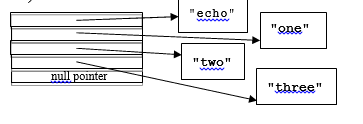
The array shown on the left has entries with subscripts 0 to 4 of type char * that is, a pointer to a character; the top entry in the figure has subscript 0. Each entry (except the last) contains the address of the first character in the character string representing the corresponding word from the command line. For example, the element with subscript 0 contains the address of (that is, a pointer to) the 'e' in "echo". The last entry, containing the null pointer, marks the end of the argument list.
6. If there is only a single command, create a child process to execute it (using the fork system call, of course), and then (in the child process that was created) invoke the execve system call to replace the shell program (which is executing in the child process) with the desired program, and to supply the arguments to the program. The parent (executing the shell) waits (using the wait system call) for the child process to terminate before returning to step 1 to read and process the next command line.
7. If there are two commands, the process creation actions in step 6 must be done for each of the commands. In addition, you must arrange for the standard output of the first process (file descriptor 1) to be associated with the write end of the pipe created in step 3. Similarly, the standard input of the second process (file descriptor 0) must be associated with the read end of the pipe. The ends of the pipe not used in each process (the read end in the left process, the write end in the right process, and both ends in the shell/parent process) must be closed. The pipe to be used by the processes for the two commands will need to be created before the processes are created (that is, before the fork system call is executed to create either child). This is because we want the child processes to inherit the open file descriptors for the two ends of the pipe. The redirection of the standard input and output in the child processes must be done before the execve system calls are done. execve will be invoked twice, once in each child process, to execute the appropriate programs (as identified by the first word in each command) and to provide the appropriate arguments. The parent process (the one executing the shell program) will also need to execute the wait system call twice, to suspend its execution while waiting for each child process to terminate. Finally, the shell process will return to step 1 to obtain the next command line.
Details
Lets consider more detail about each of these actions.
In step 1 you must use the read system call. Do not use any other system call for input! And remember: dont use any language other than C! To avoid extra complexity, assume you are reading commands from a disk file (that is, assume your shell is run with the standard input redirected to a disk file), and read a single byte at a time that is, the third argument to the read system call should always be 1. The file descriptor to use is 0, which corresponds to the standard input (that is, the first argument to the read system call should always be 0). The read system call returns the number of characters successfully read or a negative error indication (-1). Since you are always reading a single character at a time, read should return 1 (if a single character was successfully read), 0 (if nothing was read, meaning youre at the end of file), or -1 (which should normally not occur). When a single character is read and it is an end of line character (' '), then you have encountered the end of a line. You should echo the input you read (that is, write the characters read to the standard output, or file descriptor 1); when you are actually reading from the keyboard you will get an extra copy of the input, since the standard input mechanism echoes each character as it is typed. When reading from a disk file, you will get a display of the command youre about to process. You may assume that no input line contains more than 100 characters (including the end of line character). [It is advisable to display something like "# " (that is, a sharp sign and a space) before displaying the command being read. This will allow you to easily distinguish the command from any output it may produce.]
Step 2 is a simple parsing operation. We know words are separated by one or more blanks or tab characters (i.e. whitespace). Therefore can use the C library function strtok to identify the words (although youre certainly not required to do so). We will not worry about quoting arguments with single- or double-quotes or backslashes (as is done by more complete shells). Additionally, remember that the character used to specify a pipe connection between two commands (i.e. '|') will be separated from other words by whitespace. You may assume there will be no more than 16 words in any input line, including the pipe character. You may also assume no word will be longer than 64 characters, including a null terminating character which is required for C-style string values.
At this point (step 3) you have a sequence of words corresponding to a command name, its arguments, and possibly a pipe symbol and another sequence of words corresponding to a second command name and its arguments. If the pipe symbol exists, and there is at least one word on each side of it, then the shell will need to create a pipe (using the pipe system call) to use in connecting the output of the first (left) command to the input of the second (right) command. It may be appropriate to wait until after the next step to actually create the pipe, since you wont want to create it if step 4 discovers an error. If there is a pipe symbol, but no words before and/or no words after it, then theres obviously an error which you should diagnose just before ignoring the command line. Likewise, more than one pipe symbol is an error at least in this shell!
In step 4 we will validate the name of the command (or commands) to be executed (the first word in each command). If this word includes '/', then it is a relative or absolute path to a file that is expected to contain the executable code and data for the command. Otherwise it is assumed to be the name of a file that appears in one of the directories specified in the value of the PATH environment variable. The value of the PATH environment variable is character string containing a colon-separated list of the names of directories in which the shell is to search for an executable file.
So if I should enter a command line like doit to it, the shell will find that doit does not contain a '/', and search in the directories specified in PATH, in order, until the file doit is found, or each directory has been checked. If the file doit is not found in any of those directories, an error should be reported (something like doit not found), and the shell should repeat from step 1. Parsing the value of the PATH environment variable is easy using the strtok function.
The value of the PATH environment variable can be obtained using the getenv function. (The on-line description of this function can be found using the command man getenv.) The getenv function expects a character string argument, and it returns a pointer to a character string containing the value of that that environment variable (if it exists), or a NULL pointer (if there was no such environment variable). Since were interested in the value of the PATH environment variable, an appropriate function invocation might be getenv("PATH"). Recalling that the value is a colon-separated list of directory names, we can easily use the strtok function (again, use man strtok for details) to identify the individual directories.
To determine if a file exists and is executable you should likely use the access system call. This call has two arguments. The first is the path to a file, and the second is the access mode to the file that is to be tested. In our case, we specifically want to test for executability, so the second argument should be X_OK (which is defined by including the header file unistd.h). If access returns 0, then the file exists and is executable (at least as far as the files permissions indicate). Otherwise, the file does not exist, or is not executable. Notice that the first argument to access must be the path to the file, not just the file name. As a result, youll need to concatenate a directory name from the PATH environment variable, a slash, and the file name to yield a suitable string for the first argument to access.
Of course, if there are two commands to be executed (connected by a pipe), this processing must be done for each of them. If either command is not executable, then neither should be executed, a suitable error message should be displayed, and the shell should return to step 1.
Step 5 is simple. We know that there will be no more than 16 words in a command (since there can be at most 16 words in a command line), and we need one additional entry in the array of pointers to arguments to store a terminating null pointer. Thus for each command, we need an array with 17 pointers to character strings for the argument list to a command. Since each word was identified (perhaps using strtok) in step 2, it should be a simple matter to store a pointer to each word of a command in the appropriate entry in the array.
In step 6, use the fork system call to create a process, being sure to save the value it returns. As is always the case, check to see if the returned value is 1. If it is, some error occurred (like you got stuck in a loop calling fork!), and you should abandon further execution (by printing an appropriate error message and calling exit.) Then, only in the child process, use the execve system call to execute the program and pass the array of command line arguments. In the shell (the parent process), you should execute the wait system call to delay execution until the child process terminates. Then return to step 1.
Step 7 is used only if there are two commands to be executed. The work of step 6 is done for each command, but there is a bit of additional effort required. Creating the pipe is done using the pipe system call, which expects a pointer to the first element of a two-element array of integers as its only
argument (you can just pass it the name of a two-element array of type int). It will return 0 if it succeeds in creating the pipe. In that case, the 0th element of the array passed to it will contain the file descriptor used to read from the pipe, and the 1st element of the array will contain the file descriptor use to write to the pipe.
In the child process for the first of the two commands, we want to replace the association of the standard outputs file descriptor (which is 1) with whatever it was (possibly the keyboard, or a disk file whatever the shell is using for standard input) with the write end of the pipe. This is a very simple task, but its important to completely understand what is being done. First (again, only in the child process for the left command), close file descriptor 1. Then use the dup system call to create a duplicate of the file descriptor associated with the write end of the pipe. dup is guaranteed to use the lowest-numbered unused file descriptor. Since we know file descriptor 0 is in use (its associated with the same thing as the shells standard input), it wont be file descriptor 0. Instead, we know file descriptor 1 is not in use (we just closed it). So file descriptor 1 will be associated with the write end of the pipe (as will the other file descriptor already associated with it). You should close the read end of the pipe and the extra file descriptor for the write end of the pipe.
Similar steps are used in the process thats going to execute the right command, but were naturally going to reassociate file descriptor 0 with the read end of the pipe created by the shell. So youll want to close file descriptor 0, dup the file descriptor for the read end of the pipe, then close the write end of the pipe and the extra file descriptor for the read end of the pipe.
Using execve
The first argument to execve is the path to the file to be executed. If a relative or absolute path was explicitly provided in a command, then thats the path to be used. Otherwise, the path will be one of the entries from the PATH environment variable, a slash, and the name of the command to be executed (that is, the first word of the command). The second argument is a pointer to the array of argument pointers. The third and last argument to execve is a pointer to an array of strings representing the environment for the program about to be executed. This should usually be the value of the external variable environ. A simple program that illustrates these concepts can be found in the file
/home/stanw/csci4500/echo_me.c . That program uses the execve system call to execute
the file /bin/echo to display Hello, world!
Using wait
The wait system call is used to delay execution of a process (in our case, the shell process) until one of its child processes terminates. The single argument to wait is a pointer to an integer which well call status. status will receive two pieces of information. In the low-order byte of status will be an indication of the reason for the termination of the child process. If the termination was normal (that is, by returning or executing the exit system call), this byte will contain 0. If the process was terminated abnormally (e.g. it divided by zero or tried to access memory that didnt belong to it), then this byte will be non-zero; we need not be concerned with the particular values at this time. In the event of a normal termination, the next higher byte (bits 15-8 of status) will contain the low-order eight bits of the value returned by the process, either with the return statement or the exit system call. The return value from wait is normally the process ID of the child process that terminated. If there was no child process on which to wait, then wait will return 1 (which you should not get!). If the process terminated normally,
display an appropriate message including its exit status (e.g. process ### terminated normally with status ###). If the process did not terminate normally, then display a different message (e.g. process
### terminated abnormally for reason ###). Of course, ### in the example messages represent the process ID, the exit status, or the termination status. In any case, return to step 1 to process the next command.
Heres an example that shows how to use the wait system call. You should try changing the actions taken by the child process to illustrate different exit codes and termination statuses.
#include
#include
#include
extern char **environ;
int main(int argc, char *argv[])
{
pid_t pid;
int status, which;
char msg[100];
pid = fork();
if (pid == -1) {
write(1,"fork failed. ",12);
exit(1);
}
if (pid == 0) { /* child process */
int x, y, z;
y = 12;
z = 0;
x = y / z; /* divide by zero! */
exit(1);
}
if (fork != 0) { /* parent */
which = wait(&status);
if (which == -1) {
write(1,"wait failed. ",12);
exit(1);
}
if (status & 0xff) { /* abnormal termination */
sprintf(msg,"process %d terminated abnormally for reason %d ",
which, status & 0xff);
} else { /* normal termination */
sprintf(msg,"process %d terminated normally with status %d ",
which, (status >> 8) & 0xff);
} write(1,msg,strlen(msg)); exit(0);
}
}
echoons "echo" ene" "two" niu "three
Step by Step Solution
There are 3 Steps involved in it

Get step-by-step solutions from verified subject matter experts
 Study Help