







Question: This is in Java Language. This is the AnnualWeatherV1 import java.util.Scanner; public class AnnualWeatherV1 { /* main function */ public static void main(String args[]) {
This is in Java Language.
![class AnnualWeatherV1 { /* main function */ public static void main(String args[])](https://dsd5zvtm8ll6.cloudfront.net/si.experts.images/questions/2024/09/66f3e64b0fd55_23466f3e64a6bce6.jpg)
This is the AnnualWeatherV1
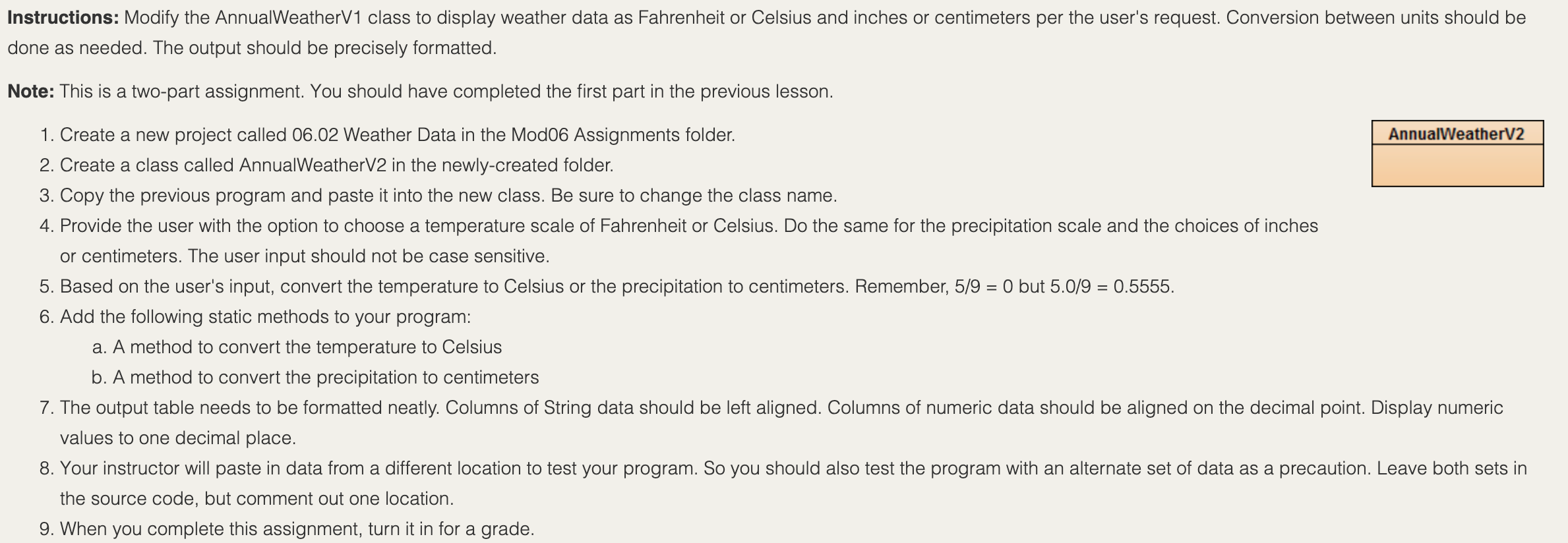
import java.util.Scanner; public class AnnualWeatherV1 { /* main function */ public static void main(String args[]) { double temp[]= new double[12]; double prec[]= new double[12]; double t=0.0,p=0.0; int i; String m[]=new String[12]; String city; Scanner sc=new Scanner(System.in); for(i=0;i Instructions: Modify the AnnualWeatherV1 class to display weather data as Fahrenheit or Celsius and inches or centimeters per the user's request. Conversion between units should be done as needed. The output should be precisely formatted. Note: This is a two-part assignment. You should have completed the first part in the previous lesson. 1. Create a new project called 06.02 Weather Data in the Mod06 Assignments folder. AnnualWeatherV2 2. Create a class called AnnualWeatherV2 in the newly-created folder. 3. Copy the previous program and paste it into the new class. Be sure to change the class name. 4. Provide the user with the option to choose a temperature scale of Fahrenheit or Celsius. Do the same for the precipitation scale and the choices of inches or centimeters. The user input should not be case sensitive. 5. Based on the user's input, convert the temperature to Celsius or the precipitation to centimeters. Remember, 5/9 = 0 but 5.0/9 = 0.5555. 6. Add the following static methods to your program: a. A method to convert the temperature to Celsius b. A method to convert the precipitation to centimeters 7. The output table needs to be formatted neatly. Columns of String data should be left aligned. Columns of numeric data should be aligned on the decimal point. Display numeric values to one decimal place. 8. Your instructor will paste in data from a different location to test your program. So you should also test the program with an alternate set of data as a precaution. Leave both sets in the source code, but comment out one location. 9. When you complete this assignment, turn it in for a grade. Expected Output: When your program runs correctly, the output should resemble the following screen shot: Bluel: Terminal Window - ... Options Choose the temperature scale (E = Fahrenheit, C = Celsius): f Choose the precipitation scale (i = inches, c = centimeters): C Weather Data Location: Tallahassee, Florida Temperature (F) Precipitation (cm.) Month Jan. Feb. Mar. Apr. May Jun. 51.8 54.8 61.1 66.4 74.4 80.4 0.9 82.4 02.9 82.1 78.9 69.1 60.4 53.7 13.7 11.7 16.5 9.1 12.7 17.5 20.3 17.8 12.7 Aug. Aug. Sep. Oct. Nov. Dec. 9.9 10.4 Average: 68.0 Annual: 160.8
Step by Step Solution
There are 3 Steps involved in it

Get step-by-step solutions from verified subject matter experts
 Study Help