







Question: This is in java. Need to use class IntStack.java and StringStack.java to do this problem. Starter code for TextEditor.java is below. I have IntStack but
This is in java. Need to use class IntStack.java and StringStack.java to do this problem. Starter code for TextEditor.java is below. I have IntStack but not StringStack. CANNOT IMPORT PACKAGES. THANK YOU!
STARTER CODE FOR TEXTEDITOR.JAVA :
public class TextEditor { /* instance variables */ private String text; private IntStack undo; private StringStack deletedText; private IntStack redo; private StringStack insertedText; public TextEditor() { /* TODO */ } public String getText() { /* TODO */ return null; } public int length() { /* TODO */ return 0; } public void caseConvert(int i, int j) { /* TODO */ } public void insert(int i, String input) { /* TODO */ } public void delete(int i, int j) { /* TODO */ } public boolean undo() { /* TODO */ return false; } public boolean redo() { /* TODO */ return false; } }IntStack.java:
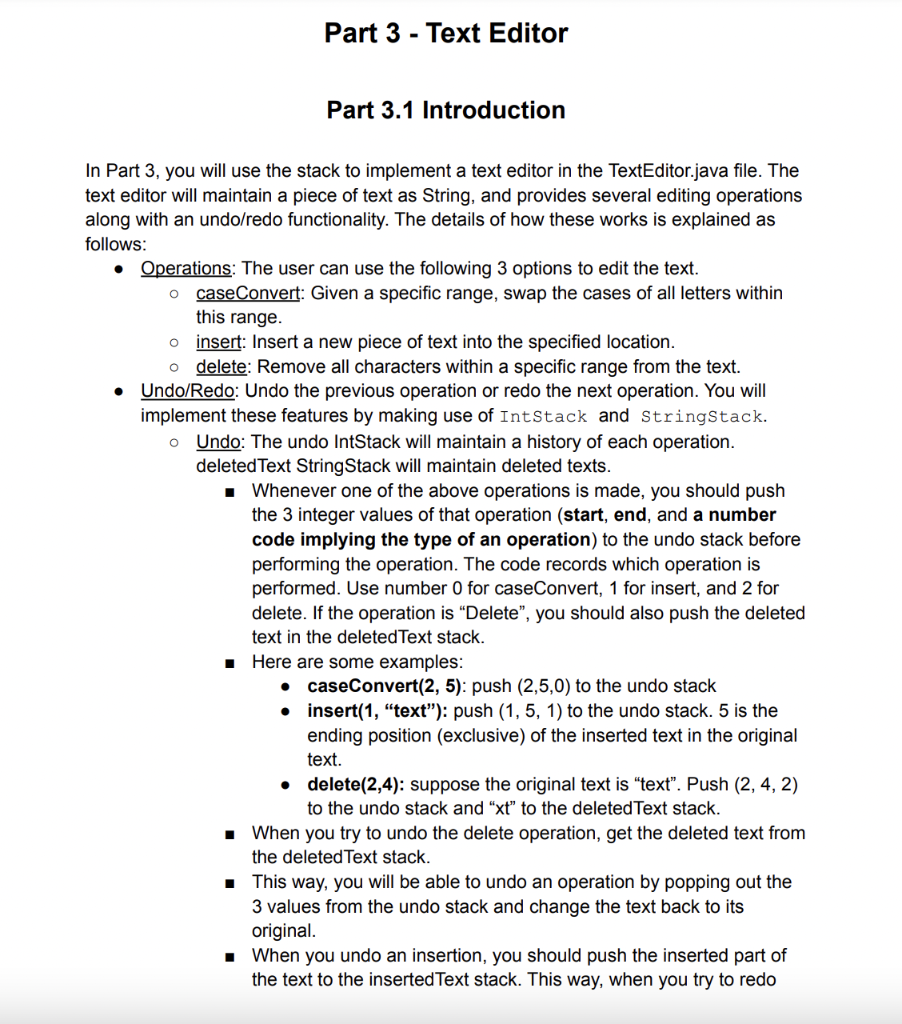
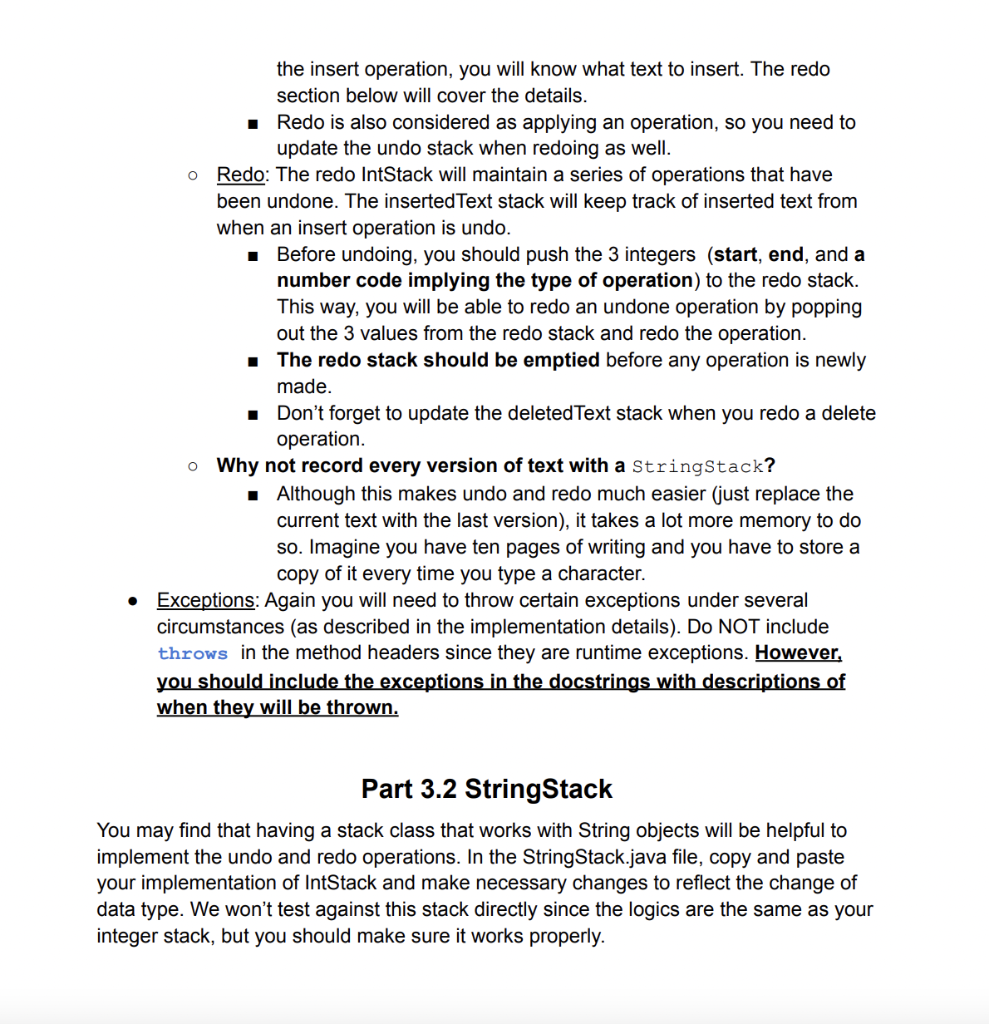
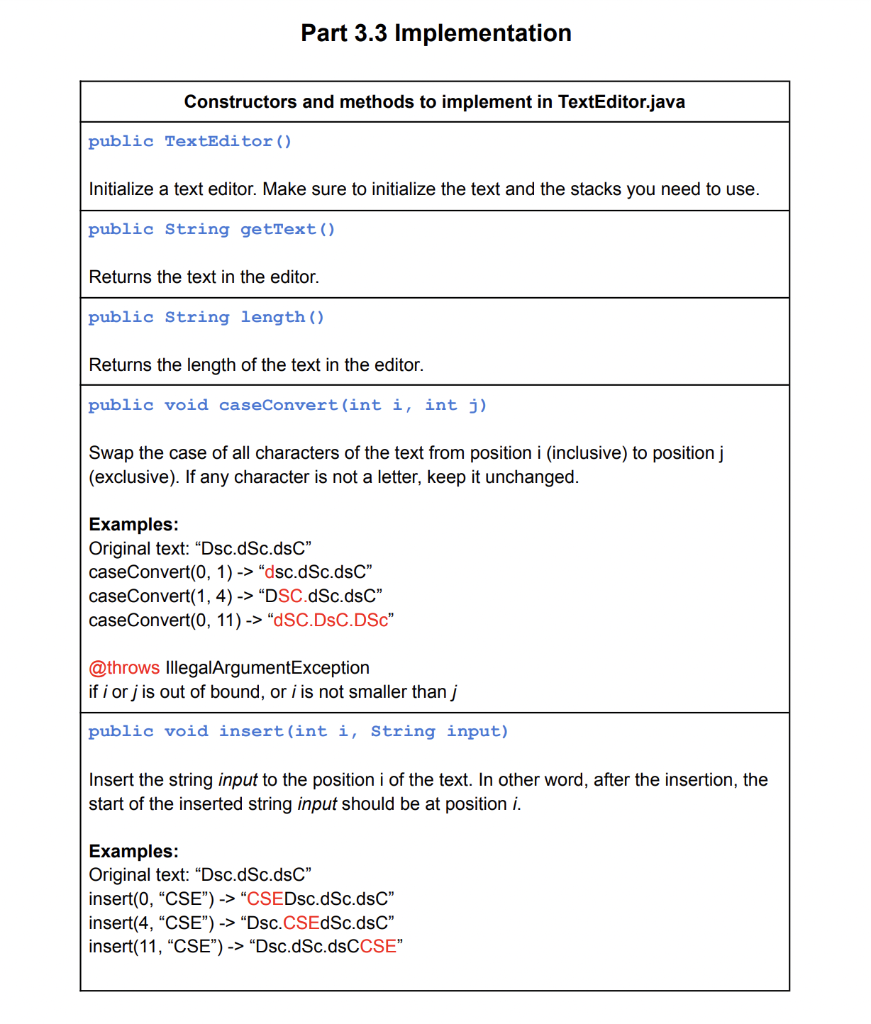
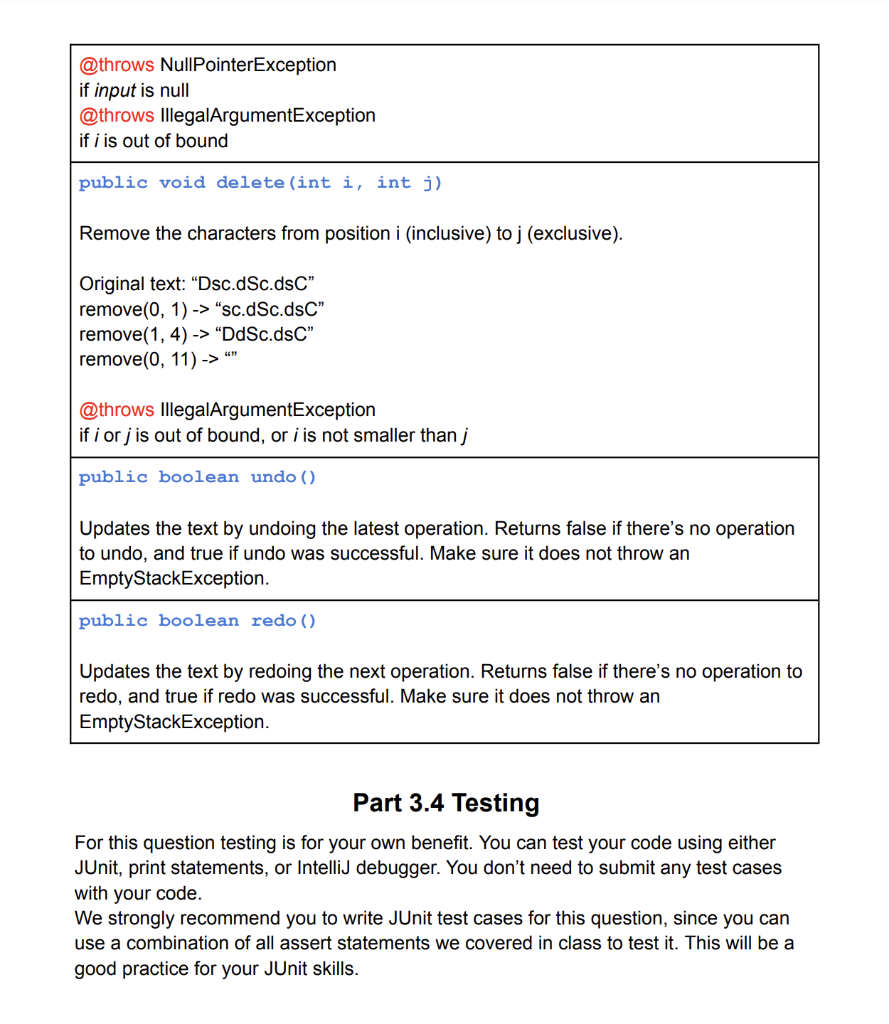
import java.util.Arrays; import java.util.EmptyStackException; public class IntStack { private int size; private int initCapacity; private int[] stack; private double loadF; private double shrinkF; public IntStack() { this(5, 0.75, 0.25); } public IntStack(int initialCapacity) { this(initialCapacity, 0.75, 0.25); } public IntStack(int capacity, double loadF, double shrinkF) { super(); this.size = 0; this.initCapacity = capacity; if (capacity 1) { throw new IllegalArgumentException(); } if (shrinkF 0.33) { throw new IllegalArgumentException(); } this.stack = new int[capacity]; this.loadF = loadF; this.shrinkF = shrinkF; } public IntStack(int capacity, double loadF) { this(capacity, loadF, 0.25); } public void push(int element) { expandCapacity(); if (size() == stack.length) expandCapacity(); stack[size++] = element; } private void expandCapacity() { double val = loadfactor(); if (val >= loadF) stack = Arrays.copyOf(stack, stack.length * 2); } private void shrinkCapacity() { double val = loadfactor(); if (val = 0; i--) { s = s + stack[i] + " "; } return s; } public void multiPush(int[] elements) { if (elements == null) throw new IllegalArgumentException(); for (int i : elements) { push(i); } } public int[] multiPop(int amount) { int[] list = new int[amount]; if (amount Part 3 - Text Editor Part 3.1 Introduction O O In Part 3, you will use the stack to implement a text editor in the TextEditor.java file. The text editor will maintain a piece of text as String, and provides several editing operations along with an undo/redo functionality. The details of how these works is explained as follows: Operations: The user can use the following 3 options to edit the text. o caseConvert: Given a specific range, swap the cases of all letters within this range. insert: Insert a new piece of text into the specified location. delete: Remove all characters within a specific range from the text. Undo/Redo: Undo the previous operation or redo the next operation. You will implement these features by making use of IntStack and StringStack. o Undo: The undo IntStack will maintain a history of each operation. deleted Text String Stack will maintain deleted texts. Whenever one of the above operations is made, you should push the 3 integer values of that operation (start, end, and a number code implying the type of an operation) to the undo stack before performing the operation. The code records which operation is performed. Use number 0 for caseConvert, 1 for insert, and 2 for delete. If the operation is Delete, you should also push the deleted text in the deleted Text stack. Here are some examples: caseConvert(2, 5): push (2,5,0) to the undo stack insert(1, "text"): push (1,5, 1) to the undo stack. 5 is the ending position (exclusive) of the inserted text in the original text. delete(2,4): suppose the original text is "text". Push (2, 4, 2) to the undo stack and "xt" to the deleted Text stack. When you try to undo the delete operation, get the deleted text from the deleted Text stack. This way, you will be able to undo an operation by popping out the 3 values from the undo stack and change the text back to its original. When you undo an insertion, you should push the inserted part of the text to the inserted Text stack. This way, when you try to redo . 1 the insert operation, you will know what text to insert. The redo section below will cover the details. Redo is also considered as applying an operation, so you need to update the undo stack when redoing as well. o Redo: The redo IntStack will maintain a series of operations that have been undone. The insertedText stack will keep track of inserted text from when an insert operation is undo. Before undoing, you should push the 3 integers (start, end, and a number code implying the type of operation) to the redo stack. This way, you will be able to redo an undone operation by popping out the 3 values from the redo stack and redo the operation. The redo stack should be emptied before any operation is newly made. Don't forget to update the deleted Text stack when you redo a delete operation. o Why not record every version of text with a stringStack? Although this makes undo and redo much easier (just replace the current text with the last version), it takes a lot more memory to do so. Imagine you have ten pages of writing and you have to store a copy of it every time you type a character. Exceptions: Again you will need to throw certain exceptions under several circumstances (as described in the implementation details). Do NOT include throws in the method headers since they are runtime exceptions. However, you should include the exceptions in the docstrings with descriptions of when they will be thrown. . Part 3.2 StringStack You may find that having a stack class that works with String objects will be helpful to implement the undo and redo operations. In the StringStack.java file, copy and paste your implementation of IntStack and make necessary changes to reflect the change of data type. We won't test against this stack directly since the logics are the same as your integer stack, but you should make sure it works properly. Part 3.3 Implementation Constructors and methods to implement in TextEditor.java public TextEditor() Initialize a text editor. Make sure to initialize the text and the stacks you need to use. public String getText() Returns the text in the editor. public String length() Returns the length of the text in the editor. public void caseConvert(int i, int j) Swap the case of all characters of the text from position i (inclusive) to position i (exclusive). If any character is not a letter, keep it unchanged. Examples: Original text: "Dsc.dSc.dsC" caseConvert(0, 1) -> "dsc.dSc.dsC" caseConvert(1, 4) -> "DSC.dSc.dsC" caseConvert(0, 11) -> "USC.DsC.DSC" @throws IllegalArgumentException if i orj is out of bound, or i is not smaller than j public void insert(int i, String input) Insert the string input to the position i of the text. In other word, after the insertion, the start of the inserted string input should be at position i. Examples: Original "Dsc.dSc.dsc" insert(O, "CSE") -> "CSEDsc.dSc.dsC" insert(4, "CSE") -> "Dsc.CSEdSc.dsC" insert(11, "CSE") -> "Dsc.dSc.dsCCSE" @throws NullPointerException if input is null @throws illegalArgumentException if i is out of bound public void delete (int i, int j) Remove the characters from position i (inclusive) to j (exclusive). Original text: "Dsc.dSc.ds" remove(0, 1) -> "sc.dSc.dsC" remove(1, 4) -> "DdSc.dsC" remove(0, 11) -> "" @throws illegalArgumentException if i orj is out of bound, or i is not smaller than j public boolean undo () Updates the text by undoing the latest operation. Returns false if there's no operation to undo, and true if undo was successful. Make sure it does not throw an EmptyStackException. public boolean redo () Updates the text by redoing the next operation. Returns false if there's no operation to redo, and true if redo was successful. Make sure it does not throw an EmptyStackException. Part 3.4 Testing For this question testing is for your own benefit. You can test your code using either JUnit, print statements, or IntelliJ debugger. You don't need to submit any test cases with your code. We strongly recommend you to write JUnit test cases for this question, since you can use a combination of all assert statements we covered in class to test it. This will be a good practice for your JUnit skills Step by Step Solution
There are 3 Steps involved in it
1 Expert Approved Answer
Step: 1 Unlock

Question Has Been Solved by an Expert!
Get step-by-step solutions from verified subject matter experts
Step: 2 Unlock
Step: 3 Unlock
 Study Help