







Question: **THIS IS IN JAVA SCRIPT ** To boil this down, I just need someone to use the following classes to construct a program that draws
**THIS IS IN JAVA SCRIPT **
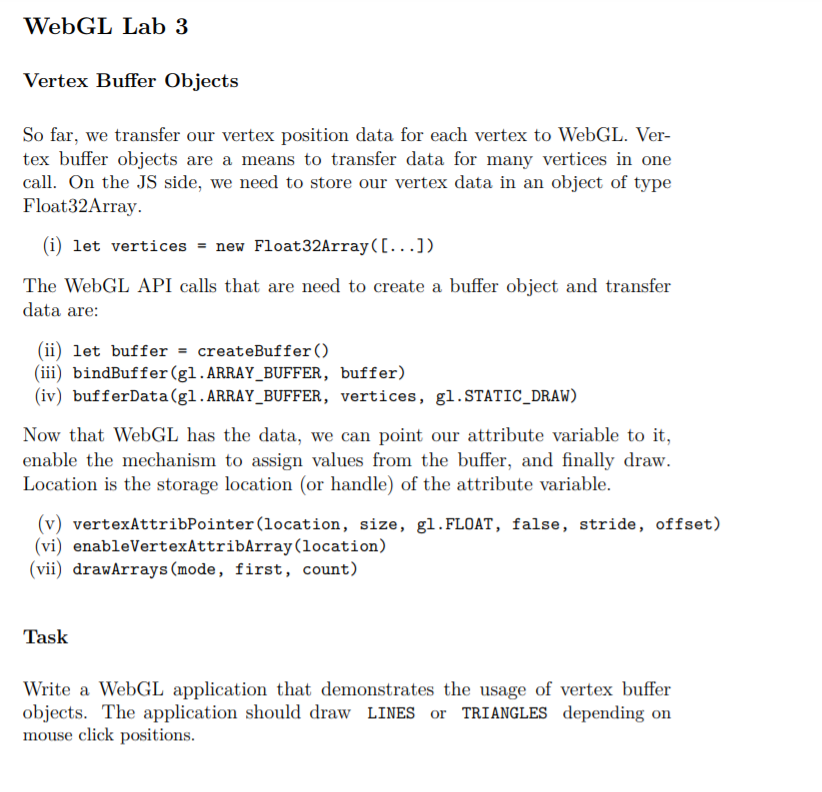
To boil this down, I just need someone to use the following classes to construct a program that draws either LINES or TRIANGLES onto the following HTML page depending on the users click positions. The needed code is below:
lab3.html
lab3.js
// ------------------------------------------------------------ // WebGL Lab 3 - Template // ------------------------------------------------------------
var VSHADER = ` attribute vec2 a_Position; void main() { gl_Position = vec4(a_Position, 0.0, 1.0); gl_PointSize = 4.0; } `
var FSHADER = ` void main() { gl_FragColor = vec4(0.0, 0.0, 1.0, 1.0); } ` // global context object to store everything. let context = { };
/* render function - currently called on every mouse click */ function render(context) {
let gl = context.gl; // shortcut
// set clear color and clear frame buffer gl.clearColor(0.9,0.9,1.0,1.0); gl.clear(gl.COLOR_BUFFER_BIT);
// set attribute variable gl.vertexAttrib2f(gl.a_Position, context.mouse.x, context.mouse.y);
// issue drawing gl.drawArrays(gl.POINTS, 0, 1); }
/* mouse handler function - gets mouse coordinates in browser client area coordinates - handler transforms from client area coordinates to WebGL normalized device coordinates */ function handle_mouse(ev, canvas, context) { let rect = ev.target.getBoundingClientRect(); let mx = ev.clientX; // x mouse let my = ev.clientY; // y mouse let cx = rect.left; // canvas position x let cy = rect.top; // canvas position y let wx = canvas.width; // canvas width x let wy = canvas.height; // canvas width y
// transform in matrix-vector notation // // 1 0 2/w_x 0 m_x - c_x - 1.0 // 0 -1 ( 0 2/w_y m_y - c_y + - 1.0 ) // let x_premul = 2.0 / wx; let y_premul = -2.0 / wy; let screen_x = x_premul*(mx-cx) - 1.0; let screen_y = y_premul*(my-cy) + 1.0;
context.mouse = { x : screen_x, y : screen_y }; render(context); }
/* initialization function - gets WebGL context from canvas object - initializes shaders via external library function - gets attribute location - stores WebGL context and additional information in global context object - registers mouse handler - clears framebuffer */ function canvas_init3D() { let canvas = document.querySelector("#canvas_gl"); let gl = canvas.getContext("webgl"); if (!gl) { console.log("Failed to get rendering context for WebGL"); return; } if (!initShaders(gl, VSHADER, FSHADER)) { console.log("Failed to initialize shaders."); return; }
var a_Position = gl.getAttribLocation(gl.program, "a_Position"); if (a_Position
// store information in context context.gl = gl; context.a_Position = a_Position;
// register mouse listener using anonymous function canvas.onmousedown = function(ev) { handle_mouse(ev, canvas, context); };
gl.clearColor(0.9,0.9,1.0,1.0); gl.clear(gl.COLOR_BUFFER_BIT); }
function main() { console.log("WebGL - Lab3"); canvas_init3D(); }
The file needed to be edited is the lab3.js. It helps to have them both in the same folder on the desktop in order to properly code this.
Please help!!!
WebGL Lab 3 Vertex Buffer Objects So far, we transfer our vertex position data for each vertex to WebGL. Ver- tex buffer objects are a means to transfer data for many vertices in one call. On the JS side, we need to store our vertex data in an object of type Float32Array. (i) let vertices = new Float32Array([...]) The WebGL API calls that are need to create a buffer object and transfer data are: (ii) let buffer = createBuffer() (iii) bindBuffer(g1.ARRAY_BUFFER, buffer) (iv) bufferData(gl. ARRAY_BUFFER, vertices, g1.STATIC_DRAW) Now that WebGL has the data, we can point our attribute variable to it, enable the mechanism to assign values from the buffer, and finally draw. Location is the storage location (or handle) of the attribute variable. (v) vertexAttribPointer(location, size, gl.FLOAT, false, stride, offset) (vi) enableVertexAttribArray(location) (vii) drawArrays (mode, first, count) Task Write a WebGL application that demonstrates the usage of vertex buffer objects. The application should draw LINES or TRIANGLES depending on mouse click positions. WebGL Lab 3 Vertex Buffer Objects So far, we transfer our vertex position data for each vertex to WebGL. Ver- tex buffer objects are a means to transfer data for many vertices in one call. On the JS side, we need to store our vertex data in an object of type Float32Array. (i) let vertices = new Float32Array([...]) The WebGL API calls that are need to create a buffer object and transfer data are: (ii) let buffer = createBuffer() (iii) bindBuffer(g1.ARRAY_BUFFER, buffer) (iv) bufferData(gl. ARRAY_BUFFER, vertices, g1.STATIC_DRAW) Now that WebGL has the data, we can point our attribute variable to it, enable the mechanism to assign values from the buffer, and finally draw. Location is the storage location (or handle) of the attribute variable. (v) vertexAttribPointer(location, size, gl.FLOAT, false, stride, offset) (vi) enableVertexAttribArray(location) (vii) drawArrays (mode, first, count) Task Write a WebGL application that demonstrates the usage of vertex buffer objects. The application should draw LINES or TRIANGLES depending on mouse click positions
Step by Step Solution
There are 3 Steps involved in it

Get step-by-step solutions from verified subject matter experts
 Study Help