







Question: this is in LINUX: While logged in as a regular user, use the following command to create a directory named top in the user's home
this is in LINUX:
While logged in as a regular user, use the following command to create a directory named top in the user's home directory:
$ mkdir -p /home/user/lab4/top
Follow the instructions below to complete Table #1.
Change the permission of the top directory using the chmod command. The exact command is given in the second column of the table.
Execute the commands listed in the first row (started with the third column) for that permission level. For each command line document whether the command line executes successfully or not: Use PD for Permission Denied, OK for success, NF for "No such file or directory"
The commands are:
$ ls -l top
$ mkdir top/sub
$ rmdir top/sub
$ cd top
$ cd .. (Execute this ONLY if your current directory is top!)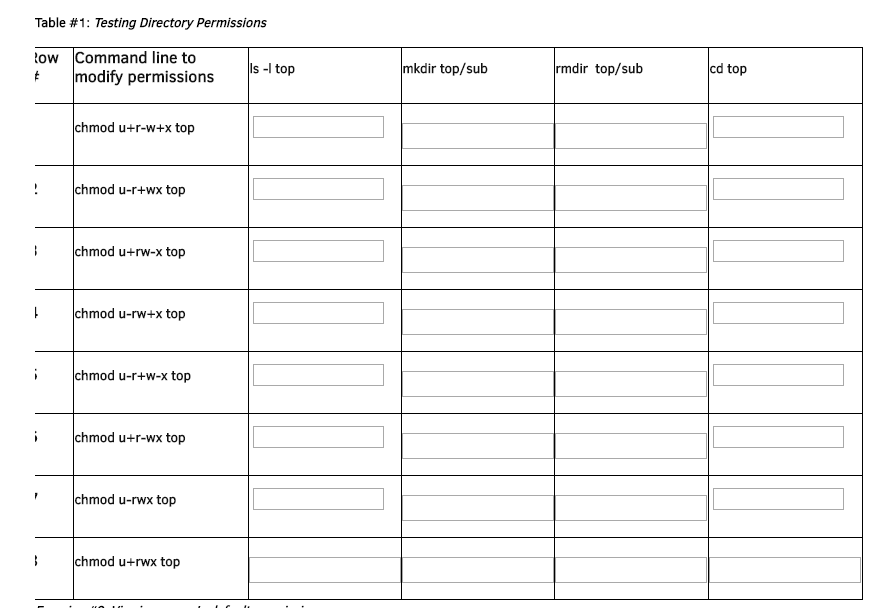
Table #1: Testing Directory Permissions ow Command line to tmodify permissions Is - top mkdir top/sub mdir top/sub cd top chmod u+r-w+x top chmod u-r+wx top chmod u+rw-x top chmod u-rw+x top chmod u-r+w-x top chmod u+r-wx top chmod u-rwx top chmod u+rwx top
Step by Step Solution
There are 3 Steps involved in it

Get step-by-step solutions from verified subject matter experts
 Study Help