







Question: This is Java GUI programming of Picture Slider. Please follow all of rewuirements.. Requirements: 1. Design and implement a Picture Slider. The main window is
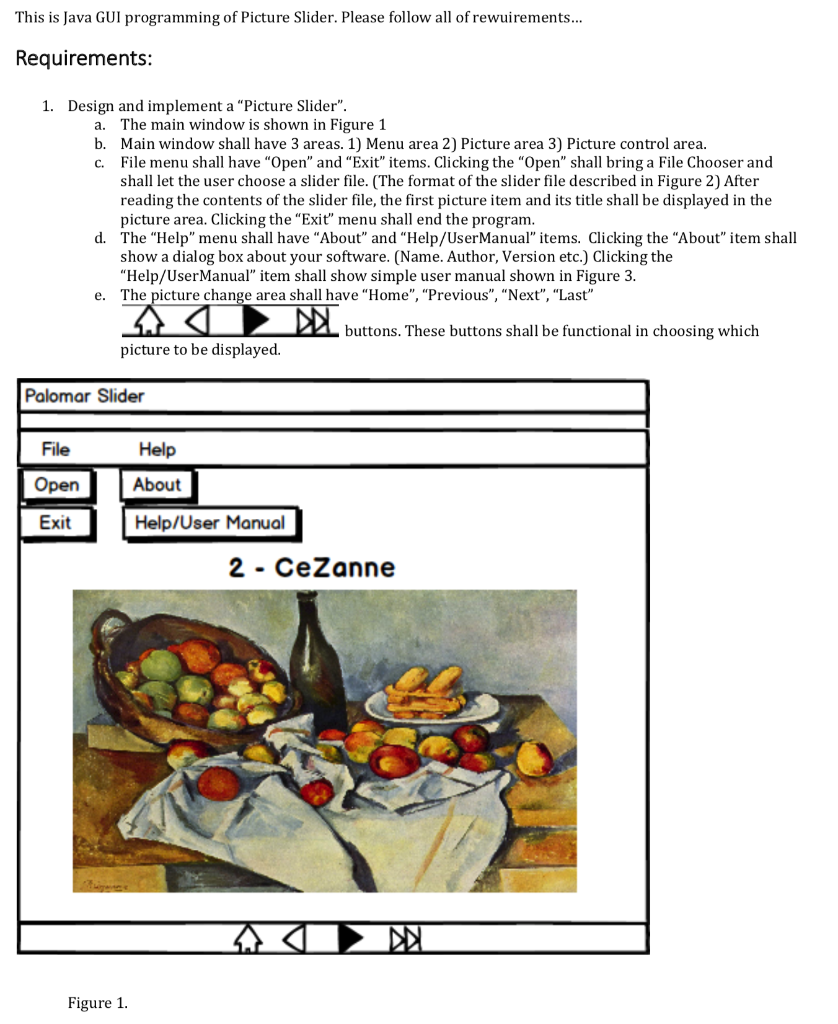
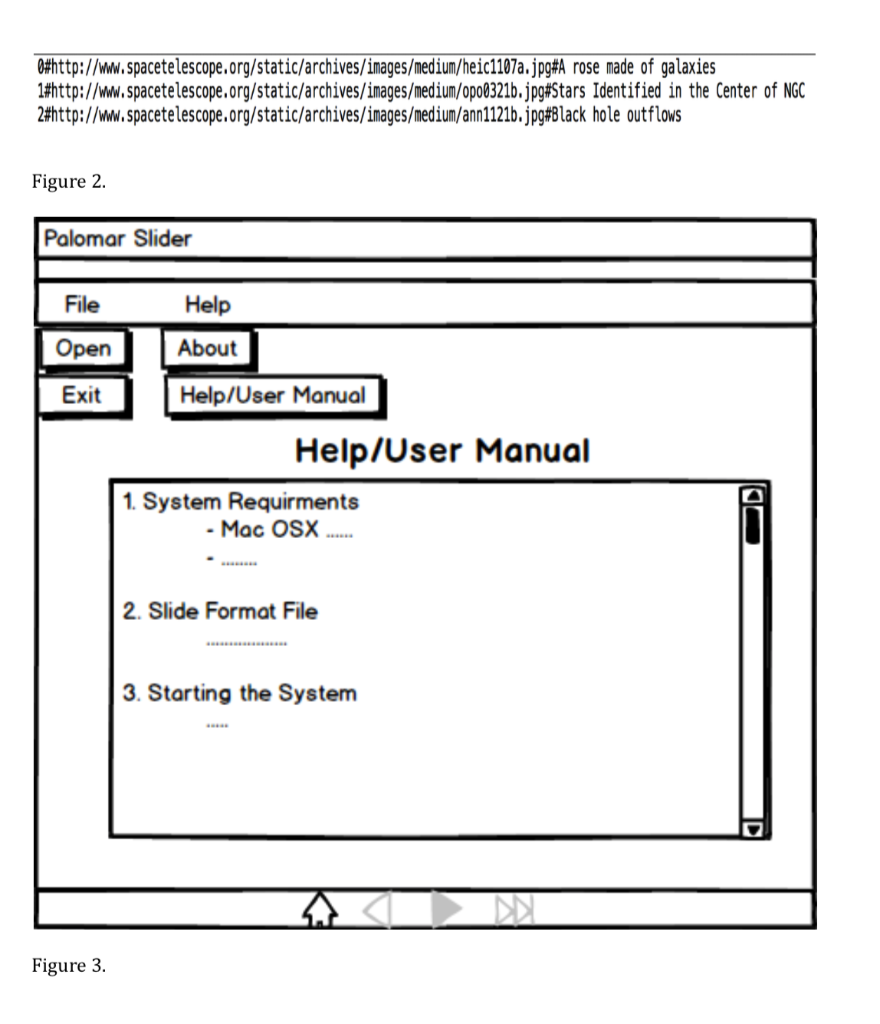
This is Java GUI programming of Picture Slider. Please follow all of rewuirements.. Requirements: 1. Design and implement a "Picture Slider". The main window is shown in Figure 1 Main window shall have 3 areas. 1) Menu area 2) Picture area 3) Picture control area. File menu shall have "Open" and "Exit" items. Clicking the "Open" shall bring a File Chooser and shall let the user choose a slider file. (The format of the slider file described in Figure 2) After reading the contents of the slider file, the first picture item and its title shall be displayed in the picture area. Clicking the "Exi" menu shall end the program. a. b. c. d. The "Help" menu shall have "About" and "Help/UserManual" items. Clicking the "About" item shall show a dialog box about your software. (Name. Author, Version etc.) Clicking the "Help/UserManual" item shall show simple user manual shown in Figure 3. e. The picture change area shall have "Home", "Previous", "Next", "Last" buttons. These buttons shall be functional in choosing which picture to be displayed. Palomar Slider File Help Exit Help/User Manual 2 - CeZanne Figure 1 Whttp://www.spacetelescope.org/static/archives/images/medium/heic1107a.jpg#A rose made of galaxies http://www.spacetelescope.org/static/archives/images/medium/opo0321b.jpg#Stars Identified in the Center of NGC 2#http://www.spacetelescope.org/static/archives/images/medium/ann1121b.jpg#Black hole outflows Figure 2 Palomar Slider File Help Exit Help/User Manual Help/User Manual 1. System Requirments 2. Slide Format File 3. Starting the System Figure 3 This is Java GUI programming of Picture Slider. Please follow all of rewuirements.. Requirements: 1. Design and implement a "Picture Slider". The main window is shown in Figure 1 Main window shall have 3 areas. 1) Menu area 2) Picture area 3) Picture control area. File menu shall have "Open" and "Exit" items. Clicking the "Open" shall bring a File Chooser and shall let the user choose a slider file. (The format of the slider file described in Figure 2) After reading the contents of the slider file, the first picture item and its title shall be displayed in the picture area. Clicking the "Exi" menu shall end the program. a. b. c. d. The "Help" menu shall have "About" and "Help/UserManual" items. Clicking the "About" item shall show a dialog box about your software. (Name. Author, Version etc.) Clicking the "Help/UserManual" item shall show simple user manual shown in Figure 3. e. The picture change area shall have "Home", "Previous", "Next", "Last" buttons. These buttons shall be functional in choosing which picture to be displayed. Palomar Slider File Help Exit Help/User Manual 2 - CeZanne Figure 1 Whttp://www.spacetelescope.org/static/archives/images/medium/heic1107a.jpg#A rose made of galaxies http://www.spacetelescope.org/static/archives/images/medium/opo0321b.jpg#Stars Identified in the Center of NGC 2#http://www.spacetelescope.org/static/archives/images/medium/ann1121b.jpg#Black hole outflows Figure 2 Palomar Slider File Help Exit Help/User Manual Help/User Manual 1. System Requirments 2. Slide Format File 3. Starting the System Figure 3
Step by Step Solution
There are 3 Steps involved in it

Get step-by-step solutions from verified subject matter experts
 Study Help