







Question: This is lab 13 that needs to be edited: import java.util.Scanner; public class Main { //Created a class called student which contain name and grades
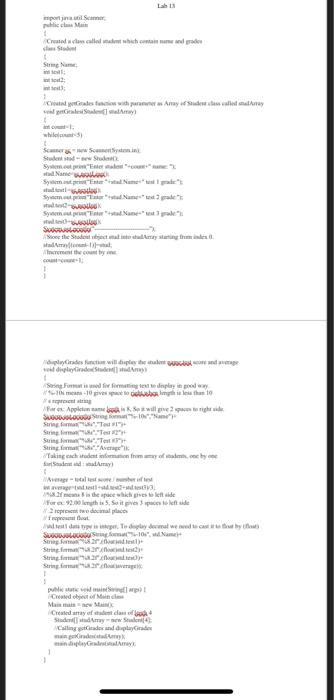
This is lab 13 that needs to be edited:
import java.util.Scanner;
public class Main { //Created a class called student which contain name and grades class Student { String Name; int test1; int test2; int test3; } //Created getGrades function with parameter as Array of Student class called studArray void getGrades(Student[] studArray) { int count=1; while(count { Scanner sc = new Scanner(System.in); Student stud = new Student(); System.out.print("Enter student "+count+" name: "); stud.Name=sc.nextLine(); System.out.print("Enter "+stud.Name+" test 1 grade:"); stud.test1=sc.nextInt(); System.out.print("Enter "+stud.Name+" test 2 grade:"); stud.test2=sc.nextInt(); System.out.print("Enter "+stud.Name+" test 3 grade:"); stud.test3=sc.nextInt(); System.out.println("--------------------------"); //Store the Student object stud into studArray starting from index 0. studArray[(count-1)]=stud; //Increment the count by one. count=count+1; } } //displayGrades function will display the student name,test score and average void displayGrades(Student[] studArray) { //String.Format is used for formatting text to display in good way. // %-10s means -10 gives space to right,when length is less than 10 // s represent string //For ex: Appleton name lenth is 8, So it will give 2 spaces to right side. System.out.println(String.format("%-10s","Name")+ String.format("%8s","Test #1")+ String.format("%8s","Test #2")+ String.format("%8s","Test #3")+ String.format("%8s","Average")); //Taking each student information from array of students, one by one for(Student std : studArray) { //Average = total test score / number of test int average=(std.test1+std.test2+std.test3)/3; //%8.2f means 8 is the space which gives to left side //For ex: 92.00 length is 5, So it gives 3 spaces to left side // .2 represent two decimal places // f represent float. //std.test1 data type is integer, To display decimal we need to cast it to float by (float) System.out.println(String.format("%-10s", std.Name)+ String.format("%8.2f",(float)std.test1)+ String.format("%8.2f",(float)std.test2)+ String.format("%8.2f",(float)std.test3)+ String.format("%8.2f",(float)average)); } } public static void main(String[] args) { //Created object of Main class Main main = new Main(); //Created array of student class of lenth 4 Student[] studArray = new Student[4]; //Calling getGrades and displayGrades main.getGrades(studArray); main.displayGrades(studArray); } }
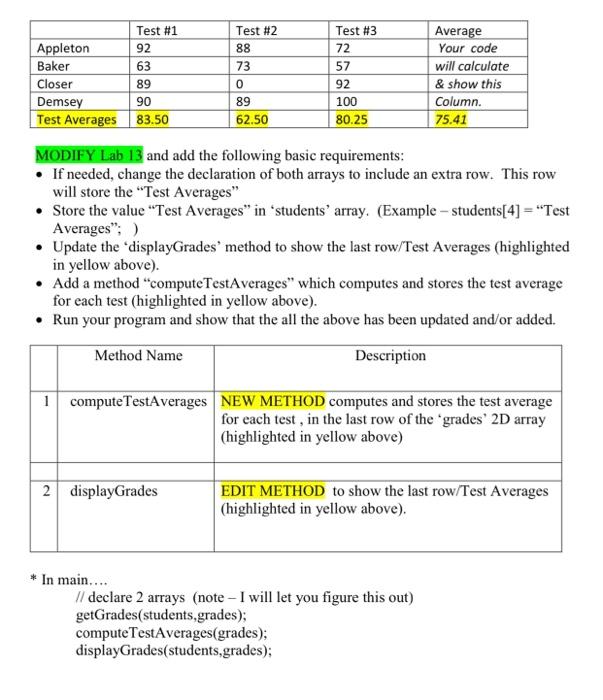
Test #3 72 Test #1 Appleton 92 Baker 63 Closer 89 Demsey 90 Test Averages 83.50 Test #2 88 73 0 89 62.50 57 92 100 80.25 Average Your code will calculate & show this Column. 75.41 MODIFY Lab 13 and add the following basic requirements: If needed, change the declaration of both arrays to include an extra row. This row will store the "Test Averages" Store the value "Test Averages" in "students' array. (Example - students[4] = "Test Averages": ) Update the displayGrades' method to show the last row/Test Averages (highlighted in yellow above). Add a method "computeTestAverages which computes and stores the test average for each test (highlighted in yellow above). Run your program and show that the all the above has been updated and/or added. Method Name Description 1 computeTestAverages NEW METHOD computes and stores the test average for each test, in the last row of the grades' 2D array (highlighted in yellow above) 2 displayGrades EDIT METHOD to show the last row/Test Averages (highlighted in yellow above). * In main.... // declare 2 arrays (note - I will let you figure this out) getGrades(students,grades); computeTestAverages(grades); displayGrades(students,grades); Creo collecharodon Catedrales with me. Any de called me alisema Sudenko System.Enemi Name www ym Sy. tud SAL See the State attestato they lides fonction will oplevelse dipladet Som de play - 10 balles 10 fare bewillige SUBS Sarma Suring String Wakiachademam. coby for det andra me is the peche for 92.005. So it goede pedala Watt W study was they SUOS102" Stregar Stringar String.fr putempt Created or Me Malowa Created any of male dans Sudedame Calling trade and uply Grade dates Amy Test #3 72 Test #1 Appleton 92 Baker 63 Closer 89 Demsey 90 Test Averages 83.50 Test #2 88 73 0 89 62.50 57 92 100 80.25 Average Your code will calculate & show this Column. 75.41 MODIFY Lab 13 and add the following basic requirements: If needed, change the declaration of both arrays to include an extra row. This row will store the "Test Averages" Store the value "Test Averages" in "students' array. (Example - students[4] = "Test Averages": ) Update the displayGrades' method to show the last row/Test Averages (highlighted in yellow above). Add a method "computeTestAverages which computes and stores the test average for each test (highlighted in yellow above). Run your program and show that the all the above has been updated and/or added. Method Name Description 1 computeTestAverages NEW METHOD computes and stores the test average for each test, in the last row of the grades' 2D array (highlighted in yellow above) 2 displayGrades EDIT METHOD to show the last row/Test Averages (highlighted in yellow above). * In main.... // declare 2 arrays (note - I will let you figure this out) getGrades(students,grades); computeTestAverages(grades); displayGrades(students,grades); Creo collecharodon Catedrales with me. Any de called me alisema Sudenko System.Enemi Name www ym Sy. tud SAL See the State attestato they lides fonction will oplevelse dipladet Som de play - 10 balles 10 fare bewillige SUBS Sarma Suring String Wakiachademam. coby for det andra me is the peche for 92.005. So it goede pedala Watt W study was they SUOS102" Stregar Stringar String.fr putempt Created or Me Malowa Created any of male dans Sudedame Calling trade and uply Grade dates Amy
Step by Step Solution
There are 3 Steps involved in it

Get step-by-step solutions from verified subject matter experts
 Study Help