







Question: This is Matlab. Please I need answer with comments. In this part, you are going to create a very similar game by constructing two command
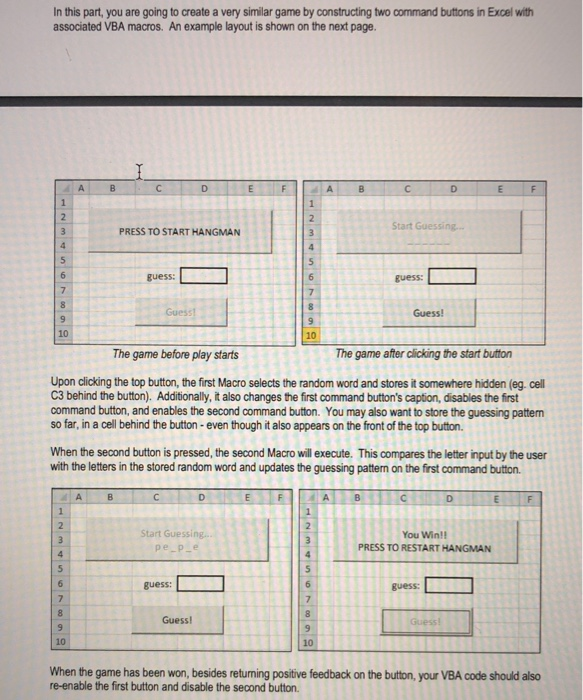
In this part, you are going to create a very similar game by constructing two command buttons in Excel with associated VBA macros. An example layout is shown on the next page. Start Guessing. PRESS TO START HANGMAN guess guess Guess! 10 10 The game before play starts The game after clicking the start button Upon clicking the top button, the first Macro selects the random word and stores it somewhere hidden (eg. cell C3 behind the button). Additionally, it also changes the first command button's caption, disables the first command button, and enables the second command button. You may also want to store the guessing pattern so far, in a cell behind the button-even though it also appears on the front of the top button. When the second button is pressed, the second Macro will execute. This compares the letter input by the user with the letters in the stored random word and updates the guessing patterm on the first command button Start Guessing.. pe_p_e You Win! PRESS TO RESTART HANGMAN ] guess: guess: Guess! Guess! 10 10 When the game has been won, besides returning positive feedback on the buton, your VBA code should also re-enable the first button and disable the second button. In this part, you are going to create a very similar game by constructing two command buttons in Excel with associated VBA macros. An example layout is shown on the next page. Start Guessing. PRESS TO START HANGMAN guess guess Guess! 10 10 The game before play starts The game after clicking the start button Upon clicking the top button, the first Macro selects the random word and stores it somewhere hidden (eg. cell C3 behind the button). Additionally, it also changes the first command button's caption, disables the first command button, and enables the second command button. You may also want to store the guessing pattern so far, in a cell behind the button-even though it also appears on the front of the top button. When the second button is pressed, the second Macro will execute. This compares the letter input by the user with the letters in the stored random word and updates the guessing patterm on the first command button Start Guessing.. pe_p_e You Win! PRESS TO RESTART HANGMAN ] guess: guess: Guess! Guess! 10 10 When the game has been won, besides returning positive feedback on the buton, your VBA code should also re-enable the first button and disable the second button
Step by Step Solution
There are 3 Steps involved in it

Get step-by-step solutions from verified subject matter experts
 Study Help