







Question: This is my code on MatLab, but basically I am having trouble with the fprintf() statement. In this example, heiResult = [158, 170] and wgtResult
This is my code on MatLab, but basically I am having trouble with the fprintf() statement.
In this example, heiResult = [158, 170] and wgtResult = [77, 112] and I want to display them like:
Height: 158 Weight: 77
Height: 170 Weight: 112
But it appears the print statement is displaying all of the heiResult vector numbers, then all of the wgtResult numbers. How do I make them alternate in the display? Thanks!
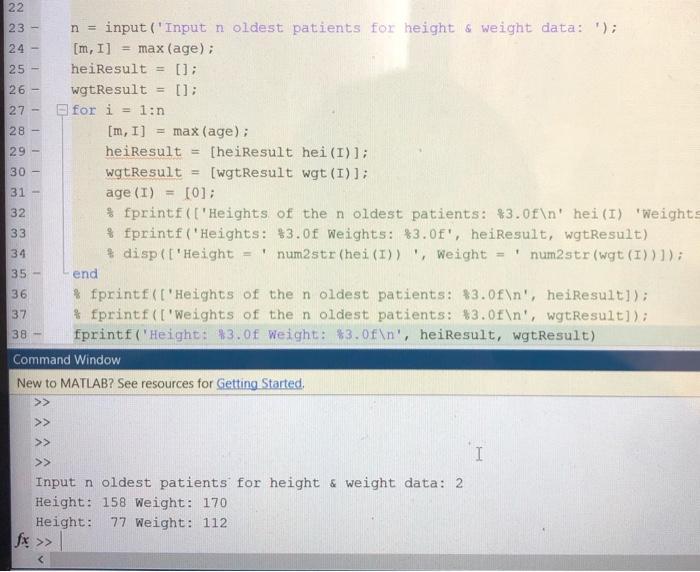
26 - 27 28 - 30 - 22 23 - n = input('Input n oldest patients for height weight data: '); 24 - [m, 1] = max (age); 25 - heiResult = 0; wgtResult = []; for i = 1:n [m, I] = max (age); 29 - heiResult = [heiResult hei (I)]; wgtResult [wgt Result wgt (I)]; 31 - age (I) = [0]; fprintf(['Heights of the n oldest patients: $3.0f ' hei(I) 'Weights fprintf("Heights: $3.0f Weights: $3.0f", heiResult, wgtResult) disp(['Height num2str (hei (I)), Weight = ' num2str(wgt (I))]); 35 - end * fprintf(['Heights of the n oldest patients: *3.0f ', heiResult]); 37 fprintf(['Weights of the n oldest patients: $3.0f ', wgtResult]); 38 fprintf("height: $3.0f weight: $3.0f ', heiResult, wgtResult) Command Window New to MATLAB? See resources for Getting Started, 32 34 - >> >> I >> Input n oldest patients for height & Weight data: 2 Height: 158 Weight: 170 Height: 77 Weight: 112
Step by Step Solution
There are 3 Steps involved in it

Get step-by-step solutions from verified subject matter experts
 Study Help