







Question: This is my code so far. Shopping Cart Manager: import java.util.Scanner; public class ShoppingCartManager { public static void main(String[] args) { String customerName, currentDate; Scanner
![public class ShoppingCartManager { public static void main(String[] args) { String customerName,](https://dsd5zvtm8ll6.cloudfront.net/si.experts.images/questions/2024/09/66f05db1875f8_65766f05db10733a.jpg)
This is my code so far.
Shopping Cart Manager:
import java.util.Scanner;
public class ShoppingCartManager { public static void main(String[] args) { String customerName, currentDate; Scanner sc = new Scanner(System.in); System.out.print("Enter Customer's Name:"); customerName = sc.nextLine().toString().trim(); System.out.println(); System.out.print("Enter Today's Date:"); currentDate = sc.nextLine().toString().trim(); System.out.println();
ShoppingCart cart = new ShoppingCart(customerName, currentDate); System.out.println("Customer Name:" + cart.getcustomerName()); System.out.println("Today's Date:" + ShoppingCart.getcurrentDate()); printMenu(cart); }
/** * Prints the menu, and builds the shopping cart * object passed in as parameter */ private static void printMenu(ShoppingCart cart) { Scanner sc = new Scanner(System.in); char choice = 'z'; System.out.println("MENU:"); System.out.println("a - Add Item To Cart"); System.out.println("d - Remove Item from Cart"); System.out.println("c - Change Item Quantity"); System.out.println("i - Output Items' Description"); System.out.println("o - Output Shopping Cart"); System.out.println("q - Quit"); System.out.print("Enter an option:"); choice = sc.nextLine().trim().charAt(0); while(choice != 'q') { if(choice != 'a' && choice != 'd' && choice != 'c' && choice != 'i' && choice != 'o') { //An invalid choice is made //Prompt for choice again System.out.print("Enter an option:"); choice = sc.nextLine().trim().charAt(0); continue; } else { switch (choice) { case 'o': { System.out.println("OUTPUT SHOPPING CART"); cart.printTotal(); break; }
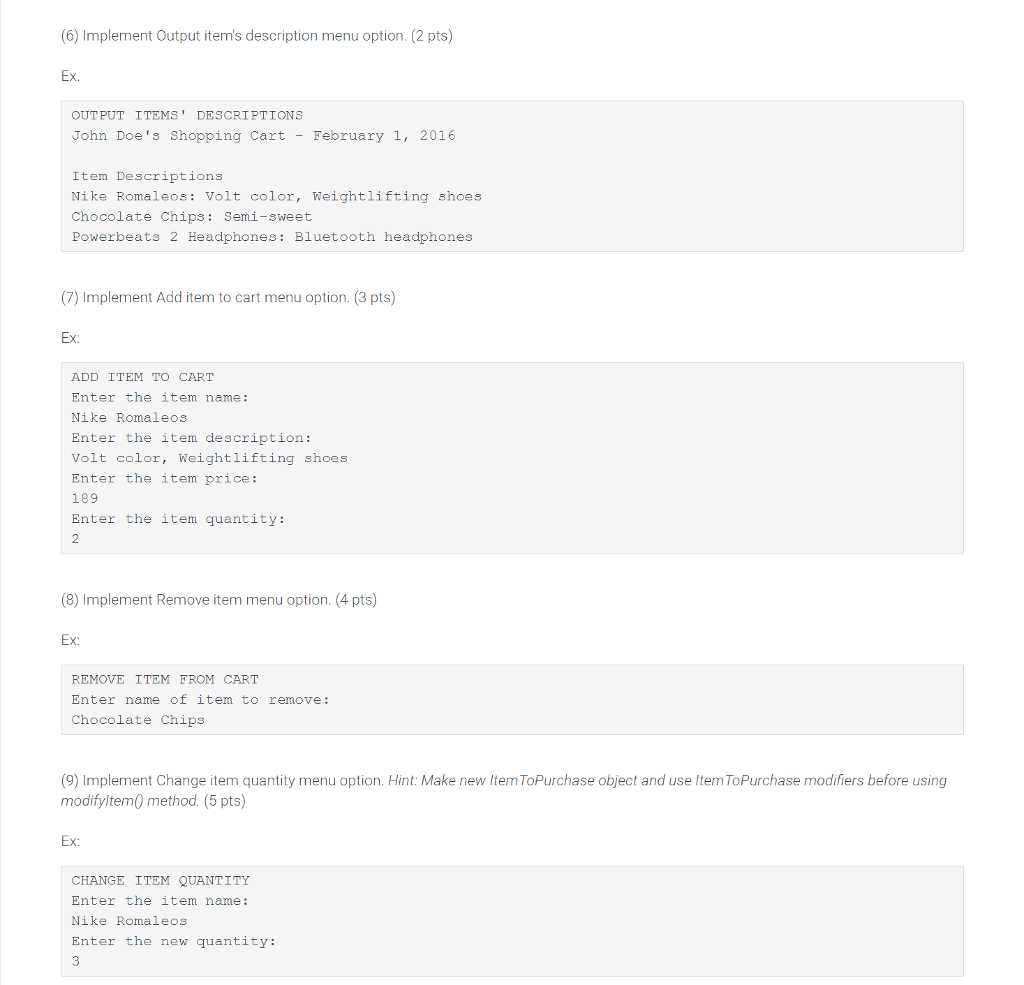
case 'i': { System.out.println("OUTPUT ITEMS' DESCRIPTIONS"); cart.printDescriptions(); break; }
case 'a': { String name, desc; int price, qty; System.out.println("ADD ITEM TO CART"); System.out.println("Enter Item name:"); name = sc.nextLine().trim().toString(); System.out.println("Enter Item description:"); desc = sc.nextLine().trim().toString(); System.out.println("Enter Item price:"); price = sc.nextInt(); sc.nextLine(); System.out.println("Enter Item quantity:"); qty = sc.nextInt(); sc.nextLine();
ItemToPurchase itemToPurchase = new ItemToPurchase(name, desc, qty, price); cart.addItem(itemToPurchase); break; }
case 'd': { String itemToRemove; System.out.println("REMOVE ITEM FROM CART"); System.out.println("Enter name of item to remove:"); itemToRemove = sc.nextLine().trim().toString(); cart.removeItem(itemToRemove); break; }
case 'c': { String itemName; int itemQty; System.out.println("CHANGE ITEM QUANTITY"); System.out.println("Enter item name:"); itemName = sc.nextLine().trim().toString(); System.out.println("Enter the new quantity:"); itemQty = sc.nextInt(); sc.nextLine();
ItemToPurchase item = new ItemToPurchase(itemName, "none", itemQty, 0); cart.modifyItem(item); break; } } System.out.print("Enter an option:"); choice = sc.nextLine().trim().charAt(0); } } } }
ShoppingCart:
import java.util.ArrayList;
public class ShoppingCart { // Private fields private String customerName; private String currentDate; private ArrayList
public ShoppingCart() { this.customerName = "none"; this.currentDate = "January 1, 2016"; cartItems = new ArrayList
public ShoppingCart(String customerName, String currentDate) { this.customerName = customerName; this.currentDate = currentDate; cartItems = new ArrayList
public String getCustomerName() { return customerName; }
public String getCurrentDate() { return currentDate; }
public void addItem(ItemToPurchase item) { cartItems.add(item); }
public void removeItem(String itemName) { boolean found = false; for (int i = 0; i
public int getNumItemsInCart() { int numItems = 0; for (ItemToPurchase item : cartItems) { numItems += item.getItemQuantity(); } return numItems; }
public int getCostOfCart() { int ttlCost = 0; for (ItemToPurchase item : cartItems) { ttlCost += item.getItemQuantity() * item.getItemPrice(); } return ttlCost; }
public void printTotal() { if (cartItems.size() == 0) System.out.println("SHOPPING CART IS EMPTY"); else { System.out.println(this.customerName + "'s" + " Shopping Cart - " + this.currentDate); System.out.println("Number of Items: " + this.cartItems.size()); for (ItemToPurchase item : cartItems) { item.printItemCost(); } System.out.println("Total: $" + getCostOfCart()); } }
public void printDescriptions() { if (cartItems.size() == 0) System.out.println("SHOPPING CART IS EMPTY"); else { System.out.println(this.customerName + "'s " + "Shopping Cart - " + this.currentDate); System.out.println("Item Descriptions"); for (ItemToPurchase item : cartItems) { item.printItemDescription(); } } } }
ItemsToPurchase:
public class ItemToPurchase { // Declare the private fields private String itemName; private int itemPrice; private int itemQuantity; private String itemDescription;
// DEFAULT CONSTRUCTOR public ItemToPurchase() { this.itemName = "none"; this.itemPrice = 0; this.itemQuantity = 0; this.itemDescription = "none"; }
public ItemToPurchase(String itemName, int itemPrice, int itemQuantity, String itemDescription) { this.itemName = itemName; this.itemPrice = itemPrice; this.itemQuantity = itemQuantity; this.itemDescription = itemDescription; }
public String getItemName() { return itemName; }
public void setItemName(String itemName) { this.itemName = itemName; }
public int getItemPrice() { return itemPrice; }
public void setItemPrice(int itemPrice) { this.itemPrice = itemPrice; }
public int getItemQuantity() { return itemQuantity; }
public void setItemQuantity(int itemQuantity) { this.itemQuantity = itemQuantity; }
public String getItemDescription() { return itemDescription; }
public void setItemDescription( String itemDescription) { this.itemDescription = itemDescription; }
public void printItemCost() { System.out.println(this.itemName + " " + this.itemQuantity + " @ $" + this.itemPrice + " = $" + (this.itemQuantity * this.itemPrice)); }
public void printItemDescription() { System.out.println(this.itemName + ": " + this.itemDescription); }
}
I cannot seem to get this to work. The program that assess it's accuracy is extremely strict. Cannot import any utilities other than the ones I have.
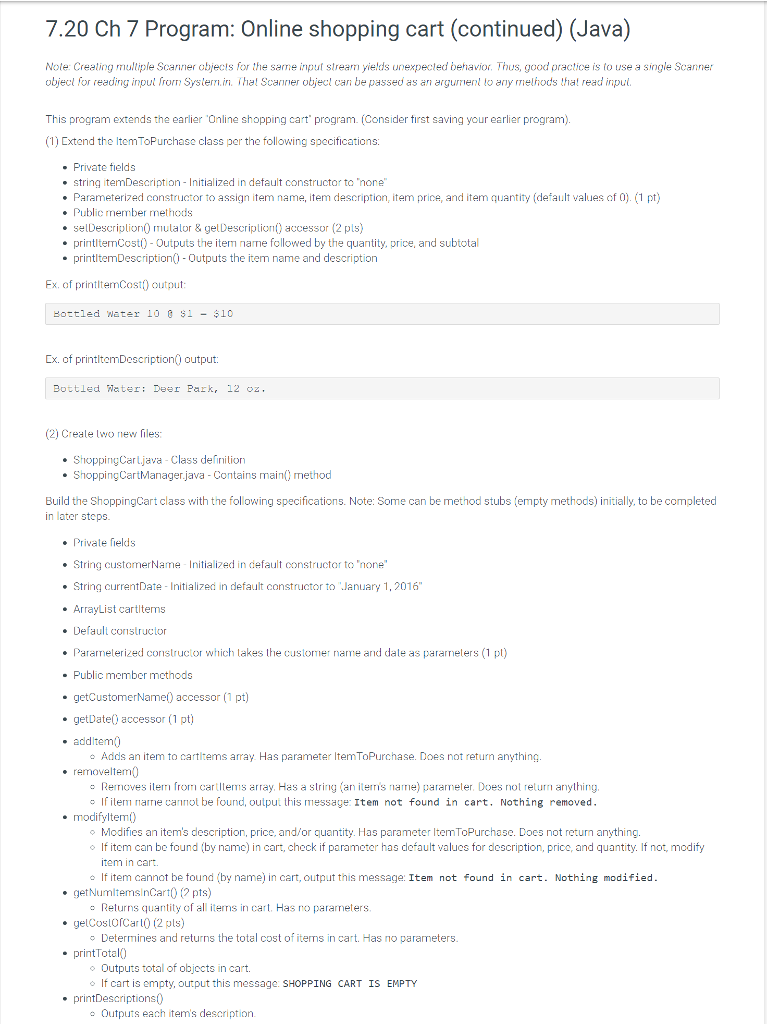
7.20 Ch 7 Program: Online shopping cart (continued) (Java) Note: Crealing muliple Scanner objecis for the sarne input strea yields unexpecled behavior. Thus, good practice is to use a single Scanner objecl for reading inpul from Systein. Thal Scanner objecl can be passed as an argumenl lo any melhods tha! read inpul This program extends the earlier Online shopping cart program. (Consider tirst saving your earlier program) (1) Extend the ItemToPurchase class per the following specifications .Private tields . string itemDescription- Initialized in default constructor ta 'hone . Parameterized constructor to assign item name, item d scription, item prin , and item quantity (derault values of 0) (1 pt) . Public member method:s .selDescriplionmulalor& gelDescriplion accessor (2 pls) printltemCost)- Outputs the item nane followed by the quantity, price, and subtotal printltemDescription-Outputs the item name and description Ex. of printltenCost output Eottled water 10 1 -10 Cx. of printltemDescription) output Bottled Nater D Park, 12 oz (2) Creale lwo new files ShoppingCarljava . Class definition ShoppingCartManagerjava Contains main) method Build the ShoppingCart class with the following specifications. Note: Some can be method stubs (empty methods) initially, to be completerd in later steps . Private fields .String customerName Initialized in default constuctor to 'none" . String crrentDate Initialized in default constructor to January 1, 2016 .ArrayList cartliterms . Default constructor . Paramelried constructor which lakes the customer name ad dale as pararnelers (1 pl) . Public member mcthods .getCustomerName) accessor (1 pt) . getDate0 accessor (1 pt) . additem . removeltem Adds an item to cartitems array Has parameter ltemToPurchase. Does not return anything. Rernoves item from cart llems array. Has a string (an iiris name) pararreter Does not return anything. Inarie canot be found, outpui this message: Item not found in cart, Nothing removed modifyltem) o Modifies an item's description, price, and/or quantity. Has parameter ItemToPurchase. Docs not return anything. If item can be found (by name) in cart, check if parameter has default values for description, price, and quantity. If not, modify item in cart. If item cannot be tound (by name) in cart, output this message: Item not found in cart. Nothing modified . getNumltemsinCart0(2 pts) Returns quantity of all iterns in cart. Has no pararnelers. .gelCoslOCar0 2 pls) Determines and returns the total cost of iterns in cart. Has no parameters printTotal0 Outputs total of objects in cart. If cart is empty, output this message. SHOPPING CART IS EMPTY printDescriptions) Outputs each items description
Step by Step Solution
There are 3 Steps involved in it

Get step-by-step solutions from verified subject matter experts
 Study Help