







Question: This is my last assignment code: // function to show the greetings message function show() { // getting entered username from the input box and
This is my last assignment code:
// function to show the greetings message
function show()
{
// getting entered username from the input box and storing in name variable
var name = document.getElementById('name').value;
// calling greeting function to generate message
greeting(name);
// calling footer function to generate footer after the getting user name input
printFooter()
}
// function to generate greeting message
function greeting(name="Guest")
{
// displaying greeting message in the paragraph with id welcome
document.getElementById("welcome").innerHTML = "welcome "+name;
}
// function to print footer with current date
function printFooter()
{
// storing date in dd/mm/yy format in variable d
let d = Date().slice(4,15);
// displaying this date in the html
document.getElementById('date').innerHTML = d;
}
// function to generate random integers and create randomImage names
function randomImage()
{
// getting random integers in the range 1 to 5
let n = Math.floor(Math.random() * 5) + 1;
// returning the image name (Nh, you have to change the name of images, I do not have it, so just download some images from google, and change it) return "./images/picture"+n+".jpg";
}
// function to change image on click
function changeImage()
{
// setting image source to the result of randomImage function
document.getElementById('image').src = randomImage();
}
// by default showing any image
document.getElementById('image').src = randomImage();
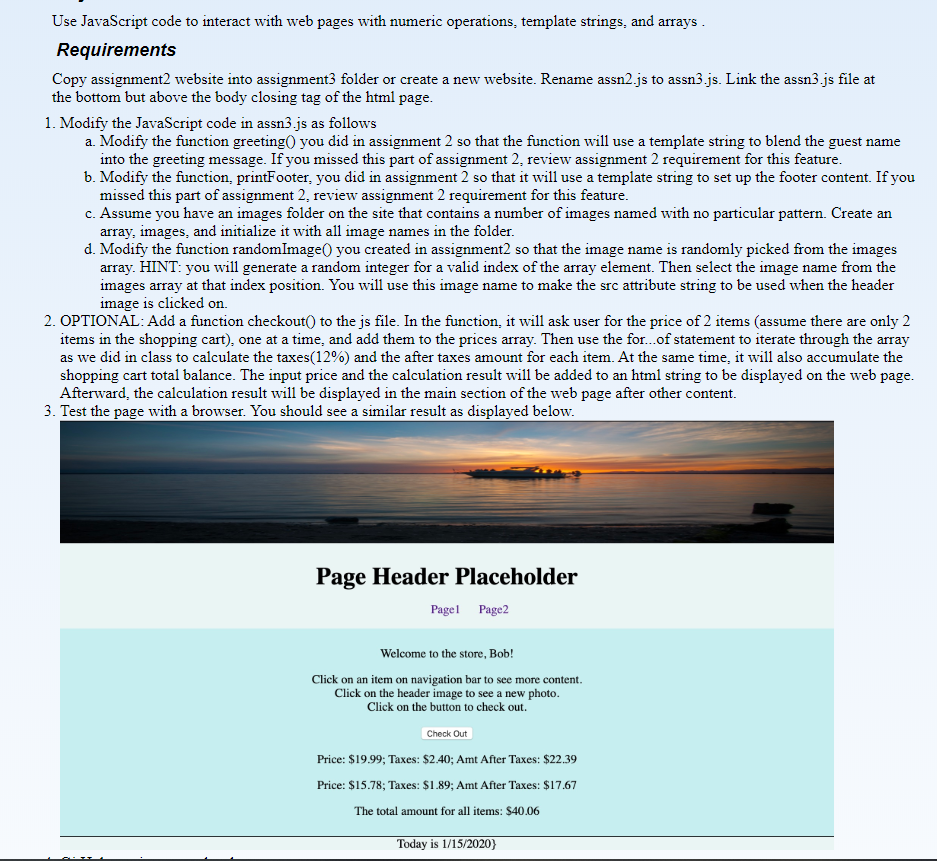 sThis is my html code:
This is my HTLM code
Page Header Placeholder
- Page1
- Page2
Main Content Area
Enter your name:
Today is :
Use JavaScript code to interact with web pages with numeric operations, template strings, and arrays. Requirements Copy assignment2 website into assignment3 folder or create a new website. Rename assn2.js to assn3.js. Link the assn3.js file at the bottom but above the body closing tag of the html page. 1. Modify the JavaScript code in assn3.js as follows a. Modify the function greeting you did in assignment 2 so that the function will use a template string to blend the guest name into the greeting message. If you missed this part of assignment 2. review assignment 2 requirement for this feature. b. Modify the function, printFooter, you did in assignment 2 so that it will use a template string to set up the footer content. If you missed this part of assignment 2. review assignment 2 requirement for this feature. c. Assume you have an images folder on the site that contains a number of images named with no particular pattern. Create an array, images, and initialize it with all image names in the folder. d. Modify the function randomImage you created in assignment2 so that the image name is randomly picked from the images array. HINT: you will generate a random integer for a valid index of the array element. Then select the image name from the images array at that index position. You will use this image name to make the src attribute string to be used when the header image is clicked on 2. OPTIONAL: Add a function checkout to the js file. In the function, it will ask user for the price of 2 items (assume there are only 2 items in the shopping cart), one at a time, and add them to the prices array. Then use the for...of statement to iterate through the array as we did in class to calculate the taxes(12%) and the after taxes amount for each item. At the same time, it will also accumulate the shopping cart total balance. The input price and the calculation result will be added to an html string to be displayed on the web page. Afterward, the calculation result will be displayed in the main section of the web page after other content. 3. Test the page with a browser. You should see a similar result as displayed below. Page Header Placeholder Pagel Page2 Welcome to the store, Bob! Click on an item on navigation bar to see more content. Click on the header image to see a new photo. Click on the button to check out. Check Out Price: $19.99; Taxes: $2.40; Amt After Taxes: $22.39 Price: $15.78; Taxes: $1.89; Amt After Taxes: $17.67 The total amount for all items: $40.06 Today is 1/15/2020)Step by Step Solution
There are 3 Steps involved in it

Get step-by-step solutions from verified subject matter experts
 Study Help