







Question: # this is the class representing our data structure class Grade: course = # the course code student = # student ID grade
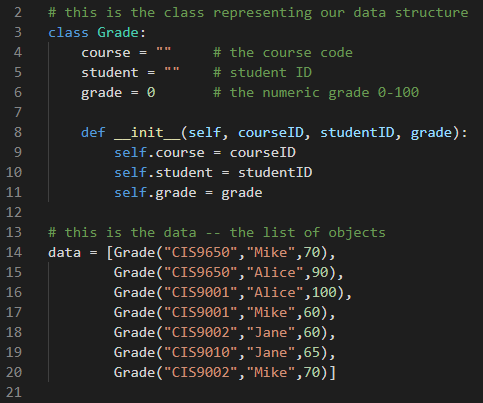
# this is the class representing our data structure class Grade: course = "" # the course code student = "" # student ID grade = 0 # the numeric grade 0-100 def __init__(self, courseID, studentID, grade): self.course = courseID self.student = studentID self.grade = grade # this is the data -- the list of objects data = [Grade("CIS9650","Mike",70), Grade("CIS9650","Alice",90), Grade("CIS9001","Alice",100), Grade("CIS9001","Mike",60), Grade("CIS9002","Jane",60), Grade("CIS9010","Jane",65), Grade("CIS9002","Mike",70)]
# I will use 2 simple helper functions
# 1- this function takes a list of numbers and returns the average def avg(numbers): return sum(numbers) / len(numbers)
# 2- this function takes a list of items (numbers or string), # returns the unique list where the duplicates are removed def unique(items): uniqueItems = [] for item in items: if item not in uniqueItems: uniqueItems.append(item) return uniqueItems
Q1: Report each course and the # of registered students for that course. Q2: Report course name along with average grade on each course Q3: Report student name along with average grade on each student Q4: Find students whose average grade is above the overall average grade? Q5: Identify the 2 students who have taken the most courses together
# this is the class representing our data structure 3 class Grade: 4 course" student" grade0 # the course code # student ID 6 the numeric grade 0-100 def init(self, courseID, studentID, grade): 8 9 10 self.course-courseID self.studentstudentID self.grade grade 12 13 # this is the data -- the list of objects 14 data [Grade("CIS9650", "Mike",70), 15 16 Grade("CIS9650", "Alice",90), Grade("CIS9001", "Alice",100), Grade("CIS9001", "Mike",60), Grade("CIS9002", "Jane",60), Grade("CIS9010", "Jane",65), Grade("CIS9002", "Mike",70)] 18 19 20 21
Step by Step Solution
There are 3 Steps involved in it

Get step-by-step solutions from verified subject matter experts
 Study Help