







Question: This is the Code for sorting bubble sort insertion sort and selection sort I want you to plz read this code and tell me how
This is the Code for sorting bubble sort insertion sort and selection sort I want you to plz read this code and tell me how much each sort would run its outer loops and inner loops
from random import randint
def GenerateRandom(n):
array = []
for _ in range(n):
array.append(randint(0,n));
return array
def bubble_sort(nums):
swapped = True
while swapped:
swapped = False
for i in range(len(nums) - 1):
if nums[i] > nums[i + 1]:
nums[i], nums[i + 1] = nums[i + 1], nums[i]
swapped = True
return nums
def selection_sort(nums):
for i in range(len(nums)):
lowest_value_index = i
for j in range(i + 1, len(nums)):
if nums[j]
lowest_value_index = j
nums[i], nums[lowest_value_index] = nums[lowest_value_index], nums[i]
return nums
def insertion_sort(nums):
for i in range(1, len(nums)):
item_to_insert = nums[i]
j = i - 1
while j >= 0 and nums[j] > item_to_insert:
nums[j + 1] = nums[j]
j -= 1
nums[j + 1] = item_to_insert
return nums
def SortComparision(n):
array = GenerateRandom(n)
start_time = time.time();
bubble_sort(array)
x = (time.time() - start_time)
start_time = time.time();
sorteds = insertion_sort(array)
y = (time.time() - start_time)
start_time = time.time();
selection_sort(array)
z = (time.time() - start_time)
print("Time comparison for 100 numbers:")
print("Bubble Sort: "+ str(x) +" seconds")
print("Insertion Sort: "+ str(y) +" seconds")
print("Selection Sort: "+ str(z) +" seconds")
SortComparision(100);
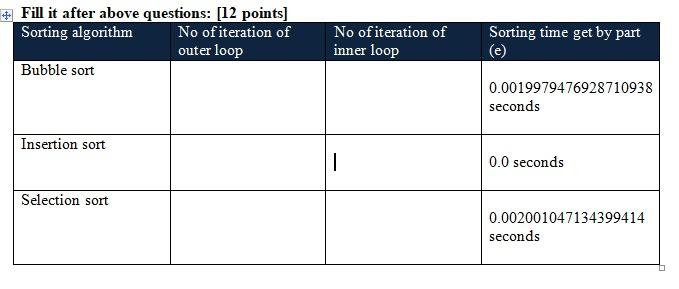
# Fill it after above questions: (12 points] Sorting algorithm No of iteration of outer loop Bubble sort No of iteration of inner loop Sorting time get by part 0.0019979476928710938 seconds Insertion sort 1 0.0 seconds Selection sort 0.002001047134399414 seconds
Step by Step Solution
There are 3 Steps involved in it

Get step-by-step solutions from verified subject matter experts
 Study Help