







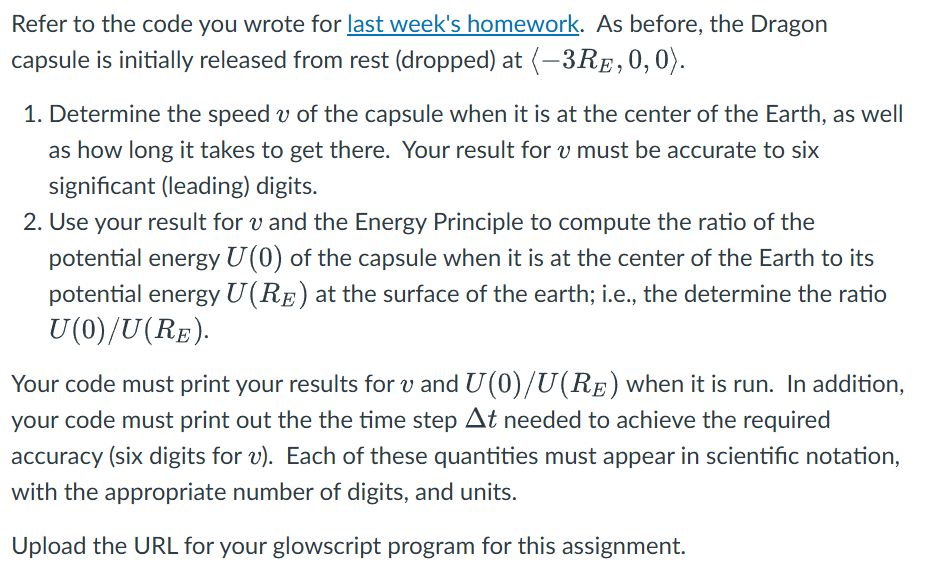
Question: This is the code from previous class. Without using threshold values, answer 1 and elaborate on result from 1 to code 2 using energy principles.
This is the code from previous class. Without using threshold values, answer and elaborate on result from to code using energy principles. Please checkif possible on glowscript vpython if it works. Web VPython
# CONSTANTS
G E # Nmkg gravitational constant
REE
mEarth E # kg mass of the Earth
mcraft # kg mass of the Dragon capsule
deltat # s timestep for iterative calculation
RE E # m radius of the Earth
# OBJECTS AND INITIAL VALUES
Earth sphereposvector radiusE colorcolor.cyan, opacity # Make Earth transparent
craft sphereposvectorEarthradius, radiusE colorcolor.yellow
trail curvecolorcolor.white # trail object to show the craft's trajectory
# Initially, the capsule is at rest
vcraft vector # ms initial velocity at rest
pcraft mcraft vcraft # Initial momentum
# Arrow representing momentum
#scalefactor Earth.radiuspcraftmag# Arbitrary scaling factor for visualization
scalefactor
momentumarrow arrowposcraft.pos,axispcraft,colorcolor.magenta
# ITERATIVE CALCULATIONS
t # initial time
tfinal # simulate for one day in seconds
while t tfinal:
rate # animation rate frames per second
# Position vector from Earth's center to the capsule
r craft.pos Earth.pos
rmag magr # Magnitude of r distance from center of the Earth
rhat normr # Unit vector in the direction of r
if rmag RE: # When capsule is inside the Earth
# Gravitational force inside the Earth
Fmag G mEarth mcraft rmag Earthradius
else: # Outside the Earth not applicable for this problem, but keeping it general
Fmag G mEarth mcraft rmag
FG Fmag rhat # Gravitational force vector directed towards Earth's center
# Update momentum and position
pcraft pcraft FG deltat # Update momentum
craft.pos craft.pos pcraft mcraft deltat # Update position
# Update trail and momentum arrow
trail.appendposcraft.pos # Add new point to the trail
momentumarrow.axis pcraft scalefactor # Update arrow axis to reflect momentum
momentumarrow.pos craft.pos # Update arrow position to follow the capsule
# Update time
t t deltat
# Stop the simulation once it reaches the other side of the Earth at RE
if rmag : # When it reaches the center or passes through
break
Step by Step Solution
There are 3 Steps involved in it
1 Expert Approved Answer
Step: 1 Unlock

Question Has Been Solved by an Expert!
Get step-by-step solutions from verified subject matter experts
Step: 2 Unlock
Step: 3 Unlock
 Study Help