







Question: This is the code he gave us and attached are the requirements. Can anyone help and explain how? I want to learn not just get
This is the code he gave us and attached are the requirements. Can anyone help and explain how? I want to learn not just get the answer. Thanks again!!!
-------------------------
Background
In class, we used a simple application to introduce socket programming. The behaviors of the application
are as follows:
1. client reads a line of characters (data) from its keyboard and sends data to server.
2. server receives the data and converts characters to uppercase.
3. server sends modified data to client; continue to run to serve other clients.
4. client receives modified data and displays line on its screen and then exits.
We assume that both the client and the server run on the same machine.
Python Socket Programming (using Python 3)
If we use UDP sockets, we have the following code:
Python code for the UDP client:
from socket import *
serverName = 'localhost'
serverPort = 5000
clientSocket = socket(AF_INET, SOCK_DGRAM)
message = input("Input a lowercase sentence: ")
clientSocket.sendto(message.encode(), (serverName, serverPort))
modifiedMessage, serverAddress = clientSocket.recvfrom(2048)
print(modifiedMessage.decode())
clientSocket.close()
Python code for the UDP server:
from socket import *
serverPort = 5000
serverSocket = socket(AF_INET, SOCK_DGRAM)
serverSocket.bind(('', serverPort))
print("The server is ready to receive.")
while True:
message, clientAddress = serverSocket.recvfrom(2048)
modifiedMessage = message.decode().upper()
print("message to be sent back: ")
print(modifiedMessage)
serverSocket.sendto(modifiedMessage.encode(), clientAddress)
If we use TCP sockets, we have the following code:
Python code for the TCP client
from socket import *
serverName = 'localhost'
serverPort = 5000
CSIT 340 Computer Networks
clientSocket = socket(AF_INET, SOCK_STREAM)
clientSocket.connect((serverName, serverPort))
sentence = input("Input a lowercase sentence: ")
clientSocket.send(sentence.encode())
modifiedSentence = clientSocket.recv(1024)
print(modifiedSentence.decode())
clientSocket.close()
Python code for the TCP server
from socket import *
serverPort = 5000
serverSocket = socket(AF_INET, SOCK_STREAM)
serverSocket.bind(('', serverPort))
serverSocket.listen(1)
print("The server is ready to receive.")
while True:
connectionSocket, addr = serverSocket.accept()
sentence = connectionSocket.recv(1024).decode()
capitalizedSentence = sentence.upper()
connectionSocket.send(capitalizedSentence.encode())
connectionSocket.close()
Java Socket Programming
If we use UDP sockets, we have the following code:
Java code for the UDP client
import java.io.*;
import java.net.*;
import java.util.Scanner;
public class UDPClient {
private final static int PORT = 5000;
private static final String HOSTNAME = "localhost";
public static void main(String[] args) {
System.out.println("This is the UDP Client.");
try {
DatagramSocket socket = new DatagramSocket(0);
Scanner scanner = new Scanner(System.in);
String requestString = scanner.nextLine();
scanner.close();
byte[] requestBuffer = requestString.getBytes();
InetAddress host = InetAddress.getByName(HOSTNAME);
DatagramPacket request = new DatagramPacket(requestBuffer, requestBuffer.length, host,
PORT);
socket.send(request);
DatagramPacket response = new DatagramPacket(new byte[1024], 1024);
socket.receive(response);
String result = new String(response.getData());
CSIT 340 Computer Networks
System.out.println(result);
} catch (IOException e) {
e.printStackTrace();
}
}
}
Java code for the UDP server
import java.io.*;
import java.net.*;
public class UDPServer {
private final static int PORT = 5000;
public static void main(String[] args) {
System.out.println("This is the UDP Server.");
try {
DatagramSocket socket = new DatagramSocket(PORT);
while (true) {
DatagramPacket request = new DatagramPacket(new byte[1024], 1024);
socket.receive(request);
byte[] requestBuffer = request.getData();
String requestString = new String(requestBuffer);
String responseString = requestString.toUpperCase();
byte[] responseBuffer = responseString.getBytes();
DatagramPacket response = new DatagramPacket(responseBuffer,
responseBuffer.length,
request.getAddress(), request.getPort());
socket.send(response);
}
} catch (IOException e) {
e.printStackTrace();
}
}
}
Java code for the TCP client
import java.net.*;
import java.io.*;
import java.util.*;
public class TCPClient {
private static final int PORT = 5000;
private static final String HOSTNAME = "localhost";
public static void main(String[] args) {
try {
Socket socket = null;
try {
socket = new Socket(HOSTNAME, PORT);
} catch (UnknownHostException e) {
e.printStackTrace();
}
System.out.println("Connected.");
DataOutputStream out = new DataOutputStream(socket.getOutputStream());
DataInputStream in = new DataInputStream(socket.getInputStream());
CSIT 340 Computer Networks
Scanner scanner = new Scanner(System.in);
String line = scanner.nextLine();
out.writeUTF(line);
out.flush();
String response = in.readUTF();
System.out.println(response);
scanner.close();
out.close();
in.close();
socket.close();
} catch(IOException e) {
e.printStackTrace();
}
}
}
Java code for the TCP server
import java.net.*;
import java.io.*;
public class TCPServer {
private static int PORT = 5000;
public static void main(String[] args) {
try {
ServerSocket server = new ServerSocket(PORT);
System.out.println("This is the TCP Server.");
while (true) {
Socket connectionSocket = server.accept();
System.out.println("Client accepted.");
DataInputStream in = new DataInputStream(connectionSocket.getInputStream());
DataOutputStream out = new
DataOutputStream(connectionSocket.getOutputStream());
String line = in.readUTF();
String newLine = line.toUpperCase();
out.writeUTF(newLine);
out.flush();
System.out.println("Closing connection.");
connectionSocket.close();
in.close();
out.close();
}
} catch(IOException e) {
e.printStackTrace();
}
}
}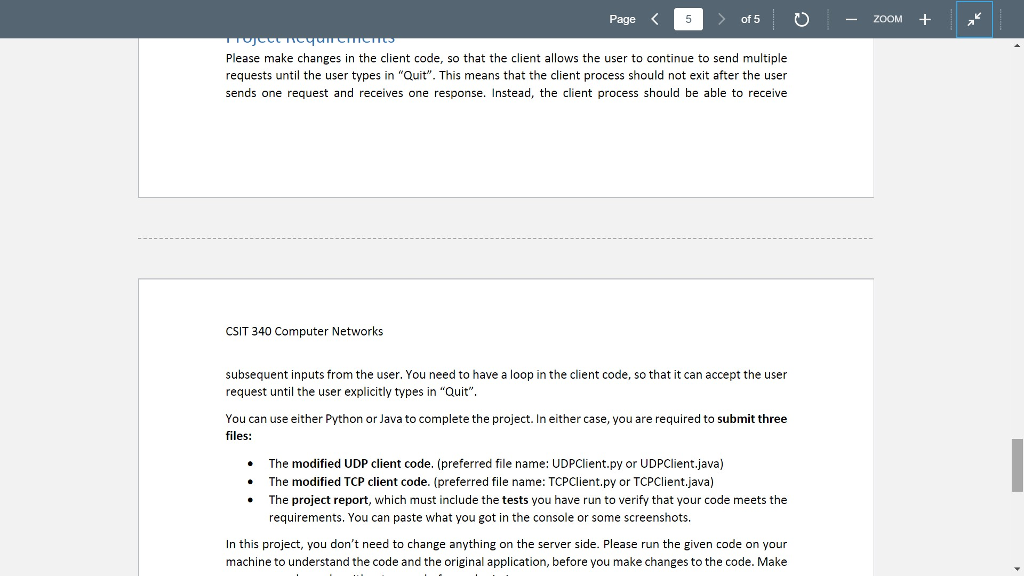
Page of 5 ZOOM+ Please make changes in the client code, so that the client allows the user to continue to send multiple requests until the user types in "Quit". This means that the client process should not exit after the user sends one request and receives one response. Instead, the client process should be able to receive CSIT 340 Computer Networks subsequent inputs from the user. You need to have a loop in the client code, so that it can accept the user request until the user explicitly types in "Quit" You can use either Python or Java to complete the project. In either case, you are required to submit three files: The modified UDP client code. (preferred file name: UDPClient.py or UDPClient.java) The modified TCP client code. (preferred file name: TCPClient.py or TCPClient.java) . The project report, which must include the tests you have run to verify that your code meets the requirements. You can paste what you got in the console or some screenshots. In this project, you don't need to change anything on the server side. Please run the given code on your machine to understand the code and the original application, before you make changes to the code. Make
Step by Step Solution
There are 3 Steps involved in it

Get step-by-step solutions from verified subject matter experts
 Study Help