







Question: This is the code that I have so far for this problem (cut into two parts): usePhoneList.java package classes2; public class usePhoneList { public static
This is the code that I have so far for this problem (cut into two parts):
usePhoneList.java
package classes2;
public class usePhoneList {
public static void main(String[] args)
{
phoneList aPhoneList = new phoneList();
aPhoneList.eventLoop();
}
}
phoneList.java
package classes2;
import java.io.BufferedReader;
import java.io.InputStreamReader;
import java.io.IOException;
import java.io.FileReader;
import java.io.FileWriter;
import java.io.PrintWriter;
import java.io.IOException;
import java.io.EOFException;
import java.io.FileNotFoundException;
public class phoneList
{
phoneList()
{
listHead = null;
}
private static class PhoneNode
{
PhoneNode()
{
name = new String("NoName");
phoneNumber = new String("(000) 000-0000");
ct = 0;
link = null;
}
PhoneNode(String fullName, String number, int count)
{
name = fullName;
phoneNumber = number;
ct = count;
}
private String name;
private String phoneNumber;
private int ct;
private PhoneNode link;
}
private void initialize()
{
try
{
listHead = null;
ptr = null;
String name;
String phone;
String line;
FileReader fr = new FileReader("phonebook.txt");
BufferedReader fd = new BufferedReader(fr);
while(true)
{
name = fd.readLine(); //get the name
if (name == null)
break;
phone = fd.readLine();
if(phone == null)
{
System.out.println("The file is corrupted.");
System.exit(-1);
}
line = fd.readLine(); //get the ct value
if (line == null)
{
System.out.println("The file is corrupted");
System.exit(-1);
}
int ct = Integer.parseInt(line);
if (listHead == null)
{
listHead = new PhoneNode(name.trim(), phone.trim(), ct);
ptr = listHead;
}
else
{
ptr.link = new PhoneNode(name.trim(), phone.trim(), ct);
ptr = ptr.link;
}
}
}
catch (EOFException eof)
{
System.out.println("End of file (EOF) reached");
}
catch (IOException ioe)
{
System.out.println("IO error" + ioe);
}
}
public void menu()
{
System.out.println("Enter option: ");
System.out.println(" A - Add a phone number");
System.out.println(" L - Look up a phone number");
System.out.println(" C - Change a phone number");
System.out.println(" S - Save Phone List to a file");
System.out.println(" Q - Quit and save list ");
}
public void eventLoop()
{
InputStreamReader reader = new InputStreamReader(System.in);
BufferedReader console = new BufferedReader(reader);
boolean finished = false;
initialize();
menu();
while (!finished)
{
System.out.println("CMD> ");
try
{
String input = console.readLine().toUpperCase().trim();
char response = input.charAt(0);
switch (response)
{
case 'A': addPhoneNumber();
break;
case 'L': lookUpPhoneNumber();
break;
case 'C': changePhoneNumber();
break;
case 'S': savePhoneNumbersToFile();
break;
case 'Q': savePhoneNumbersToFile();
finished = true;
break;
default: System.out.println("Unknown command. ");
menu();
}
}
catch (IOException e)
{
System.out.println(e);
}
}
}
private void savePhoneNumbersToFile() {
try {
PhoneNode ptr = listHead;
PrintWriter outputFile = new PrintWriter("phoneBook.txt");
while (ptr != null)
{
outputFile.write(ptr.name+" ");
outputFile.write(ptr.phoneNumber+" ");
outputFile.write(ptr.ct+" ");
ptr = ptr.link;
}
outputFile.close();
} catch (FileNotFoundException e) {
// TODO Auto-generated catch block
e.printStackTrace();
}
}
private void changePhoneNumber() {
try {
InputStreamReader reader = new InputStreamReader(System.in);
BufferedReader console = new BufferedReader(reader);
String name;
System.out.println("Enter name : ");
name = console.readLine().trim();
PhoneNode node =findNode(name);
if(node!=null){
System.out.println("Name : "+node.name);
System.out.println("Phone : "+node.phoneNumber);
System.out.println("CT : "+node.ct);
System.out.println("Enter new name : ");
name = console.readLine();
String phone;
System.out.println("Enter new phone number : ");
phone = console.readLine();
int ct;
System.out.println("Enter new ct : ");
ct = Integer.parseInt(console.readLine());
node.name = name;
node.phoneNumber = phone;
node.ct = ct;
}else{
System.out.println("Name not found");
}
} catch (IOException e) {
// TODO Auto-generated catch block
e.printStackTrace();
}
}
private void lookUpPhoneNumber() {
try {
InputStreamReader reader = new InputStreamReader(System.in);
BufferedReader console = new BufferedReader(reader);
String name;
System.out.println("Enter name : ");
name = console.readLine().trim();
PhoneNode node =findNode(name);
if(node!=null){
System.out.println("Name : "+node.name);
System.out.println("Phone : "+node.phoneNumber);
System.out.println("CT : "+node.ct);
}else{
System.out.println("Node not found");
}
} catch (IOException e) {
// TODO Auto-generated catch block
e.printStackTrace();
}
}
private void addPhoneNumber() {
try {
InputStreamReader reader = new InputStreamReader(System.in);
BufferedReader console = new BufferedReader(reader);
String name;
System.out.println("Enter name : ");
name = console.readLine();
String phone;
System.out.println("Enter phone number : ");
phone = console.readLine();
int ct;
System.out.println("Enter ct : ");
ct = Integer.parseInt(console.readLine());
if (listHead == null)
{
listHead = new PhoneNode(name.trim(), phone.trim(), ct);
ptr = listHead;
}
else
{
ptr.link = new PhoneNode(name.trim(), phone.trim(), ct);
ptr = ptr.link;
}
} catch (IOException e) {
// TODO Auto-generated catch block
e.printStackTrace();
}
}
private PhoneNode findNode(String name)
{
PhoneNode ptr = listHead;
boolean found = false;
while (ptr != null)
{
if (ptr.name.equalsIgnoreCase(name))
{
found = true;
break;
}
else
ptr = ptr.link;
}
if (!found)
return null;
else
return ptr;
}
private PhoneNode listHead;
private PhoneNode ptr ;
}
- end code -
my problem is that i need to add an e (to exit and save) after the q (to quit and have the file revert back to the last saved list) on the menu choices, and that whenever i run this code on cmd, it gives me the error from the java code that the file is corrupted. it works fine on ides such as netbeans and eclipse though. please help me fix the menu and to run this on cmd. thank you.
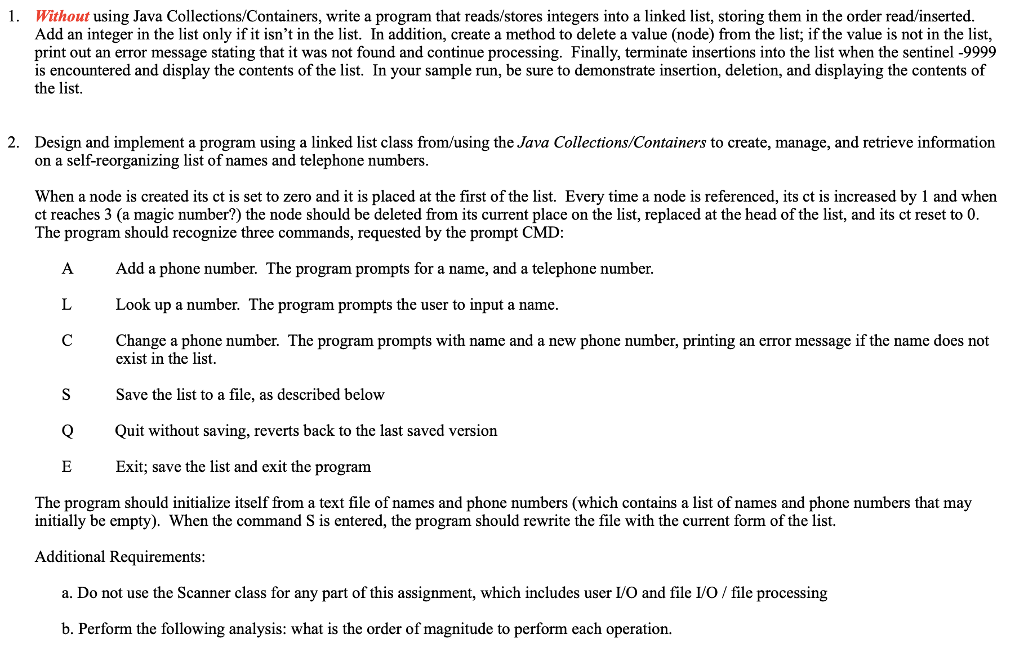
1. Without using Java Collections/Containers, write a program that reads/stores integers into a linked list, storing them in the order read/inserted. Add an integer in the list only if it isn't in the list. In addition, create a method to delete a value (node) from the list; if the value is not in the list, print out an error message stating that it was not found and continue processing. Finally, terminate insertions into the list when the sentinel -9999 is encountered and display the contents of the list. In your sample run, be sure to demonstrate insertion, deletion, and displaying the contents of the list. 2. Design and implement a program using a linked list class from/using the Java Collections/Containers to create, manage, and retrieve information on a self-reorganizing list of names and telephone numbers When a node is created its ct is set to zero and it is placed at the first of the list. Every time a node is referenced, its ct is increased by 1 and when ct reaches 3 (a magic number?) the node should be deleted from its current place on the list, replaced at the head of the list, and its ct reset to 0 The program should recognize three commands, requested by the prompt CMD A Add a phone number. The program prompts for a name, and a telephone number Look up a number. The program prompts the user to input a name Change a phone number. The program prompts with name and a new phone number, printing an error message if the name does not exist in the list. Save the list to a file, as described below QQuit without saving, reverts back to the last saved version xit; save the list and exit the program The program should initialize itself from a text file of names and phone numbers (which contains a list of names and phone numbers that may initially be empty). When the command S is entered, the program should rewrite the file with the current form of the list. Additional Requirements a. Do not use the Scanner class for any part of this assignment, which includes user I/O and file IVO / file processing b. Perform the following analysis: what is the order of magnitude to perform each operation
Step by Step Solution
There are 3 Steps involved in it

Get step-by-step solutions from verified subject matter experts
 Study Help