







Question: this is the data could you help with matlab coding please 13 2.4 122.4 10 10 2.6 136.6 14 15 16 2.8 150.2 9 3
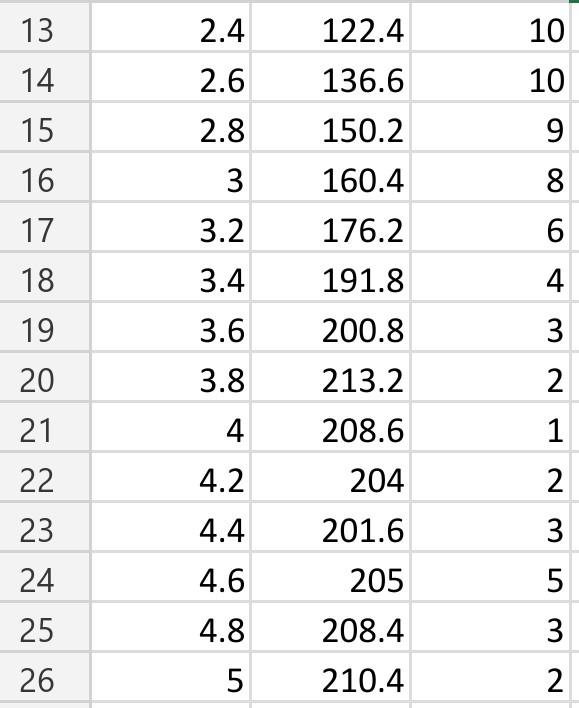
this is the data
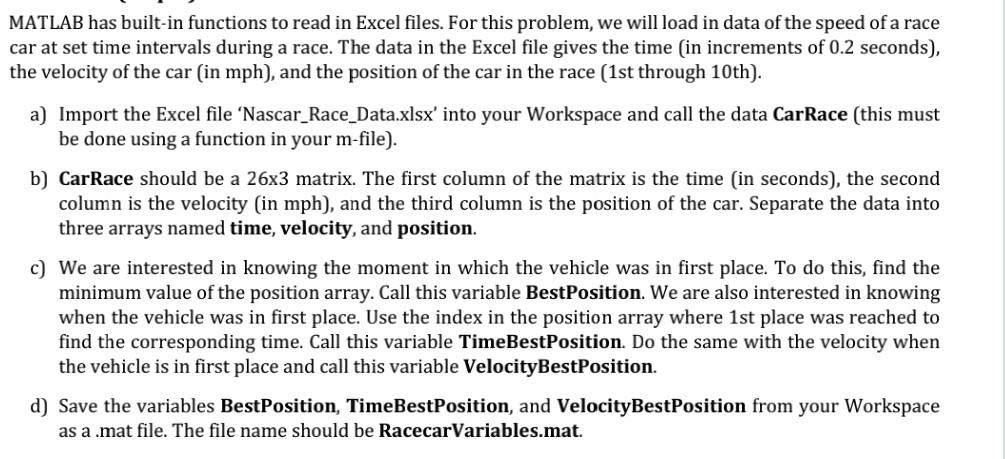
could you help with matlab coding please
13 2.4 122.4 10 10 2.6 136.6 14 15 16 2.8 150.2 9 3 8 17 3.2 160.4 176.2 191.8 6 4 18 3.4 3.6 200.8 3 19 20 3.8 213.2 2 21 4 1 2 22 208.6 204 201.6 4.2 23 4.4 3 4.6 5 24 25 205 208.4 4.8 3 26 5 210.4 2 MATLAB has built-in functions to read in Excel files. For this problem, we will load in data of the speed of a race car at set time intervals during a race. The data in the Excel file gives the time in increments of 0.2 seconds), the velocity of the car (in mph), and the position of the car in the race (1st through 10th). a) Import the Excel file 'Nascar_Race_Data.xlsx' into your Workspace and call the data CarRace (this must be done using a function in your m-file). b) CarRace should be a 26x3 matrix. The first column of the matrix is the time in seconds), the second column is the velocity (in mph), and the third column is the position of the car. Separate the data into three arrays named time, velocity, and position. c) We are interested in knowing the moment in which the vehicle was in first place. To do this, find the minimum value of the position array. Call this variable BestPosition. We are also interested in knowing when the vehicle was in first place. Use the index in the position array where 1st place was reached to find the corresponding time. Call this variable TimeBestPosition. Do the same with the velocity when the vehicle is in first place and call this variable VelocityBestPosition. d) Save the variables Best Position, TimeBestPosition, and VelocityBestPosition from your Workspace as a .mat file. The file name should be RacecarVariables.mat
Step by Step Solution
There are 3 Steps involved in it

Get step-by-step solutions from verified subject matter experts
 Study Help