


Question: This is the link that is given on the picture: https://help.tableau.com/current/guides/get-started-tutorial/en-us/get-started-tutorial-drag.htm I need answers from S1-Q1 to S1-Q3 Bb 1.2 ETL and Basic Analytics -
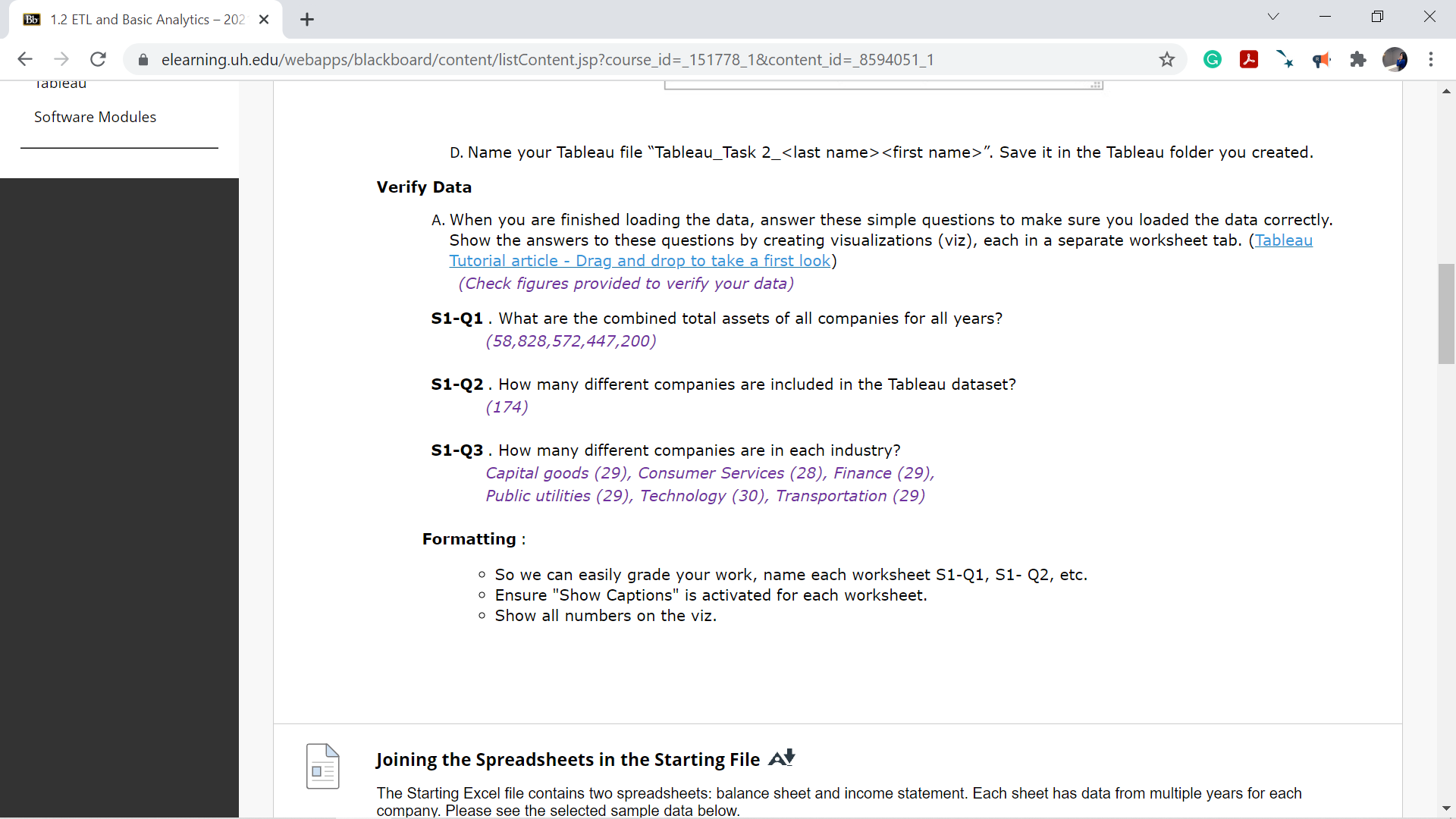
This is the link that is given on the picture:

https://help.tableau.com/current/guides/get-started-tutorial/en-us/get-started-tutorial-drag.htm

I need answers from S1-Q1 to S1-Q3

This is the link that is given on the picture:https://help.tableau.com/current/guides/get-started-tutorial/en-us/get-started-tutorial-drag.htmI need answers

Bb 1.2 ETL and Basic Analytics - 202 X + V X C A elearning.uh.edu/webapps/blackboard/content/listContent.jsp?course_id=_151778_1&content_id=_8594051_1 G . . . Tableau Software Modules D. Name your Tableau file "Tableau_Task 2_ ". Save it in the Tableau folder you created. Verify Data A. When you are finished loading the data, answer these simple questions to make sure you loaded the data correctly. Show the answers to these questions by creating visualizations (viz), each in a separate worksheet tab. (Tableau Tutorial article - Drag_and drop to take a first look) (Check figures provided to verify your data) S1-Q1 . What are the combined total assets of all companies for all years? (58,828,572,447,200) S1-Q2 . How many different companies are included in the Tableau dataset? (174) S1-Q3 . How many different companies are in each industry? Capital goods (29), Consumer Services (28), Finance (29), Public utilities (29), Technology (30), Transportation (29) Formatting : o So we can easily grade your work, name each worksheet S1-Q1, S1- Q2, etc. Ensure "Show Captions" is activated for each worksheet. o Show all numbers on the viz. Joining the Spreadsheets in the Starting File At The Starting Excel file contains two spreadsheets: balance sheet and income statement. Each sheet has data from multiple years for each company. Please see the selected sample data below

Step by Step Solution

There are 3 Steps involved in it

1 Expert Approved Answer
Step: 1 Unlock blur-text-image
Question Has Been Solved by an Expert!

Get step-by-step solutions from verified subject matter experts

Step: 2 Unlock
Step: 3 Unlock

Students Have Also Explored These Related Accounting Questions!