







Question: This is the program to be made for Agile Development. I have also added pictures of the exercise. I want to say the only difference
This is the program to be made for Agile Development. I have also added pictures of the exercise. I want to say the only difference is the 4.3 challenge requires the use of red for lower GPAs and blue for higher GPAs. Any assistance would be greatly appreciated.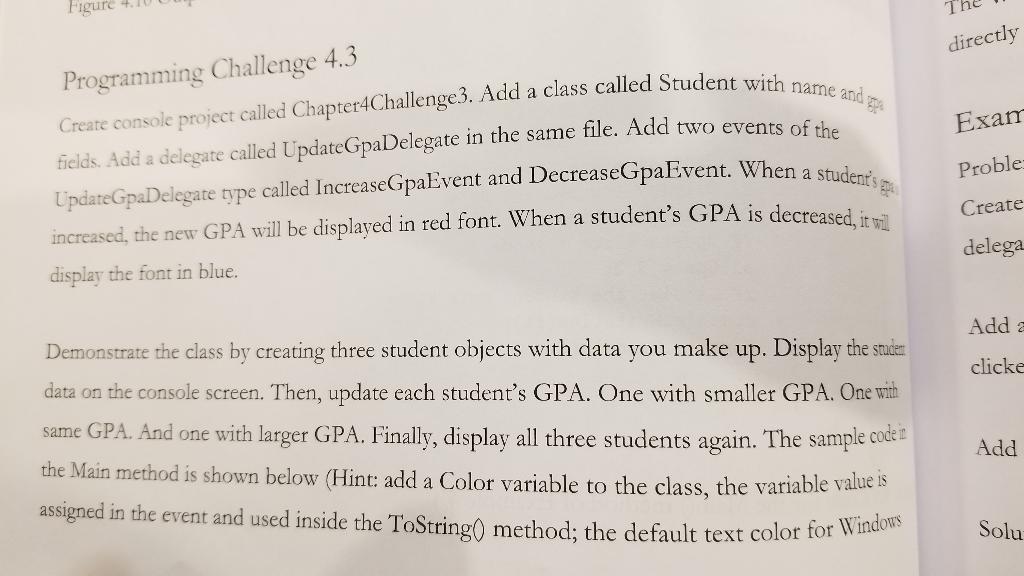
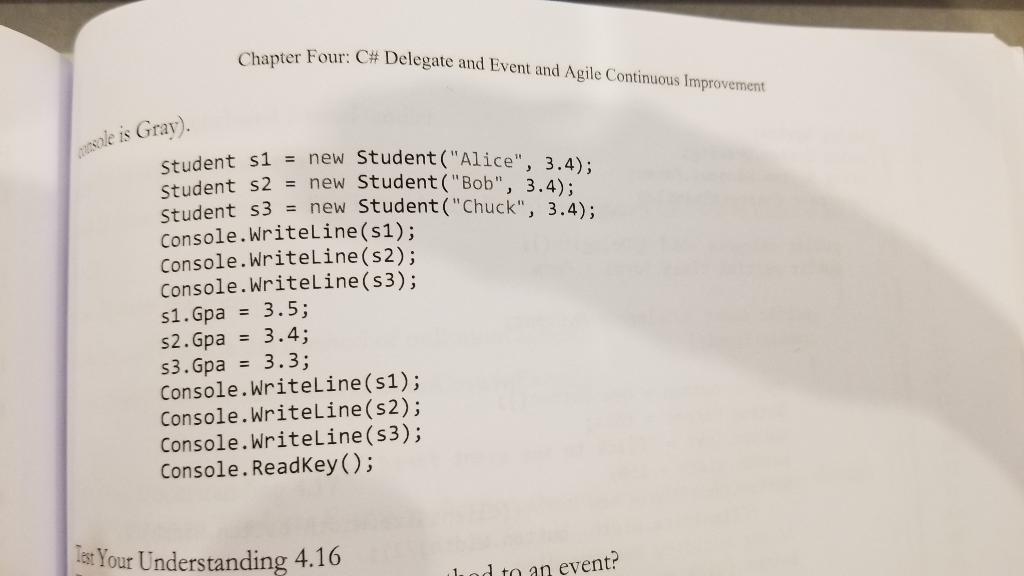
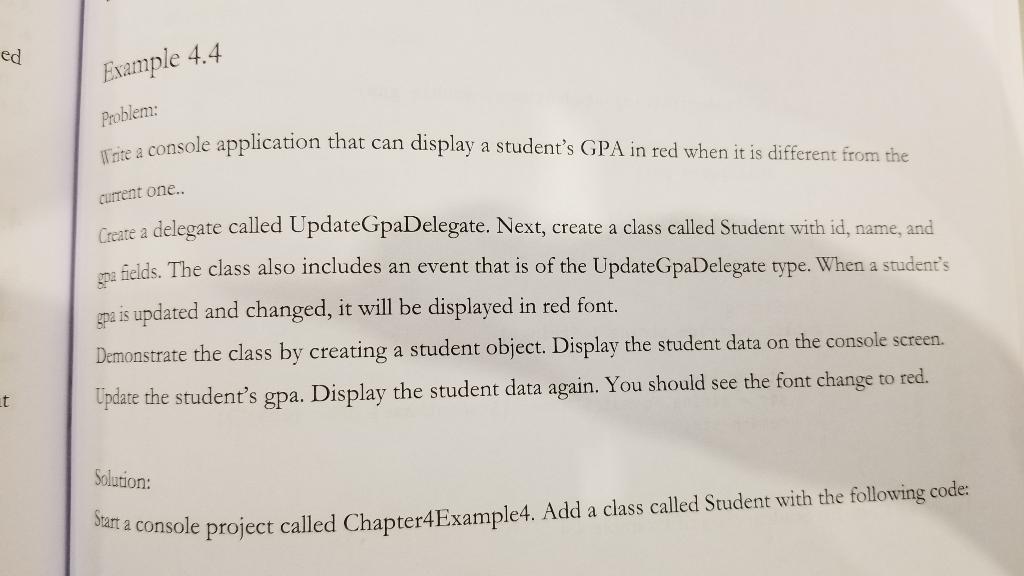
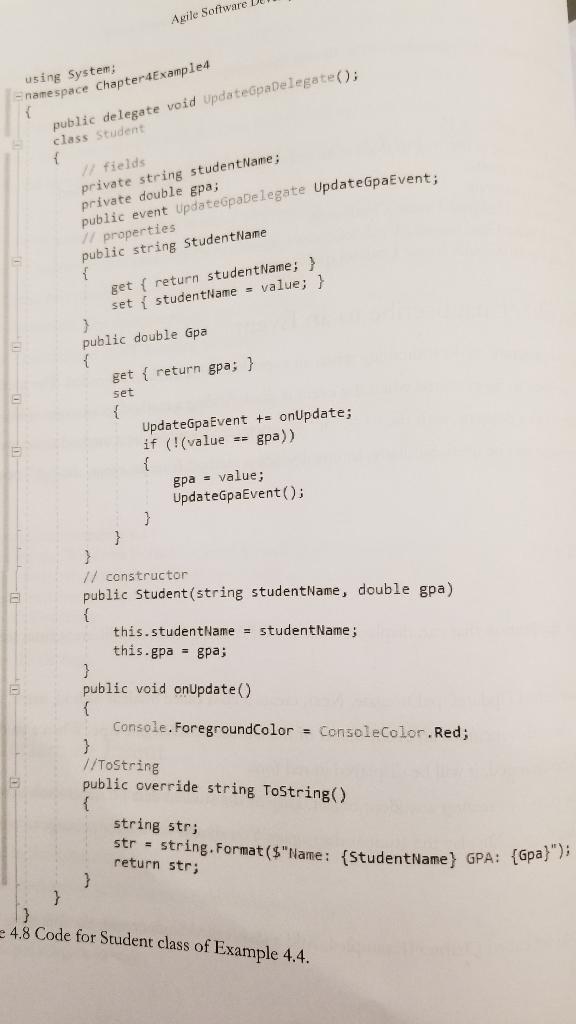
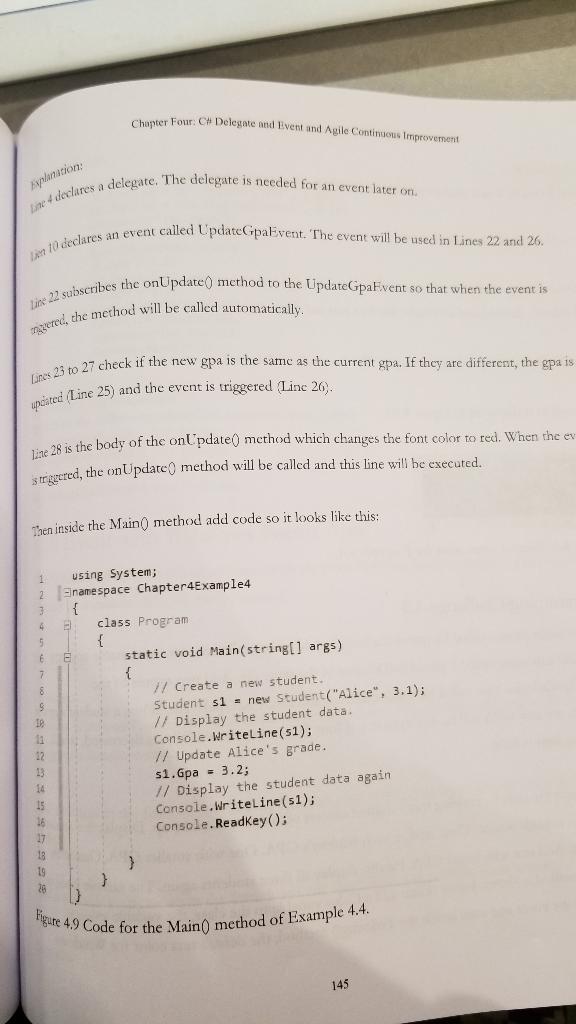
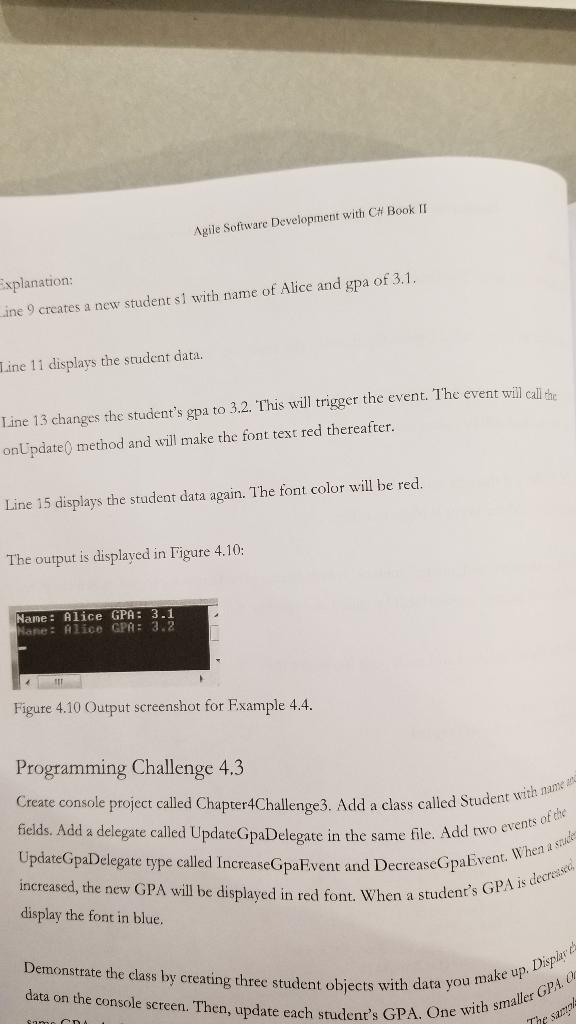
Figure directly Programming Challenge 4.3 Exam Create console project called Chapter 4 Challenge3. Add a class called Student with name and fields. Add a delegate called UpdateGpaDelegate in the same file. Add two events of the UpdateGpaDelegare type called Increase GpaEvent and DecreasepaEvent. When a student's increased, the new GPA will be displayed in red font. When a student's GPA is decreased, it wa display the font in blue. Proble Create delega Add a clicke Demonstrate the class by creating three student objects with data you make up. Display the studer data on the console screen. Then, update each student's GPA. One with smaller GPA. One with same GPA. And one with larger GPA. Finally, display all three students again. The sample code i the Main method is shown below (Hint: add a Color variable to the class, the variable value is assigned in the event and used inside the ToString0 method; the default text color for Windows Add Solu Chapter Four: C# Delegate and Event and Agile Continuous Improvement nasole is Gray). Student s1 = new Student ("Alice", 3.4); Student s2 = new Student ("Bob", 3.4); Student s3 = new Student ("Chuck", 3.4); Console.WriteLine(51); Console.WriteLine(s2); Console.WriteLine(53); 51. Gpa = 3.5; S2.Gpa = 3.4; 53. Gpa = 3.3; Console.WriteLine(51); Console.WriteLine(s2); Console.WriteLine(53); Console.ReadKey(); fet Your Understanding 4.16 d to an event? ed Example 4.4 Problem: Tire a console application that can display a student's GPA in red when it is different from the current one.. Create a delegate called Update paDelegate. Next, create a class called Student with id, name, and fields. The class also includes an event that is of the UpdateGpaDelegate type. When a student's gpa is updated and changed, it will be displayed in red font. Demonstrate the class by creating a student object. Display the student data on the console screen. Update the student's gpa. Display the student data again. You should see the font change to red. t Solution: Start a console project called Chapter4Example4. Add a class called Student with the following code: Agile Software using System; namespace Chapter4Example4 public delegate void Upda teadelegate(); class Student fields private string student Name; private double gpa; public event Updatepabelegate Update GpaEvent; 17 properties public string StudentName { get { return studentName; } set { studentName = value; } 3 public double Gpa { get { return gpa; } set str = string.Format("Name: StudentName} GPA: {Gpa}"); { UpdateGpaEvent += on Update; if (!(value == gpa)) { gpa - value; UpdateGpaEvent(); } } } // constructor public Student(string studentName, double gpa) { this.studentName = studentName; this.gpa - gpa; } public void on Update() { Console. ForegroundColor = ConsoleColor. Red; } //ToString public override string ToString() { string str; return str; } } 4.8 Code for Student class of Example 4.4. Le declares a delegate. The delegate is needed for an event later on ani declares an event called UpdateGpaEvent. The event will be used in Lines 22 and 26. tine 22 subscribes the onUpdate() method to the UpdateGpaFvent so that when the event is myered, che method will be called automatically. Lunes 23 to 27 check if the new gpa is the same as the current gpa. It they are different, the gpa is poated Line 25) and the event is triggered Linc 20. Figure 49 Code for the Main() method of Example 4.4. Chapter Four C# Delegate and Event and Agile Continuous improvement Line 28 is the body of the onlpdate() method which changes the font color to red. When the ev is triggered, the onUpdate method will be called and this line will be executed. Then inside the Main() method add code so it looks like this: using System; 2. Enamespace Chapter4Example4 { class Program { static void Main(string[] args) { 77 Create a new student. Student si = new Student("Alice", 3.1); // Display the student data Console.WriteLine(51); // Update Alice's grade. $1. Gpa = 3.2; // Display the student data again Console.WriteLine(51); Console.ReadKey(); 9 28 145 Create console project called Chapter 4 Challenge3. Add a class called Student with name me fields. Add a delegate called UpdateGpaDelegate in the same file. Add two events of the UpdateGpaDelegate type called IncreaseGpa Event and DecreaseGpaEvent. When a sad increased, the new GPA will be displayed in red font. When a student's GPA is decrease Demonstrate the class by creating three student objects with data you make up. Disper data on the console screen. Then, update each student's GPA. One with smaller GPA Agile Software Development with C# Book II Explanation: Line 9 creates a new student si with name of Alice and gpa of 3.1. Line 11 displays the student data. Line 13 changes the student's gpa to 3.2. This will trigger the event. The event will call the on Update method and will make the font text red thereafter. Line 15 displays the student data again. The font color will be red. The output is displayed in Figure 4.10: Name: Alice GPA: 3.1 Name: Alice GPA: 3.2 Figure 4.10 Output screenshot for Example 4.4. Programming Challenge 4.3 display the font in blue Samoc Figure directly Programming Challenge 4.3 Exam Create console project called Chapter 4 Challenge3. Add a class called Student with name and fields. Add a delegate called UpdateGpaDelegate in the same file. Add two events of the UpdateGpaDelegare type called Increase GpaEvent and DecreasepaEvent. When a student's increased, the new GPA will be displayed in red font. When a student's GPA is decreased, it wa display the font in blue. Proble Create delega Add a clicke Demonstrate the class by creating three student objects with data you make up. Display the studer data on the console screen. Then, update each student's GPA. One with smaller GPA. One with same GPA. And one with larger GPA. Finally, display all three students again. The sample code i the Main method is shown below (Hint: add a Color variable to the class, the variable value is assigned in the event and used inside the ToString0 method; the default text color for Windows Add Solu Chapter Four: C# Delegate and Event and Agile Continuous Improvement nasole is Gray). Student s1 = new Student ("Alice", 3.4); Student s2 = new Student ("Bob", 3.4); Student s3 = new Student ("Chuck", 3.4); Console.WriteLine(51); Console.WriteLine(s2); Console.WriteLine(53); 51. Gpa = 3.5; S2.Gpa = 3.4; 53. Gpa = 3.3; Console.WriteLine(51); Console.WriteLine(s2); Console.WriteLine(53); Console.ReadKey(); fet Your Understanding 4.16 d to an event? ed Example 4.4 Problem: Tire a console application that can display a student's GPA in red when it is different from the current one.. Create a delegate called Update paDelegate. Next, create a class called Student with id, name, and fields. The class also includes an event that is of the UpdateGpaDelegate type. When a student's gpa is updated and changed, it will be displayed in red font. Demonstrate the class by creating a student object. Display the student data on the console screen. Update the student's gpa. Display the student data again. You should see the font change to red. t Solution: Start a console project called Chapter4Example4. Add a class called Student with the following code: Agile Software using System; namespace Chapter4Example4 public delegate void Upda teadelegate(); class Student fields private string student Name; private double gpa; public event Updatepabelegate Update GpaEvent; 17 properties public string StudentName { get { return studentName; } set { studentName = value; } 3 public double Gpa { get { return gpa; } set str = string.Format("Name: StudentName} GPA: {Gpa}"); { UpdateGpaEvent += on Update; if (!(value == gpa)) { gpa - value; UpdateGpaEvent(); } } } // constructor public Student(string studentName, double gpa) { this.studentName = studentName; this.gpa - gpa; } public void on Update() { Console. ForegroundColor = ConsoleColor. Red; } //ToString public override string ToString() { string str; return str; } } 4.8 Code for Student class of Example 4.4. Le declares a delegate. The delegate is needed for an event later on ani declares an event called UpdateGpaEvent. The event will be used in Lines 22 and 26. tine 22 subscribes the onUpdate() method to the UpdateGpaFvent so that when the event is myered, che method will be called automatically. Lunes 23 to 27 check if the new gpa is the same as the current gpa. It they are different, the gpa is poated Line 25) and the event is triggered Linc 20. Figure 49 Code for the Main() method of Example 4.4. Chapter Four C# Delegate and Event and Agile Continuous improvement Line 28 is the body of the onlpdate() method which changes the font color to red. When the ev is triggered, the onUpdate method will be called and this line will be executed. Then inside the Main() method add code so it looks like this: using System; 2. Enamespace Chapter4Example4 { class Program { static void Main(string[] args) { 77 Create a new student. Student si = new Student("Alice", 3.1); // Display the student data Console.WriteLine(51); // Update Alice's grade. $1. Gpa = 3.2; // Display the student data again Console.WriteLine(51); Console.ReadKey(); 9 28 145 Create console project called Chapter 4 Challenge3. Add a class called Student with name me fields. Add a delegate called UpdateGpaDelegate in the same file. Add two events of the UpdateGpaDelegate type called IncreaseGpa Event and DecreaseGpaEvent. When a sad increased, the new GPA will be displayed in red font. When a student's GPA is decrease Demonstrate the class by creating three student objects with data you make up. Disper data on the console screen. Then, update each student's GPA. One with smaller GPA Agile Software Development with C# Book II Explanation: Line 9 creates a new student si with name of Alice and gpa of 3.1. Line 11 displays the student data. Line 13 changes the student's gpa to 3.2. This will trigger the event. The event will call the on Update method and will make the font text red thereafter. Line 15 displays the student data again. The font color will be red. The output is displayed in Figure 4.10: Name: Alice GPA: 3.1 Name: Alice GPA: 3.2 Figure 4.10 Output screenshot for Example 4.4. Programming Challenge 4.3 display the font in blue Samoc
Step by Step Solution
There are 3 Steps involved in it

Get step-by-step solutions from verified subject matter experts
 Study Help