







Question: This is the question Attached below is the example given to refer with. 2. Refer to the exercise on page 328 #6.10 to calculate and
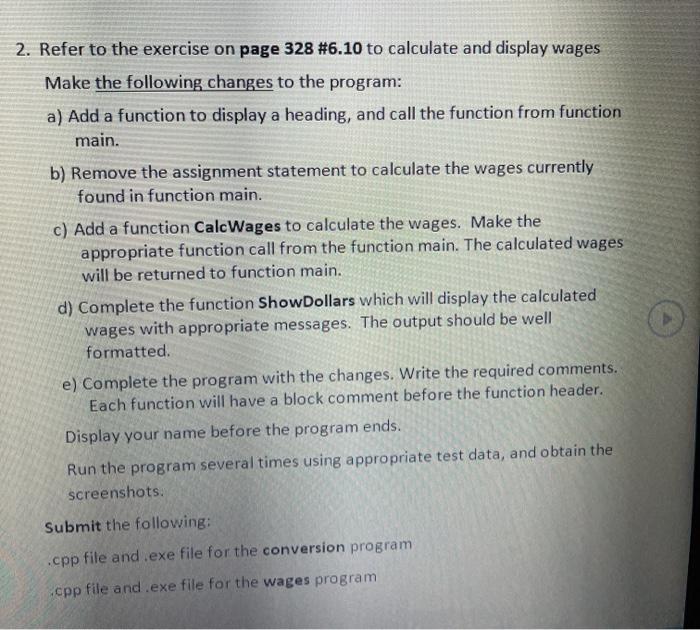
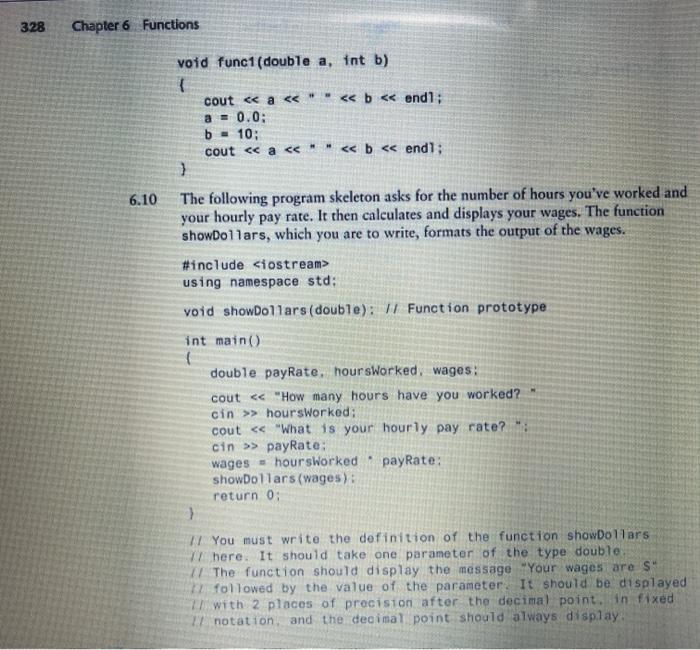
2. Refer to the exercise on page 328 #6.10 to calculate and display wages Make the following changes to the program: a) Add a function to display a heading, and call the function from function main. b) Remove the assignment statement to calculate the wages currently found in function main. c) Add a function CalcWages to calculate the wages. Make the appropriate function call from the function main. The calculated wages will be returned to function main. d) Complete the function ShowDollars which will display the calculated wages with appropriate messages. The output should be well formatted e) Complete the program with the changes. Write the required comments. Each function will have a block comment before the function header. Display your name before the program ends. Run the program several times using appropriate test data, and obtain the screenshots. Submit the following: .cpp file and .exe file for the conversion program .cpp file and.exe file for the wages program 328 Chapter 6 Functions void func1(double a, int b) { cout using namespace std; void showDollars (double): Function prototype 6.10 int main() double payRate, hoursWorked, wages: cout > hoursWorked; cout > payRate: wages = hoursWorked payRate: showDollars (wages): return 0; } You must write the definition of the function showDollars W here. It should take one parameter of the type double I/ The function should display the massage "Your wages are S" followed by the value of the parameter. It should be displayed with 2 places of precision after the decimal point. in fixed 2 notation and the decimal point should always display
Step by Step Solution
There are 3 Steps involved in it

Get step-by-step solutions from verified subject matter experts
 Study Help