







Question: THIS IS THE QUESTION THIS IS THE CODE import os # Function that displays the Master menu of categories def categoryMenu(): Function categoryMenu displays the
THIS IS THE QUESTION
THIS IS THE CODE
import os # Function that displays the Master menu of categories def categoryMenu(): """Function categoryMenu displays the category menu, returns selection. ------------------------------------------------------------------- """ os.system('cls') print (""" Select an item from the following menu or checkout:
1 = Books 2 = electronics 3 = clothing 4 = show cart contents 5 = checkout
""") category = input(' Select a category, display cart, or checkout ') return category # Function that handles the processing of items in one category ------ def processItem(category, itemList, cartIn): """processItem function - Handles processing of items in a category. Displays item menu, prompts for item, asks for confirm, adds to cart. Input: category, list of items, cart of items (list) Returns: cart (with selected items, if any, added) --------------------------------------------------------""" menu_pic = '0' # need to prime menu_pic for use as 'while' sentry while menu_pic != '5': menu_pic = itemMenu(category, itemList) if menu_pic == '4': displayCart(cartIn) elif menu_pic in ('1', '2', '3'): res, cartOut = confirmAdd (itemList, menu_pic, cartIn) elif menu_pic != '5': print('Invalid item selected') return cartOut # Function that displays all item submenus --------------------------------- def itemMenu (category, itemList): """itemMenu function - displays menu of shopping items. Inputs: category (books, etc.), list of item descriptions and prices. Returns: selected menu item (integer, 1 to n) ---------------------------------------------------------------------""" os.system('cls') print (' \t\t ' + category + ' menu') print (' \t\t Select from the following items, display cart, or checkout: ') print(' \t\t\t Item \t\t\t Price ') print('\t\t\t =======\t\t\t ====== ') for n in range(0, len(itemList)): print('\t\t\t {0:2s} - {1:20s} \t ${2:8.2f}'.format(str(n+1), itemList[n][1], itemList [n][2])) print(' \t\t\t {0:2s} - {1:20s} '.format(str(n + 2), 'show cart contents ')) print('\t\t\t {0:2s} - {1:20s} '.format(str(n + 3), 'display category menu ')) menuPic = input(' Enter Selection (1 to ' + str(n + 3) + '): ') return menuPic # Function that displays the cart summary ------------------------------- def displayCart(cartDC): """displayCart function - displays contents of shopping cart Input: cart of items (list) --------------------------------------------------------""" print(' Content of cart: ') print(' \tItem\t\t\t\tCost') for item in cartDC: print('\t{0:20s}\t\t${1:8.2f} '.format(item[1], item[2])) input(' Hit Enter to make next selection ') # Function that confirms item to be added to cart, then adds (appends) it def confirmAdd(itemList, menuPic, cartIn): """Function confirmAdd prompts user to confirm an item to add to cart. Adds (appends) item to cart after confirmed. Input: list of items (books, etc.), item selected, cart cart - items in shopping cart Return: True if confirm to add ("y"), False if "n", cart w/item added -------------------------------------------------------------------""" print (' \tAdd ', itemList[int(menuPic) - 1][1], ' to cart (y) ? ') confirm = input(' ') if confirm == 'y': cartIn.append(itemList[int(menuPic) - 1]) return True, cartIn else: return False, cartIn # Function that processes a cart checkout ------------------------------- def checkout(finalCart, totItems, totCost, totCarts): """checkout function - performs a cart checkout, displays contents Input: cart, total items (all carts), cost (all), number of carts Returns: True (nonempty cart), total items, cost, # carts ---------------------------------------------------------------""" print(' Checkout selected, contents of cart: ') cart_items, cart_cost = 0, 0.0 os.system('cls') print(' \tItems\t\t\t\tCost') for item in finalCart: print('\t{0:20s}\t\t${1:8.2f} '.format(item[1], item[2])) cart_items += 1 cart_cost += item[2] print(' Totals {0:5d} items\t\t\t${1:8.2f}'.format(cart_items, cart_cost)) totItems = totItems + cart_items totCost = totCost + cart_cost if cart_items > 0: totCarts = totCarts + 1 return totItems, totCost, totCarts # Start of active (global) code --------------------------------- # Inventory items - shown on menus ------------------------------- book_list = ((1,'Origin', 19.95), (2,'Grant', 22.50), (3, 'Prairie Fires', 18.95)) elect_list = ((1, 'HP Laptop', 429.50), (2, 'EyePhone 10', 790.00), (3, 'Bose 20 Speakers', 220.00)) cloth_list = ((1, 'T-shirt', 9.50), (2, 'Shoes', 45.00), (3, 'Pants', 24.00)) more_carts = 'y' # Stay active as long as 'y' carts = 0 # sequential number of shopping carts total_items = 0 # total number of items in all carts total_cost = 0.0 # total cost of all items in all carts # Start processing 1 or more carts -------------------------------- while more_carts == 'y': cart = [ ] # List - holds the cart's contents more_items = True # Sentry - controls category menu display
# Fill and process a single shopping cart---------------------------- while more_items: category = categoryMenu() # display menu, select category if category == '1': # ...Books category selected ------- cart = processItem('Book', book_list, cart) elif category == '2': # ...Electronics category selected - cart = processItem('Electonics', elect_list, cart) elif category == '3': # ...Clothing category selected ---- cart = processItem ('Clothing', cloth_list, cart) elif category == '4': # display cart contents displayCart(cart) elif category == '5': # checkout selected... more_items = False # ...end 'while' iteration else: print('Invalid category selected') # Checkout----------------------------------------------------- if category == '5': total_items, total_cost, carts = \ checkout (cart, total_items, total_cost, carts) more_carts = input(' Are there more carts to process (y)? ') # End of session summary ---------------------------------------- os.system('cls') print(' \tTotal number of carts: ', carts) print('\tTotal number of items: ', total_items) print('\tTotal cost of items: ${0:8.2f}'.format(total_cost)) input(' Hit Enter to end program')
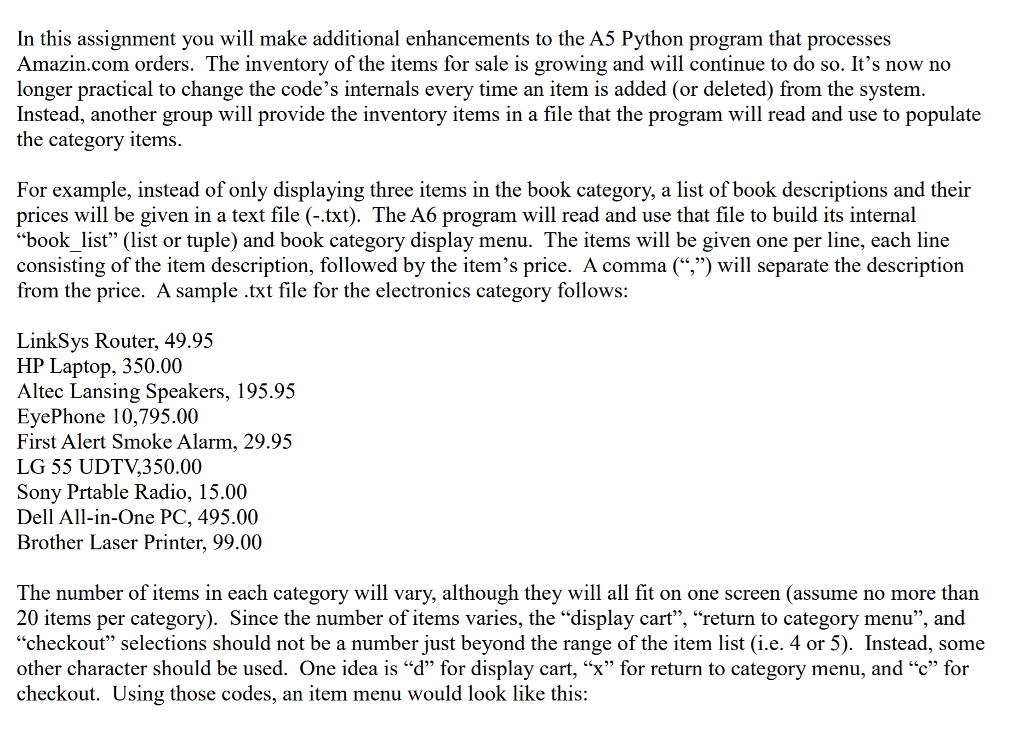
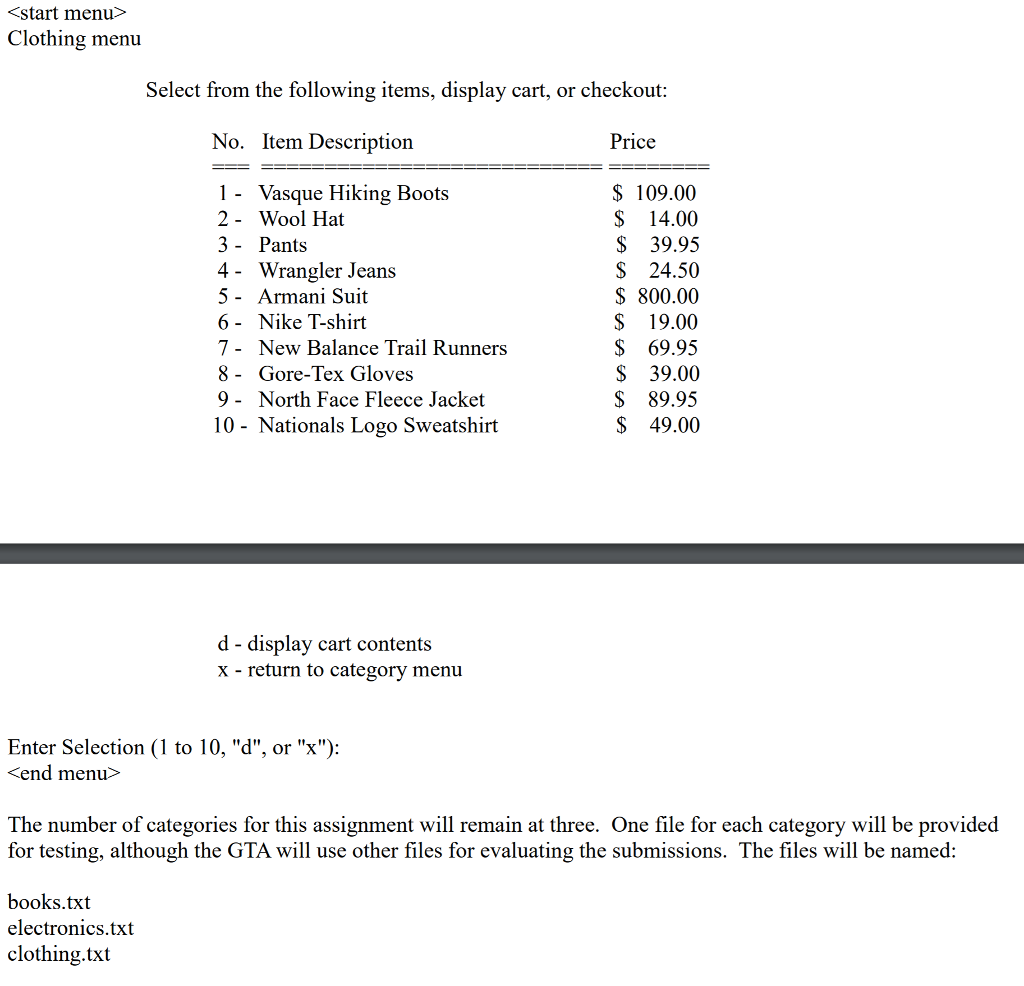
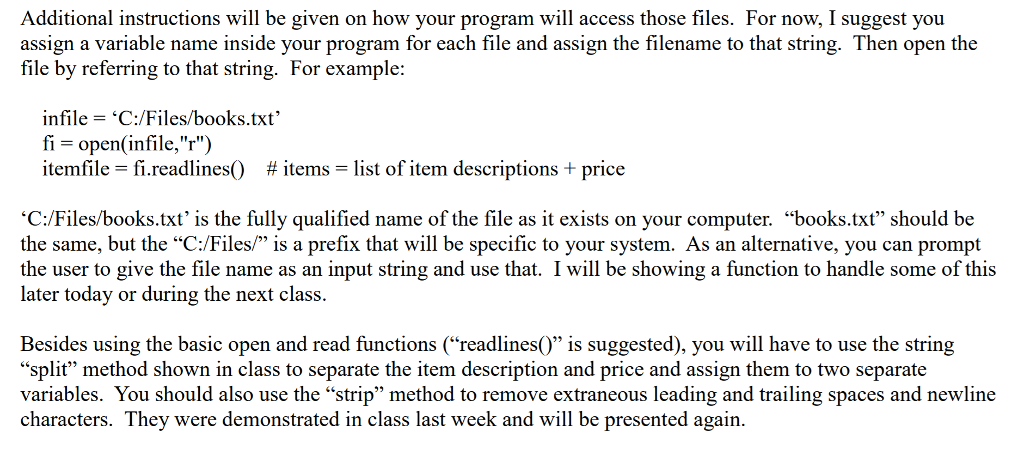
In this assignment you will make additional enhancements to the A5 Python program that processes Amazin.com orders. The inventory of the items for sale is growing and will continue to do so. It's now no longer practical to change the code's internals every time an item is added (or deleted) from the system Instead, another group will provide the inventory items in a file that the program will read and use to populate the category items For example, instead of only displaying three items in the book category, a list of book descriptions and their prices will be given in a text file (-.txt). The A6 program will read and use that file to build its internal "book list (list or tuple) and book category display menu. The items will be given one per line, each line consisting of the item description, followed by the item's price. A comma (",") will separate the description from the price. A sample .txt file for the electronics category follows: LinkSys Router, 49.95 HP Laptop, 350.00 Altec Lansing Speakers, 195.95 EyePhone 10,795.00 First Alert Smoke Alarm, 29.95 LG 55 UDTV,350.00 Sony Prtable Radio, 15.00 Dell All-in-One PC, 495.00 Brother Laser Printer, 99.00 The number of items in each category will vary, although they will all fit on one screen (assume no more than 20 items per category). Since the number of items varies, the "display cart", "return to category menu", and "checkout" selections should not be a number just beyond the range of the item list (i.e. 4 or 5). Instead, some other character should be used. One idea is "d" for display cart, "X" for return to category menu, and c" for checkout. Using those codes, an item menu would look like this In this assignment you will make additional enhancements to the A5 Python program that processes Amazin.com orders. The inventory of the items for sale is growing and will continue to do so. It's now no longer practical to change the code's internals every time an item is added (or deleted) from the system Instead, another group will provide the inventory items in a file that the program will read and use to populate the category items For example, instead of only displaying three items in the book category, a list of book descriptions and their prices will be given in a text file (-.txt). The A6 program will read and use that file to build its internal "book list (list or tuple) and book category display menu. The items will be given one per line, each line consisting of the item description, followed by the item's price. A comma (",") will separate the description from the price. A sample .txt file for the electronics category follows: LinkSys Router, 49.95 HP Laptop, 350.00 Altec Lansing Speakers, 195.95 EyePhone 10,795.00 First Alert Smoke Alarm, 29.95 LG 55 UDTV,350.00 Sony Prtable Radio, 15.00 Dell All-in-One PC, 495.00 Brother Laser Printer, 99.00 The number of items in each category will vary, although they will all fit on one screen (assume no more than 20 items per category). Since the number of items varies, the "display cart", "return to category menu", and "checkout" selections should not be a number just beyond the range of the item list (i.e. 4 or 5). Instead, some other character should be used. One idea is "d" for display cart, "X" for return to category menu, and c" for checkout. Using those codes, an item menu would look like this
Step by Step Solution
There are 3 Steps involved in it

Get step-by-step solutions from verified subject matter experts
 Study Help