







Question: This is the soundlib.py code # CS 87A soundLib # Wav file creator and player import numpy as np from scipy.io.wavfile import write import simpleaudio
This is the soundlib.py code
# CS 87A soundLib # Wav file creator and player import numpy as np from scipy.io.wavfile import write import simpleaudio as sa # Sample rate per second for waves SAMPLE_RATE = 44100 # Filename for final output WAV_FILE_NAME = "output.wav" # BPM range MIN_BPM = 50 MAX_BPM = 300 currentBmp = 150 # Make the sounds as loud as possible AMPLITUDE = np.iinfo(np.int16).max # Setup for musical notes NOTE_NAMES = list("CcDdEFfGgAaB") noteDict = {} BASE_FREQ = 16.3516 NUM_OCTAVES = 9 # Holds the note names and durations song = [] # Holds outputted string morseMessage = [] def getWave(freq, beats): ''' Returns a sine-wave representing the note for a particular number of beats :param freq: A frequency in Hz :param beats: A number of beats (can be fractions of a beat) :return: A wave -- which is really just a NumPy array of the samples ''' # Determine how many seconds the note should play duration = float(beats) / float(currentBmp) * 60. # Calculate how many samples the note should be time = np.linspace(0, duration, int(SAMPLE_RATE * duration)) # Generate the wave that represents the beep wave = AMPLITUDE * np.sin(2 * np.pi * freq * time) return wave def genNotes(noteDict): ''' Generates the note names and frequencies and stores them into the inputted dictionary :param noteDict: An empty dictionary to recieve the key/value pairs of noteName & frequency (in Hz) :return: None ''' currBase = BASE_FREQ for j in range(NUM_OCTAVES): for i in range(len(NOTE_NAMES)): # Generate the right note name currNote = "" possibleFlat = "" if (NOTE_NAMES[i].islower()): currNote = NOTE_NAMES[i].upper() + str(j) + "sharp" possibleFlat = NOTE_NAMES[i+1].upper() + str(j) + "flat" else: currNote = NOTE_NAMES[i] + str(j) # Generate the right note frequency noteWave = currBase * pow(2, (i / float(len(NOTE_NAMES)))) # Add it to the dictionary noteDict[currNote] = noteWave # Handle the flat if it's there if possibleFlat: noteDict[possibleFlat] = noteWave # Done with one octave, move up an octave currBase *= 2 # add a rest noteDict["rest"] = 0 def initSound(): ''' Initializer for the sound system TODO: could add BPM adjustments :return: None ''' # Generate the note frequencies genNotes(noteDict) # initialize song list song.clear() def addNote(noteName, beats): ''' Adds a note to the "song" array -- that's just a series of strings with each element of the form "noteName,beats" -- so an example would be ["C4,1", "D4sharp,0.5"] :param noteName: The name of the note, in the form of "C4", "G2sharp" or "B6flat" :param beats: Number of beats (can be fractional :return: None ''' song.append(noteName + "," + str(beats)) def playSound(): ''' Uses the song array to generate sound waves to make a song :return: ''' # Setup final sound output output = [] # Go through all the elements made up of "note,beat" strings. for pair in song: # Get note name and beats noteName = pair.split(",")[0] noteBeats = float(pair.split(",")[1]) # get the frequency of the note and add it to the output output.append(getWave(noteDict[noteName], noteBeats)) # add a tiny rest to break up the notes output.append(getWave(noteDict["rest"], .1)) # Put all the waves together fileOutput = np.concatenate(output) # Write out the final WAV file write(WAV_FILE_NAME, SAMPLE_RATE, fileOutput.astype(np.int16)) # Play the final WAV file waveObj = sa.WaveObject.from_wave_file(WAV_FILE_NAME) playObj = waveObj.play() playObj.wait_done() def addMorseDot(): song.append("C5" + "," + str(0.5)) song.append("rest, " + str(0.1)) morseMessage.append(".") def addMorseDash(): song.append("C5" + "," + str(1.5)) song.append("rest, " + str(0.1)) morseMessage.append("_") def addMorsePause(): song.append("rest, " + str(2.5)) morseMessage.append(" ") def initMorse(): initSound() def playMorse(): playSound() return "".join(morseMessage)
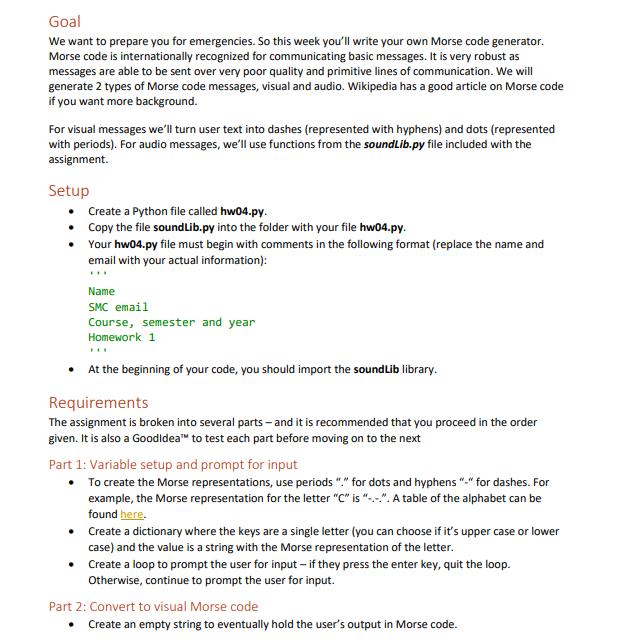
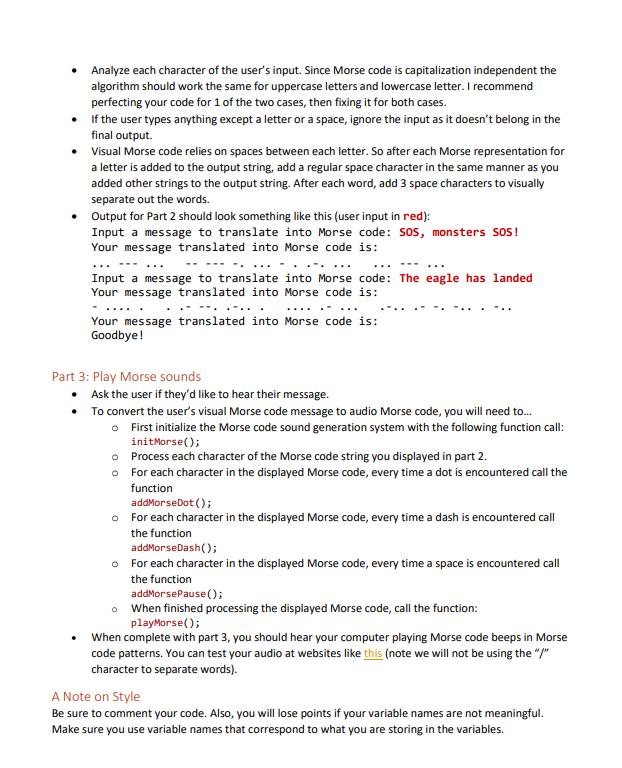
Goal We want to prepare you for emergencies. So this week you'll write your own Morse code generator. Morse code is internationally recognized for communicating basic messages. It is very robust as messages are able to be sent over very poor quality and primitive lines of communication. We will generate 2 types of Morse code messages, visual and audio. Wikipedia has a good article on Morse code if you want more background. For visual messages we'll turn user text into dashes (represented with hyphens) and dots (represented with periods). For audio messages, we'll use functions from the soundLib.py file included with the assignment. Setup Create a Python file called hw04.py. Copy the file soundLib.py into the folder with your file hw04.py. Your hw04.py file must begin with comments in the following format (replace the name and email with your actual information): Name SMC email Course, semester and year Homework 1 At the beginning of your code, you should import the sound Lib library. Requirements The assignment is broken into several parts - and it is recommended that you proceed in the order given. It is also a Good idea to test each part before moving on to the next Part 1: Variable setup and prompt for input To create the Morse representations, use periods "." for dots and hyphens "-" for dashes. For example, the Morse representation for the letter "C" is "--". A table of the alphabet can be found here. Create a dictionary where the keys are a single letter (you can choose if it's upper case or lower case) and the value is a string with the Morse representation of the letter. Create a loop to prompt the user for input - if they press the enter key, quit the loop. Otherwise, continue to prompt the user for input. Part 2: Convert to visual Morse code Create an empty string to eventually hold the user's output in Morse code.
Step by Step Solution
There are 3 Steps involved in it

Get step-by-step solutions from verified subject matter experts
 Study Help