







Question: This is the Starter Code 1. EventController.java /** * Handles events for the Tetris Game. User events (key strokes) as well as periodic timer *
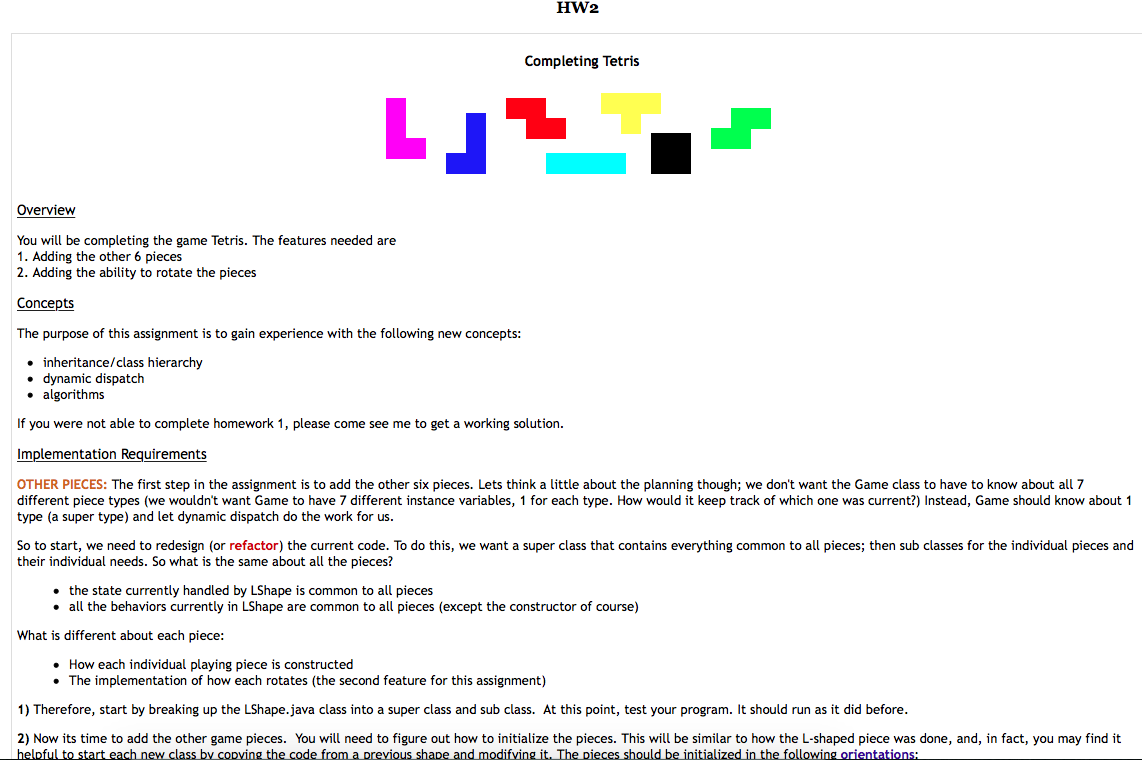
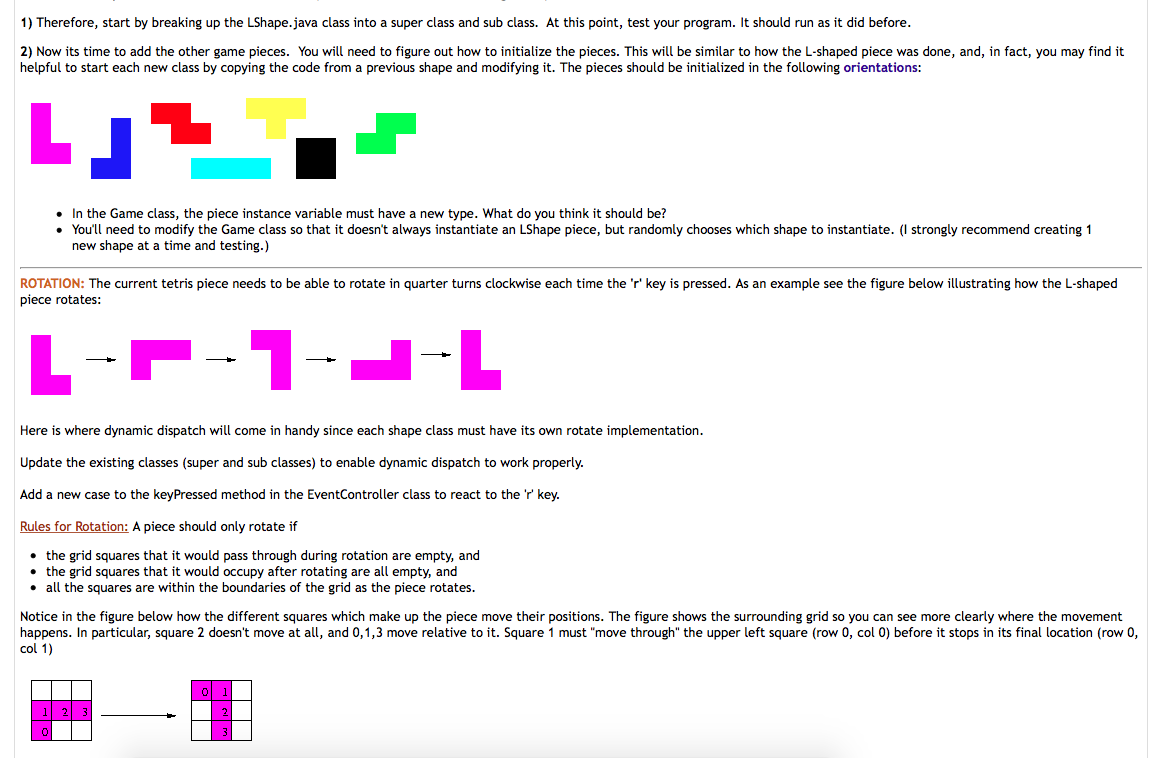
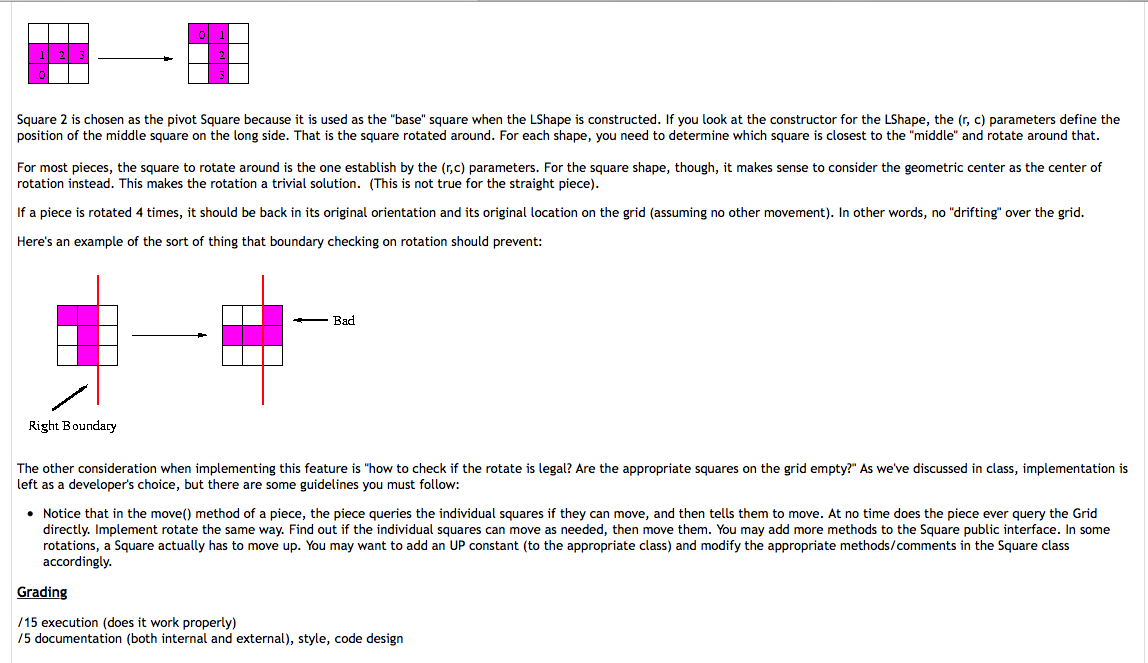
This is the Starter Code
1. EventController.java
/** * Handles events for the Tetris Game. User events (key strokes) as well as periodic timer * events. * * @author CSC 143 */ import java.awt.event.*; import javax.swing.*;
public class EventController extends KeyAdapter implements ActionListener { private Game theGame; private Timer timer; private static final double PIECE_MOVE_TIME = 0.8; //controls time between //piece moving down //increase to slow it down private boolean gameOver; /** * Constructor for objects of class EventController * @param g the game this is controlling */ public EventController(Game g) { theGame = g; gameOver = false; double delay = 1000 * PIECE_MOVE_TIME; // in milliseconds timer = new Timer((int)delay, this); timer.setCoalesce(true); // if multiple events pending, bunch them to 1 event timer.start(); }
/* * Respond to special keys being pressed * Currently just responds to the space key */ public void keyPressed(KeyEvent e) { if (!gameOver) { switch(e.getKeyCode()) { case KeyEvent.VK_SPACE : handleMove(Game.DOWN); break; // HANDLE other keystrokes here } } } /** Update the game periodically based on a timer event*/ public void actionPerformed(ActionEvent e) { handleMove(Game.DOWN); } /** Update the game by moving in the given direction */ private void handleMove(int direction){ theGame.movePiece(direction); gameOver = theGame.isGameOver(); if (gameOver) timer.stop(); } }
2. Game.java
import java.awt.*; /** * Manages the game Tetris. Keeps track of the current piece and the grid. * Updates the display whenever the state of the game has changed. * * @author CSC 143 */ public class Game { private Grid theGrid; // the grid that makes up the Tetris board private Tetris theDisplay; // the visual for the Tetris game private LShape piece; // the current piece that is dropping private boolean isOver; // has the game finished? // possible move directions public static final int LEFT = 0; public static final int RIGHT = 1; public static final int DOWN = 2; /** * Create a Tetris game * @param Tetris the display */ public Game(Tetris display) { theGrid = new Grid(); theDisplay = display; piece = new LShape(1, Grid.WIDTH/2 -1, theGrid); isOver = false; }
/** Draw the current state of the game * @param g the Graphics context on which to draw */ public void draw(Graphics g) { theGrid.draw(g); if (piece != null) piece.draw(g); } /** Move the piece in the given direction * @param the direction to move * @throws IllegalArgumentException if direction is not legal */ public void movePiece(int direction){ if (piece != null) piece.move(direction); updatePiece(); theDisplay.update(); theGrid.checkRows(); } /** * Returns true if the game is over */ public boolean isGameOver() { // game is over if the piece occupies the same space as some non-empty // part of the grid. Usually happens when a new piece is made if (piece == null) return false; // check if game is already over if (isOver) return true; // check every part of the piece Point[] p = piece.getLocations(); for (int i = 0; i
3. Grid.java
import java.awt.*; /** * This is the Tetris board represented by a (HEIGHT - by - WIDTH) matrix of Squares * The upper left Square is at (0,0) The lower right Square is at (HEIGHT -1, WIDTH -1) * Given a Square at (x,y) the square to the left is at (x-1, y) * the square below is at (x, y+1) * * Each Square has a color. A white Square is EMPTY; any other color means that spot is * occupied (i.e. a piece cannot move over/to an occupied square). A grid will also remove * completely full rows. * * @author CSC 143 */ public class Grid { private Square[][] board; // Width and Height of Grid in number of squares public static final int HEIGHT = 20; public static final int WIDTH = 10; private static final int BORDER = 5; public static final int LEFT = 100; // pixel position of left of grid public static final int TOP = 75; // pixel position of top of grid private static final Color EMPTY = Color.white; /** * Create the Grid */ public Grid() { board = new Square[HEIGHT][WIDTH]; //put squares in the board for (int row = 0; row
}
/** * Returns true if the location (row, col) on the grid is occupied * @param row the row in the grid * @param col the column in the grid */ public boolean isSet( int row, int col){ boolean isEmpty = board[row][col].getColor().equals(EMPTY); return !isEmpty; } /** * Change the color of the Square at the given location * @param row the row of the Square in the Grid * @param col the column of the Square in the Grid * @param c the color to set the Square * @throws IndexOutOfBoundsException if row = WIDTH || col = HEIGHT */ public void set(int row, int col, Color c) { board[row][col].setColor(c); } /** * Check for and remove all solid rows of squares * If a solid row is found and removed, all rows above * it are moved down and the top row set to empty */ public void checkRows() { } /** * Draw the grid on the given Graphics context */ public void draw(Graphics g){ // draw the edges as rectangles: left, right in blue then bottom in red g.setColor(Color.blue); g.fillRect(LEFT - BORDER, TOP, BORDER, HEIGHT * Square.HEIGHT); g.fillRect(LEFT + WIDTH * Square.WIDTH, TOP, BORDER, HEIGHT * Square.HEIGHT); g.setColor(Color.red); g.fillRect(LEFT - BORDER, TOP + HEIGHT * Square.HEIGHT, WIDTH * Square.WIDTH + 2 * BORDER, BORDER); // draw all the squares in the grid for (int r = 0; r
4. LShape.java
import java.awt.*; /** * An L-Shape piece in the Tetris Game. * * This piece is made up of 4 squares in the following configuration * Sq * Sq * Sq Sq * * The game piece "floats above" the Grid. The (row, col) coordinates * are the location of the middle Square on the side within the Grid * * @author CSC 143 */ public class LShape { private boolean ableToMove; // can this piece move private Square[] square; // the Squares that make up this piece // Made up of PIECE_COUNT squares private Grid theGrid; // the board this piece is on // number of squares in 1 Tetris game piece private static final int PIECE_COUNT = 4; /** * Create an L-Shape piece. See class description for actual location * of r and c * @param r row location for this piece * @param c column location for this piece * @param g the grid for this game piece * */ public LShape(int r, int c, Grid g) { theGrid = g; square = new Square[PIECE_COUNT]; ableToMove = true; // Create the squares square[0] = new Square(g, r - 1, c, Color.magenta, true); square[1] = new Square(g, r, c , Color.magenta, true); square[2] = new Square(g, r + 1, c, Color.magenta, true); square[3] = new Square(g, r + 1, c + 1, Color.magenta, true); } /** * Draw the piece on the given Graphics context */ public void draw(Graphics g){ for (int i = 0; i
/** Return the (row,col) grid coordinates occupied by this Piece * @return an Array of (row,col) Points */ public Point[] getLocations(){ Point[] points = new Point[PIECE_COUNT]; for(int i = 0; i
5. Square.java
import java.awt.*; /** * One Square on our Tetris Grid or one square in our Tetris game piece * * @author csc143 */ public class Square { private Grid theGrid; // the environment where this Square is private int row, col; // the grid location of this Square private boolean ableToMove; // true if this Square can move private Color color; // the color of this Square // possible move directions are defined by the Game class // dimensions of a Square public static final int WIDTH = 20; public static final int HEIGHT = 20; /** * Constructor for objects of class Square * @param g the Grid for this Square * @param row the row of this Square in the Grid * @param col the column of this Square in the Grid * @param c the Color of this Square * @param mobile true if this Square can move * * @throws IllegalArgumentException if row and col not within the Grid */ public Square(Grid g, int row, int col, Color c, boolean mobile){ if (row g.HEIGHT-1) throw new IllegalArgumentException("Invalid row =" + row); if (col g.WIDTH-1) throw new IllegalArgumentException("Invalid column = " + col); // initialize instance variables theGrid = g; this.row = row; this.col = col; color = c; ableToMove = mobile; }
/** * Return the row for this Square */ public int getRow() { return row; } /** * Return the column for this Square */ public int getCol() { return col; } /** * Return true if this Square can move 1 spot in direction d * @param direction the direction to test for possible move * @throws IllegalArgumentException if direction is not valid */ public boolean canMove(int direction){ if (!ableToMove) return false; boolean move = true; // if the given direction is blocked, we can't move // remember to check the edges of the grid switch(direction) { case Game.DOWN: if (row == (theGrid.HEIGHT -1) || theGrid.isSet(row + 1, col)) move = false; break; //currently doesn't support checking LEFT or RIGHT //MODIFY so that it correctly returns if it can move left or right case Game.LEFT: case Game.RIGHT: move = false; break; default: throw new IllegalArgumentException("Bad direction to Square.canMove()"); } return move; } /** move Square in the given direction if possible * Square will not move if direction is blocked, or Square is unable to move * If attempt to move DOWN and it can't, the Square is frozen * and cannot move anymore * @param direction the direction to move */ public void move(int direction) { if (canMove(direction)) { switch(direction) { case Game.DOWN: row = row + 1; break; // currently doesn't support moving LEFT or RIGHT // MODIFY so that the Square moves appropriately } } } /** Change the color of the Square * @param c the new color */ public void setColor(Color c) { color = c; } /** Get the color of this Square */ public Color getColor() { return color; } /** * Draw this square on the given Graphics context */ public void draw(Graphics g) { // calculate the upper left (x,y) coordinate of this square int actualX = theGrid.LEFT + col * WIDTH; int actualY = theGrid.TOP + row * HEIGHT; g.setColor(color); g.fillRect(actualX, actualY, WIDTH, HEIGHT); } }
6. Tetris.java
/** * Create and control the game Tetris. * * NOTE: when putting a Tetris object in a top-level container, make sure the Tetris * object has the focus (use requestFocus()) * * @author CSC 143 Based on a C++ version written by the * University of Washington CSE department */ import javax.swing.*; import java.awt.*; import java.awt.event.*;
public class Tetris extends JPanel { private Game theGame; /** Set up the parts for the Tetris game, display and user control */ public Tetris() { theGame = new Game(this); EventController ec = new EventController(theGame); addKeyListener(ec); setBackground(Color.yellow); } /** * Update the display */ public void update() { repaint(); } /** * Paint the current state of the game */ public void paintComponent(Graphics g) { super.paintComponent(g); theGame.draw(g); if (theGame.isGameOver() ) { g.setFont(new Font("Palatino", Font.BOLD, 40)); g.setColor(Color.BLACK); g.drawString("GAME OVER", 80, 300); } } /* Create a game and play it*/ public static void play() { JFrame f = new JFrame("The Tetris Game"); Tetris t = new Tetris(); f.getContentPane().add(t); f.setDefaultCloseOperation(JFrame.EXIT_ON_CLOSE); f.setSize(400,600); f.validate(); f.setVisible(true); t.requestFocus(); // so that Tetris (the JPanel) fires the keyboard events. } /** * To be able to run from the command line or desktop */ public static void main(String[] args) { SwingUtilities.invokeLater(new Runnable() { public void run() { play(); } }); } }
Step by Step Solution
There are 3 Steps involved in it

Get step-by-step solutions from verified subject matter experts
 Study Help