



Question: this is what i am asked to do in R studio, please inform me of how I go about doing this, I am so lost
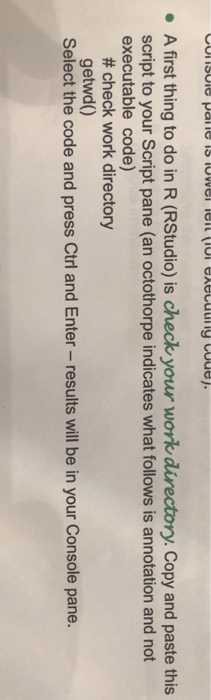
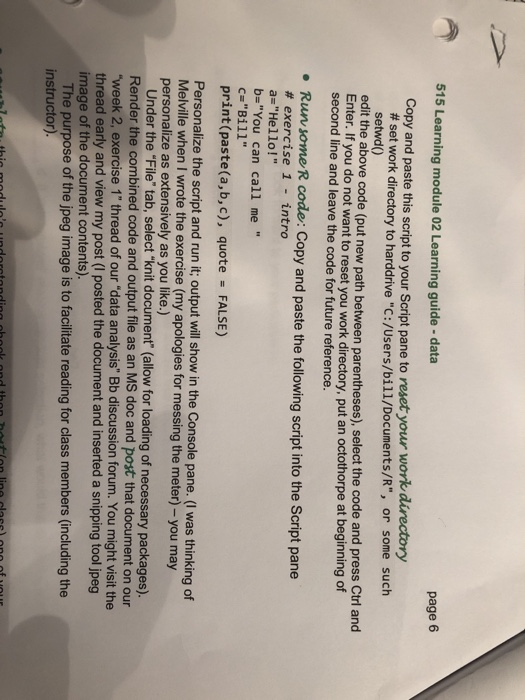
. A first thing to do in R (RStudio) is check your work Copy and paste this script to your Script pane (an octothorpe indicates what follows is annotation and not executable code) # check work directory getwd() Select the code and press Ctrl and Enter- results will be in your Console pane. 515 Learning module 02 Learning guide -data page 6 Copy and paste this script to your Script pane to reset your work directory # set work directory to harddrive "C:/Users/bill/Documents/R", setwd) or some such the above code (put new path between parentheses), select the code and press Ctrl and Enter. If you do not want to reset you work directory, second line and leave the code for future reference. put an octothorpe at beginning of Run some R code: Copy and paste the following script into the Script pane # exercise 1 - intro a-"Hello!" b-"You can call me " C "Bill" print(paste(a,b, c), quote FALSE) Personalize the script and run it; output ill show in the Console pane. (I was thinking of Melville when I wrote the exercise (my apologies for messing the meter) - you may personalize as extensively as you like.) Under the "File" tab, select "knit document (allow for loading of necessary packages). Render the combined code and output file as an MS doc and post that document on our week 2, exercise 1" thread of our "data analysis" Bb discussion forum. You might visit the thread early and view my post (I posted the document and inserted a snipping tool jpeg image of the document contents) The purpose of the jpeg image is to facilitate reading for class members (including the instructor)
Step by Step Solution
There are 3 Steps involved in it

Get step-by-step solutions from verified subject matter experts