





Question: This lab exercise is an Individual exercise that you need to carryout on your own. During the lab, the instructor will explain some GDB commands
 This lab exercise is an Individual exercise that you need to
carryout on your own. During the lab, the instructor will explain some

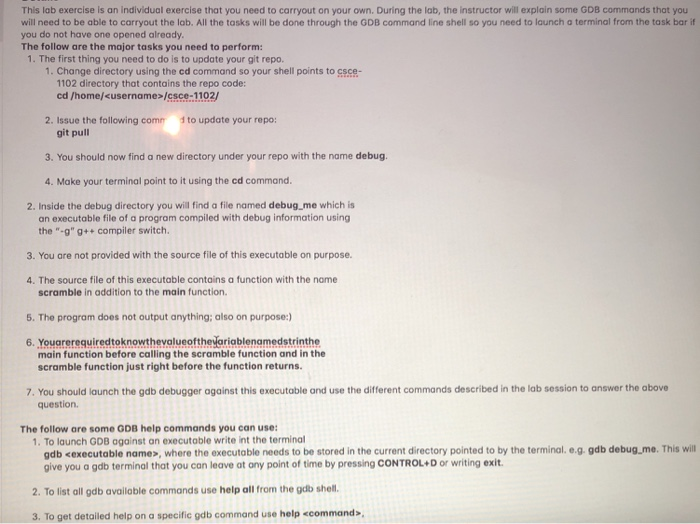
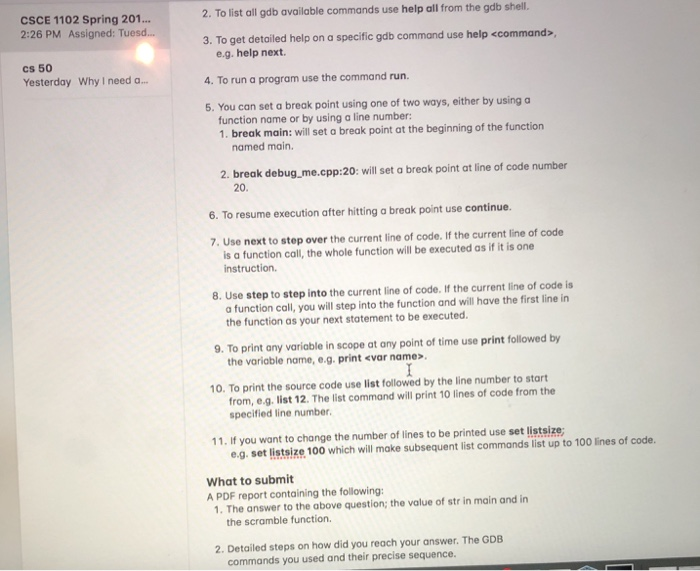
This lab exercise is an Individual exercise that you need to carryout on your own. During the lab, the instructor will explain some GDB commands that you will need to be able to carryout the lab. All the tasks will be done through the GDB command line shell so you need to launch a terminal from the task bar if you do not have one opened already The follow are the major tasks you need to perform 1. The first thing you need to do is to update your git repo. 1. Change directory using the cd command so your shell points to csce- 1102 directory that contains the repo code: cd /home/cusername>Iesce 1102/ 2. Issue the following comm d to update your repo: git pull 3. You should now find a new directory under your repo with the name debug 4. Make your terminal point to it using the cd command. 2. Inside the debug directory you will find a file named debug-me which is an executable file of a program compiled with debug information using the "-g" g++ compiler switch. 3. You are not provided with the source file of this executable on purpose. 4. The source file of this executable contains a function with the name scramble in addition to the main function. 5. The program does not output anything; also on purpose:) 6. Youarerequiredtoknowthevalueofthevariablenamedstrinthe main function before calling the scramble function and in the scramble function just right before the function returns. 7. You should launch the gdb debugger ogainst this executoble and use the different commands described in the lab session to answer the above question. The follow are some GDB help commands you can use: 1. To launch GDB against an executable write int the terminal gdb cexecutable name>, where the executable needs to be stored in the current directory pointed to by the terminal. e.g. gdb debug me. This will give you a gdb terminal that you can leave at ony point of time by pressing CONTROL+D or writing exit. 2. To list all gdb available commands use help all from the gdb shell 3. To get detailed help on a specific gdb command use help ccommand> CSCE 1102 Spring 201... 2:26 PM Assigned: Tuesd.. 2. To list all gdb available commands use help all from the gdb shell. 3. To get detailed help on a specific gdb command use help e.g. help next. cs 50 Yesterday Why I need .. 4. To run a program use the command run. 5. You can set a break point using one of two ways, either by using a function name or by using a line number: 1. break main: will set a break point at the beginning of the function named main 2. break debug me.cpp:20: will set a break point at line of code number 20. 6. To resume execution after hitting a break point use continue. 7. Use next to step over the current line of code. If the current line of code is a function call, the whole function will be executed as if it is one instruction. 8. Use step to step into the current line of code. If the current line of code is a function call, you will step into the function and will have the first line in the function as your next statement to be executed. 9. To print any variable in scope at any point of time use print followed by the variable name,e.g.print 10. To print the source code use list followed by the line number to start from, e.g. list 12. The list command will print 10 lines of code from the specified line number. 11. If you want to change the number of lines to be printed use set listsize e.g. set listsize 100 which will make subsequent list commands list up to 100 lines of code. What to submit A PDF report containing the following 1. The answer to the above question; the value of str in main and in the scramble function. 2. Detailed steps on how did you reach your answer. The GDB commands you used and their precise sequence. This lab exercise is an Individual exercise that you need to carryout on your own. During the lab, the instructor will explain some GDB commands that you will need to be able to carryout the lab. All the tasks will be done through the GDB command line shell so you need to launch a terminal from the task bar if you do not have one opened already The follow are the major tasks you need to perform 1. The first thing you need to do is to update your git repo. 1. Change directory using the cd command so your shell points to csce- 1102 directory that contains the repo code: cd /home/cusername>Iesce 1102/ 2. Issue the following comm d to update your repo: git pull 3. You should now find a new directory under your repo with the name debug 4. Make your terminal point to it using the cd command. 2. Inside the debug directory you will find a file named debug-me which is an executable file of a program compiled with debug information using the "-g" g++ compiler switch. 3. You are not provided with the source file of this executable on purpose. 4. The source file of this executable contains a function with the name scramble in addition to the main function. 5. The program does not output anything; also on purpose:) 6. Youarerequiredtoknowthevalueofthevariablenamedstrinthe main function before calling the scramble function and in the scramble function just right before the function returns. 7. You should launch the gdb debugger ogainst this executoble and use the different commands described in the lab session to answer the above question. The follow are some GDB help commands you can use: 1. To launch GDB against an executable write int the terminal gdb cexecutable name>, where the executable needs to be stored in the current directory pointed to by the terminal. e.g. gdb debug me. This will give you a gdb terminal that you can leave at ony point of time by pressing CONTROL+D or writing exit. 2. To list all gdb available commands use help all from the gdb shell 3. To get detailed help on a specific gdb command use help ccommand> CSCE 1102 Spring 201... 2:26 PM Assigned: Tuesd.. 2. To list all gdb available commands use help all from the gdb shell. 3. To get detailed help on a specific gdb command use help e.g. help next. cs 50 Yesterday Why I need .. 4. To run a program use the command run. 5. You can set a break point using one of two ways, either by using a function name or by using a line number: 1. break main: will set a break point at the beginning of the function named main 2. break debug me.cpp:20: will set a break point at line of code number 20. 6. To resume execution after hitting a break point use continue. 7. Use next to step over the current line of code. If the current line of code is a function call, the whole function will be executed as if it is one instruction. 8. Use step to step into the current line of code. If the current line of code is a function call, you will step into the function and will have the first line in the function as your next statement to be executed. 9. To print any variable in scope at any point of time use print followed by the variable name,e.g.print 10. To print the source code use list followed by the line number to start from, e.g. list 12. The list command will print 10 lines of code from the specified line number. 11. If you want to change the number of lines to be printed use set listsize e.g. set listsize 100 which will make subsequent list commands list up to 100 lines of code. What to submit A PDF report containing the following 1. The answer to the above question; the value of str in main and in the scramble function. 2. Detailed steps on how did you reach your answer. The GDB commands you used and their precise sequence

Step by Step Solution

There are 3 Steps involved in it

1 Expert Approved Answer
Step: 1 Unlock blur-text-image
Question Has Been Solved by an Expert!

Get step-by-step solutions from verified subject matter experts

Step: 2 Unlock
Step: 3 Unlock

Students Have Also Explored These Related Databases Questions!